Microsoft Flight Simulator
Compatible with MSFS.


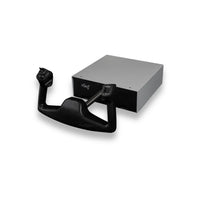
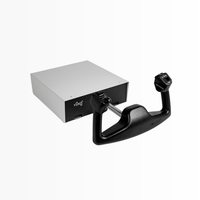
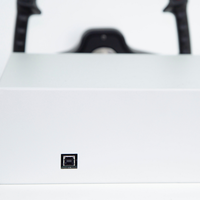
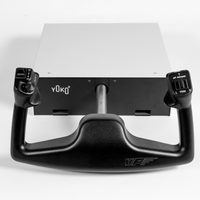
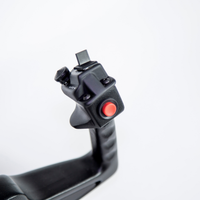
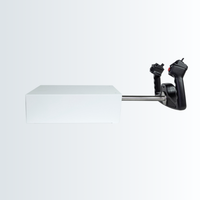
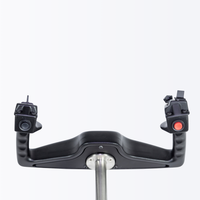

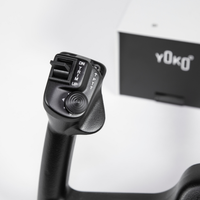
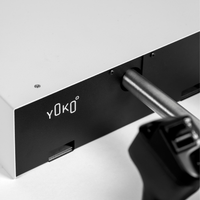
HEAVY-DUTY FLIGHT SIM YOKE

Hall magnetic sensors provide 12-bit resolution with 4096 values on each axis.
The Linear Guide System provides a 144 mm longitudinal course for pitch-axis control.
Built with 90% metallic construction for the YOKO+ heavy-duty range.
Includes an 8-way hat switch with push button for view control and centering the camera.
Includes six programmable buttons covering trim, autopilot disengage, and push-to-talk functions.
Supports driverless USB installation for PC.
Secure the YOKO+ with the included clamp or using four screws.
The yoke features an aeronautical leather feel for flight simulation control.
Product Details
| Product | Virtual Fly YOKO+ |
|---|---|
| Product Type | Flight Simulator Yoke |
| Axis Sensors | Hall Magnetic Contactless Sensors |
| Resolution | 12-Bit, 4096 Values on Each Axis |
| Construction | 90% Metallic |
| Pitch Travel | 144 mm |
| Programmable Buttons | 6 |
| Trim Controls | Vertical and Horizontal Trim Functions |
| Hat Switch | 8-Way with Push Button |
| Autopilot Disengage Button | Included |
| Push-to-Talk Button | Included |
| Guide System | Linear Ball Guide Technology |
| USB Installation | Plug and Play, Driverless for PC |
| Connectivity | USB |
| Mounting | Included Clamp or 4-Screw Installation |
| Virtual Fly Panel Compatibility | Fits Virtual Fly Flight Panels |
| Packed Dimensions | 600 × 390 × 280 mm |
| Packed Weight | 9 kg |
| Available Versions | Standard YOKO+ and First Officer Edition |

In The Box
When ordering any of our Yoko Options your package will include:
System Support
SOFTWARE
Compatible with MSFS.
Compatible with Prepar3D. VFHub specifically supports Prepar3D v4-v5.
Compatible with X-Plane. VFHub specifically supports X-Plane 11.
Compatible with Windows.
Compatible with macOS.
Supports testing, calibration, setup, and adjustment of the YOKO+ and other compatible Virtual Fly devices.
Order Fulfillment
We ship from Huntington, CA.
Orders placed before 11am PST will ship the same day, while orders placed after 11am will ship the next business day.
For large simulator components, shipping times may vary depending on destination and carrier availability.
Tracking information will be provided once your order has been processed.
VIRTUAL FLY FLIGHT SIM YOKE – YOKO+
The Virtual Fly YOKO+ is a premium flight simulator yoke designed to deliver realistic aircraft control. It features a heavy-duty metal construction, Hall Effect magnetic sensors, 12-bit axis resolution, and a smooth linear guide system for precise pitch and roll control.
Yes, the YOKO+ is compatible with Microsoft Flight Simulator (MSFS), X-Plane, and Prepar3D. It connects via USB and functions as a standard game controller, making it easy to integrate into your flight simulation setup.
The YOKO+ includes Hall Effect sensors, an 8-way HAT switch with a push button, pitch and rudder trim controls, a push-to-talk button, and an autopilot disengage button. Its 144 mm longitudinal travel and smooth linear guide system provide precise, realistic handling.
The Standard Edition features the HAT switch and trim controls in the standard configuration, while the First Officer Edition positions the HAT switch on the right and adjusts the trim controls for right-hand flying. Choose the edition that best suits your preferred cockpit layout.
The YOKO+ offers plug-and-play USB connectivity for PC and includes a standard mounting clamp, screws, and the necessary cables. It can be secured to a suitable desk or cockpit using the included clamp or mounted with four screws. Virtual Fly's VFHub software also supports configuration, calibration, and adjustments.
Yes. The YOKO+ is designed for both advanced home flight simulation and professional training environments. It integrates with compatible Virtual Fly flight panels, including the SOLO GA, SOLO Airliner, and SOLO PRO series, and can also be combined with compatible third-party hardware for a customized cockpit setup.
Engineered for performance. Built to last.