50.8 mm Quick Releases
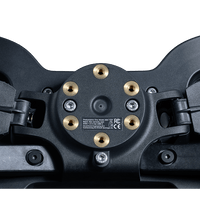
Compatible quick releases using the integrated 50.8 mm threaded mounting pattern can attach directly to the steering wheel.


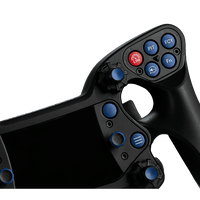
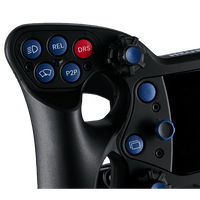
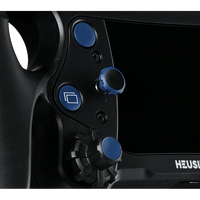
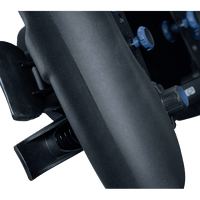
ADD LIGHTNESS

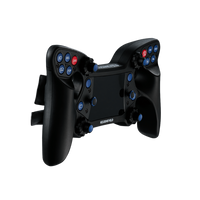
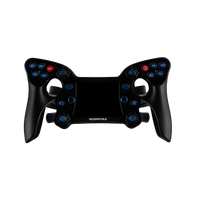
Sculpted grips provide a large contact area with fewer pressure points, while rounded paddle edges support comfortable long-session driving.
Remap buttons, rotaries, switches, clutch axes, and keyboard outputs through Heusinkveld SmartControl.
Standard 2-way shifter paddles support both push and pull operation with adjustable paddle length.
Configure the center-panel LEDs through SimHub for supported RPM, flag, TC, ABS, and other telemetry information.
Fiber-reinforced composite components keep total wheel weight to 1024 grams for low inertia and responsive steering.
An integrated 50.8 mm threaded hub supports compatible quick releases, with an optional adapter available for 70 mm mounting.
Product Details

In The Box
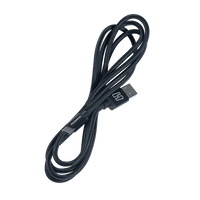
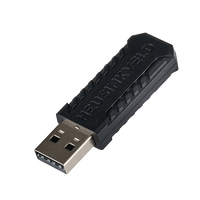
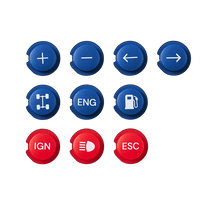
The supplied product information confirms the Heusinkveld One steering wheel, wireless dongle, interchangeable button covers, two angled mounts, and mounting screws. The wheel comes with 14 button covers installed and 10 additional covers, for a total of 24 supplied button covers.
EASY WIRELESS COMPATIBILITY
The Heusinkveld One uses an integrated 50.8 mm threaded hub, allowing compatible Wheel Base quick releases to mount directly to the steering wheel. For quick releases using a different mounting pattern, Heusinkveld offers an optional adapter that converts the 50.8 mm mounting pattern to 70 mm with a depth of only 15 mm. Wireless communication is handled through the included dongle, reducing cable clutter between the steering wheel and PC.
Compatible quick releases using the integrated 50.8 mm threaded mounting pattern can attach directly to the steering wheel.
Use the optional Heusinkveld mounting adapter to convert the wheel's 50.8 mm pattern to a 70 mm mounting pattern.
Designed for use with a wide range of Wheel Bases when paired with a compatible quick-release mounting solution.
Configure button assignments, clutch behavior, output mappings, function layers, and other supported wheel settings.
Use SimHub to configure the nine RGB telemetry LEDs for supported racing telemetry.
The approximately 270 mm ergonomic design is suitable for Formula-style racing.
Control layout and dual-clutch functionality support GT-style sim racing configurations.
Suitable for endurance prototype-style racing applications.
Order Fulfillment
We ship from Huntington, CA.
Orders placed before 11:00 AM PST will ship the same day, while orders placed after 11:00 AM PST will ship the next business day.


FREQUENTLY ASKED QUESTIONS
The Heusinkveld One steering wheel can be mounted directly on your wheelbase using its 50.8mm threaded hub, compatible with most quick release systems or adapters.
To use a 70mm quick release setup, the optional Heusinkveld Steering Wheel Adapter (HE-SW-ADAPT) is recommended.
The product does not work (correctly) with consoles such as Xbox or PlayStation.
The Heusinkveld One steering wheel allows owners to customize the layout of its 14 pushbuttons. A few extra buttons have been supplied with the wheel.
You can also change the length of the shifter paddles.
Please refer to the manual for instructions on how to do this easily.
When you are finished racing, there is no need to manually turn off your Heusinkveld® One steering wheel. It will automatically turn itself off after a period of non-activity.
In order to wake the wheel up again, press any button on the wheel. The wheel will automatically establish a connection again with the dongle. The connection status led will first blink purple and then green for a few seconds when the connection has been re-established.
Your Heusinkveld® One steering wheel features 9 configurable RGB telemetry leds. Using SimHub software, these leds can be used to show information such as RPM, flag warnings and TC/ABS activity (depending on simulator software support for these features).
Both grids of 5 thumb buttons and the 4 push-buttons next to the panel can be rearranged to your personal preference. Please consult the manual for instructions and take care when tightening the button guard bolts: do not overtighten
Using SmartControl, you can double or quadruple outputs from your Heusinkveld One wheel, enabling 100+ configurable outputs.
1. Function Key (Fn) Method:
Assign a function button (Fn) to any wheel input. When pressed, a green Fn icon lights up and all other inputs can trigger alternate outputs.
2. Short Press / Long Press Method:
Configure different outputs depending on whether a button is pressed briefly or held longer.
When you unpack the wheel it is in transport mode. It must be activated before first use. Insert a powered USB-C cable in the wheel to activate the wheel. The USB-C port is at the bottom of the wheel.
The dongle and wheel are pre-paired.
Press any button on the wheel to establish the connection.
Your Heusinkveld® One steering wheel requires little to no maintenance. You can clean it using a damp cloth: no cleaning agents are necessary.
Avoid using dry cloths, as they can be abrasive and may damage the wheel’s surface.
Both grids of 5 thumb buttons can be rearranged to personal preference by removing the button guards using the provided Torx 10 tool. Unscrew both bolts from either button guard to release the guard.
Buttons can be exchanged between all 10 positions. Please take care while re-installing the button guards: The buttons must be lined up perfectly horizontal, so they slide over their guide notch when pressed.
Test if you can press the buttons before screwing down the button guard (gently hold down the button guard with your thumb while testing). If necessary, realign the buttons and test again.
IMPORTANT: Please take care while tightening the button guard bolts and prevent overtightening. Only a very light torque is needed to secure the button guards.
The 4 push-buttons next to the panel with RGB LEDs can also be changed. First remove the caps of the multifunction switches by pulling them upwards. Then proceed to remove the panel bolts with the Torx 10 tool. The rest of the procedure is similar to changing the thumb buttons.
When reinstalling the caps of the multifunction switches, note the indentation in the shaft which is also present on the inside of the cap.
Engineered for performance. Built to last.