Difference Between Entry-Level and Pro Sim Gear: What Does It Cost
The difference between entry-level and pro sim gear isn’t a guaranteed lap-time gain. It’s the clarity, control, and consistency you can get from the wheel and pedals. Entry-level equipment makes racing accessible, while direct-drive wheelbases and load-cell pedals provide more detailed feedback and a more precise way to control braking. Better feel can help you respond to the car, but it won’t make you faster on its own.
Counterintuitively, the most expensive wheelbase isn’t necessarily the best first upgrade. Your cockpit, pedals, and wheelbase need to work together, especially when stronger forces call for a more stable mounting setup. This guide explains how gear tiers differ in feel and performance, what affects the overall budget, and how to balance a setup around your goals. Whether you’re upgrading from a starter wheel or planning your first serious rig, you’ll have a clearer basis for deciding where the investment matters most.
Key Takeaways
- More detailed wheel feedback can help you read grip changes and respond consistently, but better hardware alone won’t make you faster.
- Load-cell pedals measure braking pressure rather than pedal travel, making repeatable braking a key part of the upgrade decision.
- Plan upgrades around compatibility between your wheelbase, pedals, cockpit, and mounting solution, not around a single headline component.
- Choose wheelbase strength according to your experience, driving goals, and preferred level of force feedback.
- A custom simulator build can help bring core components together when you’re planning a complete, high-performance setup.
Does gear really matter in sim racing?
Yes. Wheelbases and pedals shape the information you feel and how consistently you can respond, but more powerful equipment alone doesn’t guarantee faster lap times.
The difference between entry-level and pro sim gear is clearest in feedback detail, braking control, and the support needed to use the equipment effectively.
Consistency and Control Support
Equipment can support consistency by making steering and braking inputs easier to feel and repeat. A wheelbase communicates tire grip, road texture, curbs, and weight transfer, giving you information to use through each corner. Direct drive connects the steering shaft to the motor without belts or gears, delivering detailed, low-latency feedback. That detail may help you notice grip loss sooner and correct a slide, but practice determines how effectively you use it.
Why Beginners Choose Entry-Level Gear
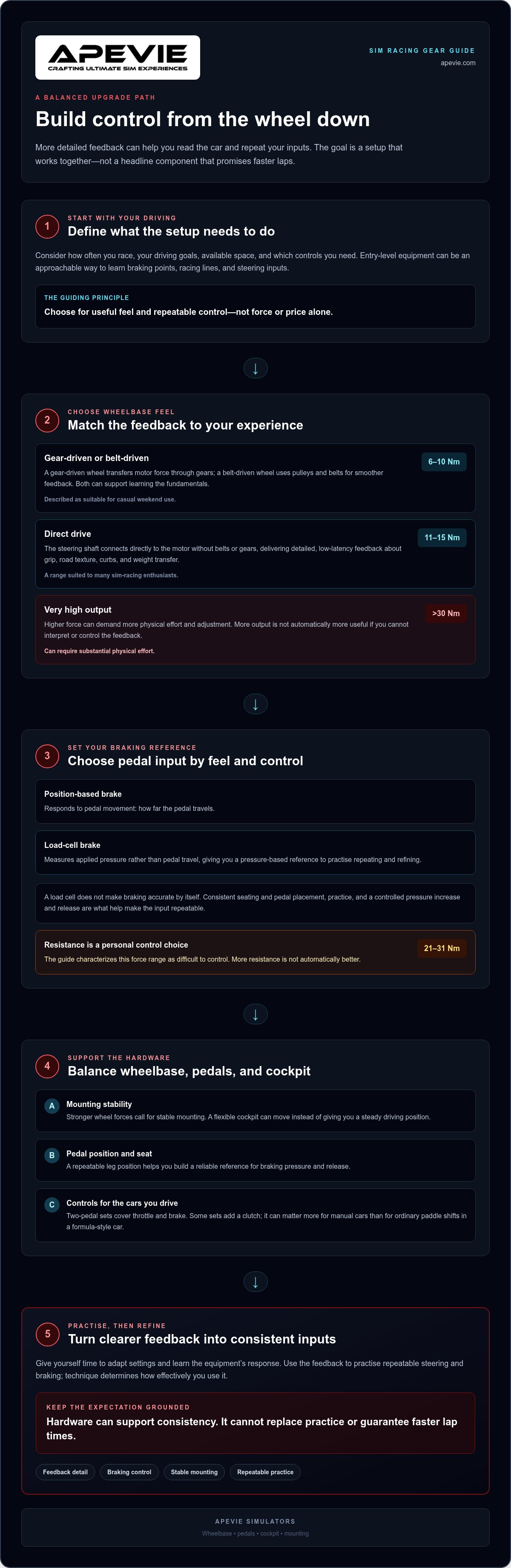
Entry-level equipment can suit beginners because it provides a more approachable way to learn racing fundamentals. A gear-driven wheel transfers motor force through physical gears, while a belt-driven wheel uses pulleys and belts for smoother feedback. Both let a new driver learn braking points, racing lines, and steering inputs without starting with the force and adjustability of advanced hardware. For casual weekend use, a wheelbase producing 6-10 Nm of torque is described as suitable. The best starting point depends on how often you race and which controls you need.
Entry-Level and Advanced Equipment
Advanced equipment offers more detailed feedback and control, but it also asks more of the driver and rig. Direct-drive wheelbases provide strong, precise feedback; a range of 11-15 Nm suits many sim-racing enthusiasts, while output over 30 Nm can require substantial physical effort. Higher force needs stable mounting, and adjustment takes time as you find settings that suit your driving. Professional gear can also add setup complexity and require occasional checks of connections and mounting hardware. Its value is clearest when you can use its feedback consistently, not simply because it has higher output.
Limits of Equipment Upgrades
An upgrade can improve the information available to you, but it can’t replace technique, practice, or a balanced setup. For example, a powerful direct-drive base on a flexible cockpit may transmit force without providing a stable driving position. Detailed feedback helps only when you can interpret it and make repeatable corrections. Treat hardware as a tool for consistency, not a shortcut to faster laps. Compare the wheelbase, pedals, mounting stability, and adjustability together, then choose equipment that suits your racing goals.
Load-cell pedal pressure measurement
Brake pedals affect how consistently you can slow the car before a corner. A load cell measures applied pressure rather than pedal travel, so braking depends more on how hard you press than how far the pedal moves. That distinction matters in sim racing because you can practise repeating a pressure input, much like controlling braking force in motorsport.
How the Brake Sensor Changes Your Input
A position-based brake sensor responds to pedal movement. A load-cell brake registers pressure, giving you a different reference for building and releasing braking force. Neither sensor automatically makes you more accurate. The practical benefit comes from repeating a familiar pressure, then refining it for different corners, car behavior, and braking points.
Imagine approaching the same turn in a racing sim: with a pressure-based brake, you can learn how a firm initial press and gradual release affect the car. This can make your braking input more repeatable than judging pedal movement alone. A load cell changes the physical feel, too, so you may need time to adapt. Consistent seating and pedal placement help you build a reliable reference.
Brake Resistance and Control
Load-cell pedals can be configured to require substantial pressure, but higher resistance isn’t automatically better. The right feel should let you apply and release braking force with control, without shifting your position or straining to reach the pedal. The guide characterizes 21-31 Nm as roughly the force real-world racing drivers feel and as difficult to control. That range illustrates why more force can demand greater effort, rather than guaranteeing better immersion.
Brake feel also depends on the pedal mechanism, mounting stability, and your preference. A firm pedal on a flexible mount can move the cockpit instead of giving you a steady reference. Before changing resistance, make sure the pedal position and seat allow a repeatable leg position. Then practise smooth pressure increases and releases in the same corner.
Throttle, Brake, and Clutch
Each pedal has a distinct role. The throttle controls acceleration, the brake manages deceleration, and the clutch supports cars with manual gear changes. Entry-level sets commonly include two pedals for throttle and brake; some add a third for a manual gearbox. In a formula-style car with paddle shifts, a clutch pedal may matter less during ordinary shifts. In a manual car, it can be central to your driving routine.
When comparing pedals, consider sensor type, resistance, adjustability, and how you plan to drive. A load-cell brake can support pressure-based consistency, while throttle and clutch feel shape your other inputs. Choose a setup that suits your cars and practice goals, then give yourself time to learn its response. Equipment can provide clearer feedback, but technique turns that feedback into controlled driving.
How much should you spend on a sim racing setup?
There isn’t one budget that suits every driver. The right spend depends on your platform, racing goals, available space, and upgrade plans. A useful approach is to choose core components as a system, then prioritize the part limiting your driving. For some sim racers, that’s a brake pedal; for others, it’s a wheelbase, cockpit, or compatibility with their chosen platform.
Plan an Upgrade Path Around Compatibility
Start with the equipment you already own and identify what you want to improve. If braking consistency is your priority, pedals may deserve an upgrade before the wheelbase. If you want more detailed steering feedback, a direct-drive wheelbase may be the more relevant step. PC sim racing supports advanced setups with direct-drive wheelbases and load-cell or hydraulic pedals.
Compatibility determines whether an upgrade fits into the rest of your rig. Consider the wheelbase connection, steering wheel support, pedal connection, mounting points, and software platform. A new wheelbase, for example, won’t create a useful upgrade path if it can’t work with the steering wheel or computer setup you plan to use. Treat compatibility as part of choosing a component, not an afterthought.
PC, Console, and Compact Setups
PC and console setups don’t always support the same hardware combinations. Console compatibility depends on the specific platform and supported equipment, while PC setups can accommodate advanced combinations such as direct drive with load-cell pedals. Decide which system you’ll use before choosing a wheelbase, then compare the full control setup against that requirement. A component that doesn’t suit your platform adds no value to your driving.
Space can also shape your budget. A foldable or compact cockpit may suit a room that serves other purposes, while a fixed, sturdy cockpit better supports direct-drive forces. The practical trade-off is that a smaller rig is easier to store, but its mounting solution must still keep the wheel and pedals stable during use. Plan around your available space and how often you’ll fold or move the setup.
Spend for the Driving You’ll Actually Do
Set priorities before comparing individual parts: platform first, then the control that most limits your consistency, followed by a suitable cockpit and compatible upgrades. If the budget allows, the guide recommends 8 Nm over 5 Nm for broader suitability across wheels and driving styles. That figure is a reference for comparing wheelbase options, not a complete system budget.
A balanced setup usually offers more value than a top-tier wheelbase paired with unsuitable pedals or unstable mounting. Choose each component for a clear purpose, and leave room for future upgrades that fit the same platform and rig. This keeps spending focused on usable control rather than specifications you won’t use during your racing sessions.
Choosing a first setup by goals and budget
Choose your first simulator based on the racing you plan to do, not the highest specification you can find. A console player focused on casual sessions has different needs from a serious PC racer practising across a range of cars and tracks.
Start with three decisions: your platform, your driving goals, and your available space. Then decide whether a complete starter setup or staged upgrades make more sense. A driver focused on learning race lines may prioritize a stable wheel and pedals. Someone practising competitive laps may value finer steering feedback and pressure-based braking. Judge the difference between entry-level and pro sim gear by these priorities, not by the label alone.
- Casual console racing: Prioritize a wheel and pedals that support your console, with controls that are comfortable for your usual cars.
- PC sim racing: Consider a direct-drive wheelbase and load-cell pedals when detailed feedback and braking control matter to your practice.
- Limited space: Choose a compact rig that fits your room while keeping the wheel and pedals stable during driving.
- Long-term development: Favor components that fit your platform and leave room for compatible upgrades.
For example, a driver who mainly races road cars may prefer a round steering wheel and a cockpit suited to that position. A formula-focused driver may choose a formula steering wheel and an open-wheel seating position. These choices affect hand placement, visibility, and comfort, so consider them before adding advanced hardware. Match the wheel shape and cockpit to the cars you actually drive.
Budget also depends on how you divide spending across the rig. A powerful wheelbase paired with a moving seat or unstable mount can make steering inputs harder to repeat. Conversely, a sound mounting solution and well-matched pedals can make a more modest wheelbase practical for regular sessions. Compare the complete setup, including the computer or console, display, cockpit, wheelbase, steering wheel, and pedals. Every part affects how well the simulator works as a system.
If you’re unsure where to begin, write down your platform, preferred racing style, available space, and the control you most want to improve. A casual console racer might keep the first setup straightforward; a PC racer pursuing competition could plan a staged move to direct drive and load-cell braking. This framework keeps your initial purchase relevant and makes future upgrades easier to choose.
Balancing core setup components
A balanced rig makes each component useful instead of letting one part expose another’s weakness. For sim racing enthusiasts, that means matching steering, braking, mounting, and visuals to the same driving goals.
A practical starter setup can combine a mid-range direct-drive wheelbase, a compatible steering wheel, load-cell pedals, and a solid mounting solution. Each component has a distinct role: the wheelbase delivers steering feedback, the pedals translate foot pressure into braking and throttle, and the cockpit holds both controls steady. Compatibility matters across the whole chain, including the platform running the simulator.
Start with the Physical Inputs
Consider how forces travel through the rig. A direct-drive wheelbase produces torque at the steering shaft, so a sturdy cockpit helps keep the wheel and frame stable. If the mount flexes, steering inputs can feel less consistent, even when the wheelbase provides detailed feedback. A load-cell brake also needs a secure pedal mount, since firm pressure can shift a poorly supported pedal assembly.
Match the wheel and pedals to your driving style. A formula steering wheel suits open-wheel layouts, while a different shape may better fit other cars. If you race several vehicle types, weigh comfort and control layout alongside force feedback. Hardware that feels realistic in one discipline may be less practical in another.
Give Displays and Motion a Clear Role
Visual hardware should support how you use the simulator, not compete with core controls for attention. A triple-monitor setup can show views across multiple screens, while an ultrawide curved monitor offers one wide display. A VR headset changes how you view the cockpit, but it also becomes part of your driving setup. Choose the view and routine you prefer, while keeping steering and pedal controls properly supported.
Motion hardware adds physical cues, but it doesn’t replace a stable cockpit or well-matched pedals. A motion platform may suit a driver seeking more movement cues, while an esports-focused setup may prioritize repeatable steering and braking. The right balance depends on which sensations help your practice and which components you’ll use in every session.
Assess a build in this order: confirm platform and component compatibility, secure the cockpit and controls, then choose display or motion options to suit your goals. A mid-range wheelbase with compatible pedals and solid mounting can form a coherent foundation. A premium wheelbase attached to a flexing rig is less balanced. Compare the complete setup, not just its most impressive component, before deciding on your next upgrade.
Apevie Simulators: Custom High-Performance racing simulator
Apevie Simulators offers a Custom High-Performance racing simulator for drivers who want core components considered as one complete setup. It’s a natural fit when you’re weighing wheel feel, pedal control, cockpit stability, and motion as part of one build.
Options include Heusinkveld Sim Pedals Sprint and Sigma Integrale DK2 and DK2+ Motion Systems. These address different build priorities: pedal control and motion cues. The right configuration depends on your racing goals and the role each component should play in your simulator.
Contact Apevie Simulators to discuss your racing simulator goals.
Make Your Next Upgrade a Deliberate One
Think of your simulator as a system that can evolve with your driving. Rather than treating “pro” as a finish line, identify what you want your setup to do next: support longer practice sessions, refine your control inputs, or create a more immersive cockpit. That goal gives future purchases a purpose and helps prevent upgrades that don’t fit how you race.
The difference between entry-level and pro sim gear matters most when it changes how you interact with the car and how well the components work together. Your next step could be refining an existing rig or planning a complete build around your preferred racing style. Apevie Simulators builds custom high-performance racing simulators with professional-grade components, including Simucube wheelbases, Heusinkveld pedals, and Sigma Integrale motion systems. Share your goals with the team to discuss a practical setup.
Contact Apevie Simulators today to discuss your goals and plan a setup that suits the way you want to race. Take the next step with clarity, and let your rig develop around your ambitions.
Frequently Asked Questions
What is the difference between entry-level and professional sim racing gear?
The difference between entry-level and pro sim gear usually comes down to feedback detail, adjustability, construction, and how much control you have over setup. Entry-level equipment covers essential steering and pedal inputs, while advanced components offer more ways to shape those inputs. A racer who changes cars often, for example, may value adjustable controls more than someone who drives one familiar vehicle.
How do entry-level and pro sim racing wheels compare in force feedback and torque?
Entry-level wheels generally provide less detailed force feedback than direct-drive bases, which connect the steering shaft directly to the motor. Torque is one comparison point: 11-15 Nm suits many enthusiasts, while output over 30 Nm can require substantial physical effort. More force isn’t automatically more useful. Consider your cars, preferred feedback strength, and whether your cockpit can support the wheelbase.
How do entry-level and pro sim racing pedals compare in load-cell and hydraulic braking?
Entry-level pedals may use pedal movement to register braking, while load-cell pedals measure pressure. Hydraulic pedals are another option for advanced PC setups, but the technology label alone doesn’t determine the right choice. If you switch between cars, consider whether the brake response and adjustment options help you develop a familiar input. Consistent pedal placement matters as you adapt to a new system.
What are the differences between entry-level and pro sim racing rigs and cockpits?
Entry-level rigs tend to prioritize straightforward mounting, while advanced cockpits must support the forces and components of a more demanding setup. A direct-drive wheel benefits from a sturdy cockpit, since frame movement can affect steering feel. Before choosing, consider your available space, seating position, and whether you need to reposition or store the rig after racing.
How much does entry-level sim racing gear cost compared with professional gear in the US?
The total cost depends on what each setup includes, so compare complete configurations rather than wheelbase prices alone. A wheel, pedals, cockpit, display, and compatible computer or console all affect the total. Advanced setups can add direct drive, load-cell or hydraulic pedals, and display options. Decide which components you need now and which can wait to make comparisons more useful.
What features distinguish entry-level from pro sim racing wheelbases and steering wheels?
Wheelbases differ in drive design, feedback detail, torque, and adjustability. Steering wheels vary in shape, control layout, and suitability for specific driving styles. A formula steering wheel, for instance, fits an open-wheel format, while another shape may suit different cars. Match the wheel to your preferred racing and the wheelbase connection so the controls work together as intended.
What performance benefits does pro sim racing gear offer over entry-level equipment?
Advanced gear can give you clearer feedback and more repeatable control inputs, helping you recognize changes in grip or braking response. That can support practice, but equipment alone doesn’t guarantee faster laps. Consider whether a component solves a real limitation, such as inconsistent braking or insufficient steering detail. If your current setup already supports focused practice, a more expensive part may add little.
When should a sim racer upgrade from entry-level to pro gear?
Upgrade when a specific limitation repeatedly affects your sessions, not simply because you’ve reached a particular experience level. If you’re unsure how to shape a complete build around your goals, contact Apevie Simulators to discuss a custom racing simulator. A focused upgrade plan can keep your equipment aligned with the way you want to race.