Simucube Wheels & Wheelbases: A Buyer’s Guide to the Right Setup
The highest-torque wheelbase isn’t automatically the right choice for your rig. When comparing simucube wheels & wheelbases, focus on how you race, which wheel format suits your driving, and whether you need a standalone component or a bundle.
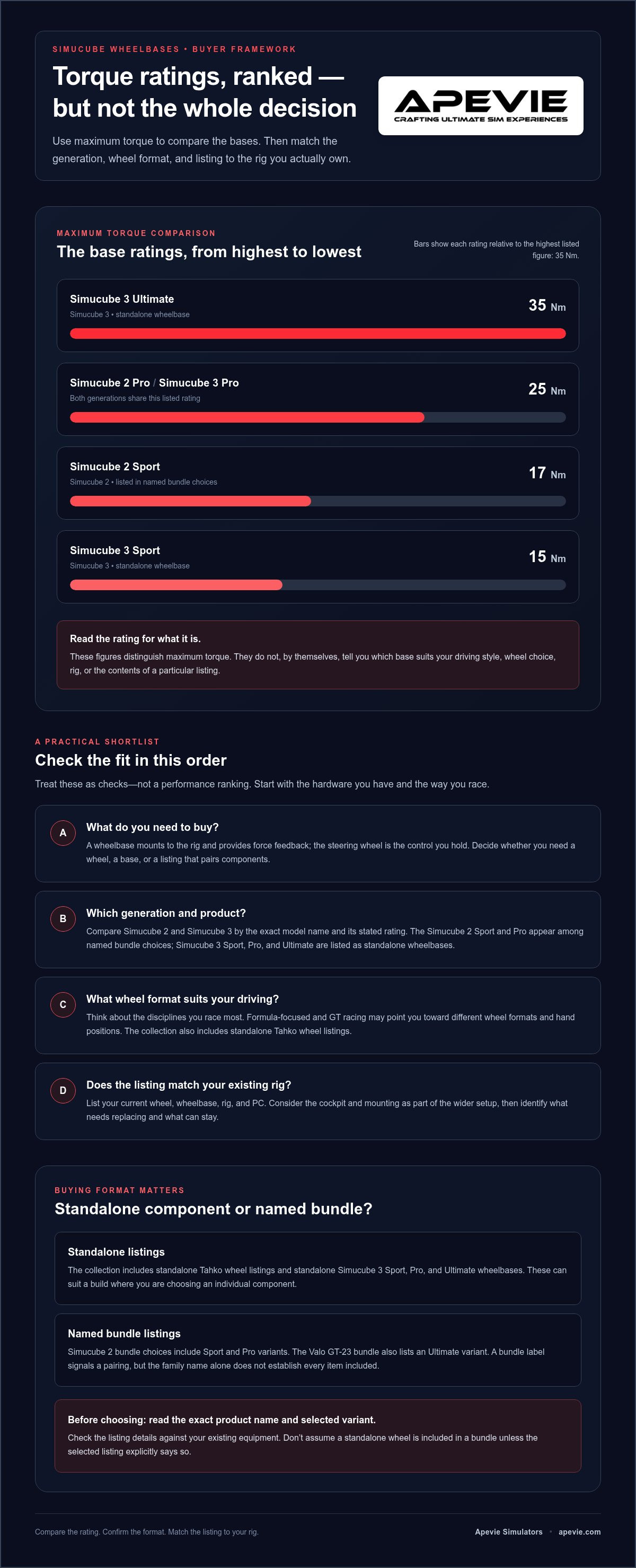
Simucube product names can make the differences easy to misread. Simucube 3 Sport, Pro, and Ultimate bases are rated at 15, 25, and 35 Nm respectively, while the Simucube 2 Sport and Pro are rated at 17 and 25 Nm. Those figures distinguish the bases by maximum torque, but they don’t tell you which one fits your driving style, wheel choice, or rig. The collection also includes standalone Tahko wheels and named wheelbase bundles, so identify exactly what each listing includes before choosing.
This guide compares the options by generation, wheel format, and buying format, with practical criteria for matching them to your racing habits. You’ll have a clearer shortlist whether you’re building around an existing wheel or choosing a complete Simucube setup through Apevie Simulators.
Key Takeaways
- Decide whether you need a steering wheel, a wheelbase, or a listed bundle, then match that format to the components you already own.
- Compare simucube wheels & wheelbases by generation and exact product pairing, rather than assuming every listing includes both components.
- Use the torque ratings, product names, and listing formats to build a shortlist around your needs, not a broad performance claim.
- Weigh the flexibility of standalone components against the convenience of a named bundle before making your selection.
- Before choosing, revisit your racing habits and rig plans, then review the exact product name and variant in the listing.
Simucube Wheels & Wheelbases: What Should You Choose First?
Before comparing model names, decide what your simulator actually needs: a steering wheel, a wheelbase, or a listing that pairs components. The right starting point depends on your rig, the hardware you already own, and how you race. If you’re replacing a wheel, you may not need another base. If you’re building a system from scratch, consider the wheel and base together.
A wheelbase mounts to your rig and provides the force feedback; the steering wheel is the control you hold to steer. They work together, but they are separate components unless a product listing presents them as a bundle. Keep these four checks in view:
- Generation: Are you considering a Simucube 2 or Simucube 3 listing?
- Wheel format: Do you want a standalone wheel or a wheel included in a named listing?
- Buying format: Are you replacing one component or selecting a bundle?
- Use: Is the setup for PC-based sim racing, and what hardware do you already have?
Standalone wheel, wheelbase, or bundle?
A standalone listing names an individual component. Apevie’s collection includes standalone Tahko wheel listings and standalone Simucube 3 Sport, Pro, and Ultimate wheelbases. A named Simucube 2 bundle is a different buying format, with collection variants listed for Sport and Pro; the Valo GT-23 bundle also lists Ultimate. A bundle label signals a pairing, but the family name alone doesn’t establish every item included.
Read the exact selected variant before deciding. Product families can contain several options, and a shared name doesn’t tell you which one you’ve selected or what that listing includes. Compare its title and variant details with your existing equipment, especially if you already own a wheel or base. This helps prevent buying a component you don’t need or overlooking the format that suits your build.
Start with your racing and simulator setup
Think about the disciplines you drive most. Formula-focused racing and GT racing may lead you toward different wheel formats and hand positions, so choose around your regular sessions rather than a hypothetical future build. Then list your current hardware: rig, wheel, wheelbase, and PC. This gives you a practical starting point for identifying what needs replacing and what can remain in the system.
For a serious PC simulator, the wheel and base are part of a wider build, not isolated purchases. Mounting and the rest of the cockpit affect how a component fits into your setup, so consider the whole configuration before settling on a listing. Apevie’s professional sim rig guide can help you think through that broader foundation. For background on how wheel types and force feedback fit into the discipline, see this overview of sim racing wheel technology.
Once you know what you own and how you race, compare simucube wheels & wheelbases by generation, wheel format, and listing format. Those criteria make product names easier to interpret and help you build a shortlist based on your actual rig, not just a headline torque figure.
Match a Simucube Wheelbase and Steering Wheel Without Guesswork
Once you know whether you’re shopping for a wheel, a base, or both, compare listings in a deliberate order: identify the product generation, choose the wheel format that suits your driving, then decide whether a named bundle matches your needs. This keeps the choice grounded in the actual collection rather than assumptions about what a product family includes.
Understand the Simucube 2 and Simucube 3 listings
The collection presents Simucube 2 through named bundle choices, including Sport and Pro variants. The Valo GT-23 bundle also has an Ultimate variant. Simucube 3 appears as standalone Sport, Pro, and Ultimate wheelbase options. The torque ratings give you one useful point of comparison: Simucube 2 Sport is rated at 17 Nm, Simucube 2 Pro and Simucube 3 Pro at 25 Nm, and Simucube 3 Sport and Ultimate at 15 Nm and 35 Nm respectively. These figures describe maximum torque, not the whole driving experience or the contents of a listing.
For background on the manufacturer’s product range, consult Simucube official information. Then return to the specific Apevie listing you’re considering and read its full title and selected variant. A Simucube 2 bundle title signals a different purchase format from a standalone Simucube 3 Sport wheelbase. The generation helps identify the product family, while the listing format tells you whether you’re looking at a base or a pairing.
Choose a wheel format and purchase format
Apevie’s collection includes standalone Simucube Tahko wheel listings as well as named wheelbase bundles. Treat those as distinct paths: a standalone wheel is the wheel-focused choice, while a bundle listing identifies a named pairing. Use the title and variant details to determine which option fits your build. Don’t assume a Tahko wheel is part of a bundle unless the selected listing explicitly says so.
Choose wheel format based on how you drive, not just what looks appealing in a product image. Consider the disciplines you spend the most time racing and the type of steering wheel you prefer. If a formula-style wheel is on your shortlist, Apevie’s F1 steering wheel guide offers a focused reference for that format. Keep the wheel decision separate from the base-generation decision until you’ve compared the listings in front of you.
Read the exact product name and selected variant because those details identify the listing you’re choosing, not just the broader Simucube family. This matters when a product family appears in more than one format. Confirm whether the title describes a standalone wheelbase, a standalone Tahko wheel, or a named bundle, then compare that choice with the components you intend to use.
For a side-by-side review of the available listings, browse the Simucube wheels and wheelbases collection. Match the product title and variant to your intended setup. Apevie’s professional consultation can help you narrow down a serious PC sim racing build around the equipment you already own.
Compare Standout Simucube Wheels & Wheelbases in the Collection
The clearest comparison starts with what each listing represents, not a claim that one setup is best for every driver. The table separates named bundles from standalone wheels and wheelbases, so you can quickly see which listings may suit the way you’re building your rig. Buyer fit refers to the purchase format and stated listing description, not an unverified performance advantage.
| Product name | Listing format | Generation | Stated buyer fit |
|---|---|---|---|
| Simucube Valo GT-23 x Simucube 2 Wheelbase | Named bundle, with Sport, Pro, and Ultimate variants listed | Simucube 2 | All-rounder high-end combo for a buyer considering a named pairing |
| Simucube Valo GT-23 x Simucube 2 Wheelbase with Tahko GT-21, Black or Orange variant | Named bundle variant | Simucube 2 | Buyer choosing the listed Tahko GT-21 bundle option by color |
| Simucube Tahko GT-21 Wireless Wheel, Black or Orange variant | Standalone wheel | Tahko wheel listing | Buyer selecting a wheel separately from a named bundle |
| Simucube Tahko Round Wireless Wheel, Black or Orange variant | Standalone wheel | Tahko wheel listing | Buyer seeking a standalone round-wheel listing |
| Simucube 3 Sport, Simucube 3 Pro, or Simucube 3 Ultimate | Standalone wheelbase | Simucube 3 | Buyer choosing a base separately from a wheel |
Simucube 2 bundles: Valo GT-23 and Tahko GT-21
The collection describes the Simucube Valo GT-23 x Simucube 2 Wheelbase as an all-rounder high-end combo. Its listed base variants are Simucube 2 Sport, Simucube 2 Pro, and Simucube 2 Ultimate. The Tahko GT-21 bundle options are presented in black and orange. Treat those colors as variant choices, not evidence of a functional difference; compare the exact selected product title before you decide.
The distinction matters if you’re considering a bundle rather than selecting each component separately. Use the full listing name to identify whether you’re looking at the Valo GT-23 pairing and which base variant is selected. Don’t assume every option within the Simucube 2 bundle family has identical contents simply because the family name is shared.
Standalone Tahko wheels and Simucube 3 bases
The standalone Tahko listings give you two named wheel formats: Simucube Tahko GT-21 Wireless Wheel and Simucube Tahko Round Wireless Wheel, each with Black and Orange variants. Separately, the Simucube 3 wheelbase listings are Sport, Pro, and Ultimate. The format difference is straightforward: the Tahko entries are wheels, while the Simucube 3 entries are bases.
For simucube wheels & wheelbases, use the table to narrow your shortlist by listing type, then inspect the exact product name and selected variant. It lets you compare a named Simucube 2 bundle with a standalone Tahko wheel or Simucube 3 base without turning the comparison into an unsupported performance ranking.
Use This Buyer Framework to Avoid a Mismatched Simucube Setup
A useful shortlist starts with your real requirements, not a long list of model names. For simucube wheels & wheelbases, work through these steps in order. The goal isn’t to declare one option universally best, but to identify the listing format and variant that fit your PC sim racing setup.
A four-step shortlist for serious sim racers
- Start with your use case. Consider the racing disciplines you drive most and the wheel format you prefer. A formula-style wheel and a round wheel suit different preferences, so focus on the type of driving you actually do.
- Choose where your search begins. If you already have a wheelbase, look at standalone wheels. If you have a wheel but need a base, start with standalone wheelbase listings. If you’re assembling a system, consider a named bundle.
- Compare generation and named variants. Separate Simucube 2 bundle listings from Simucube 3 base listings. Then compare the exact options shown, such as Sport, Pro, or Ultimate. The torque ratings can help distinguish the stated output, but the model names alone don’t explain every technical difference.
- Review the exact product description. Before selecting a configuration, make sure the product title and selected variant match the component or pairing you intend to buy. Use the description, not assumptions based on a family name.
This sequence keeps the comparison practical: intended use first, purchase format second, then generation and variant details. It also helps you avoid filtering by a label that doesn’t address your actual need, such as comparing base-only options when you’re looking for a wheel.
Standalone components versus named bundles
-
Standalone components
Pros: Let you focus on the wheel or wheelbase you need and account for equipment you already own.
Cons: Require you to select each component separately when building a setup. -
Named bundles
Pros: Present a named pairing in one listing, which can be useful when you’re considering a combined setup.
Cons: You still need to read the selected variant and product description rather than assuming every bundle has the same contents.
Neither format is automatically the better choice. A driver upgrading one part of an established rig may find a standalone listing more relevant; someone selecting a named pairing may prefer to compare bundle variants. Let the gear you already own guide that decision.
Common buying mistakes to avoid
- Don’t assume a standalone wheel listing includes a wheelbase, or that a named bundle includes accessories beyond what its description states.
- Don’t infer cross-generation compatibility from the Simucube name alone. Compare the actual listing information instead.
- Don’t rank options using torque, connectivity, compatibility, or other specifications without checking that the product descriptions support the comparison.
With your shortlist in hand, compare the Simucube collection against your shortlist. The exact listing and variant help you make a considered choice for your rig.
Choose Your Simucube Setup and Take the Next Step
A considered purchase starts with a clear shortlist, not the longest feature list. Match the product generation and wheel format to the way you race, then choose the listing type that fits your current PC simulator build. A single-component upgrade and a fresh build call for different decisions, even if they share the same Simucube name.
Turn your shortlist into a considered purchase
Use your existing hardware as the final filter. If you’re keeping your current wheelbase and want a different steering wheel, a standalone Tahko listing may be the relevant place to focus. If your wheel is already sorted and you’re selecting a base, compare the Simucube 3 Sport, Pro, and Ultimate listings as standalone options. If you’re considering a combined purchase, look at the named Simucube 2 bundle listings and their selected variants.
Before settling on an option, pause and make sure your shortlist answers these questions:
- Generation: Does the listing name Simucube 2 or Simucube 3?
- Wheel format: Are you choosing a Tahko GT-21, a Tahko Round, or another listed wheel format?
- Purchase format: Is the product a standalone component or a named bundle?
- Variant: Does the selected option match the exact product and configuration you intended?
These checks keep your final choice tied to what the collection describes. Don’t treat a family name as a complete specification, or assume a bundle contains components beyond those identified in its listing. Read the product description and variant together, especially when similar names appear in different purchase formats.
Browse Simucube wheels and wheelbases at Apevie
Apevie Simulators specializes in high-performance, PC-focused simulator hardware, and its Simucube collection brings together standalone wheelbases, standalone Tahko wheels, and named bundles. Reviewing those options together makes it easier to compare listing formats against your shortlist and keep the decision grounded in your rig and racing habits.
Think about the whole simulator as you make the final call. Your selected wheel and base should make sense alongside the equipment you already own and the way you intend to use your PC setup. If you’re planning a broader build, Apevie’s expert consultation and turnkey simulator builds can help you consider how the chosen hardware fits into the complete system.
Ready to review the options? Browse Apevie’s Simucube wheels and wheelbases, compare the exact product names and variants, and choose the configuration that fits your setup.
Make Your Simucube Shortlist Part of the Complete Build
Your next step is to turn a preferred wheel and base into a clear plan for the rest of your PC simulator. Consider how the controls fit your driving style and the rig you’re building around them, then keep your shortlist focused on the exact product and variant you intend to select. That makes comparing simucube wheels & wheelbases more useful than choosing from model names alone.
Apevie specializes in premium, PC-focused simulator hardware, with expert consultation to help serious racers plan a complete setup. Whether you’re refining an established rig or planning a new build, make your choice with the full system in mind.
Explore Simucube wheels and wheelbases and find the option that fits your next step. For a complete setup, contact Apevie Simulator about a turnkey build or professional consultation.
Frequently Asked Questions
Can I buy a Simucube wheelbase without a steering wheel?
Yes. If you already own a wheel and are replacing only the base, a standalone wheelbase listing may fit your purchase plan. Compare the exact base title and selected variant with your build notes. This keeps your parts list clear and avoids treating a wheelbase listing as a complete set of controls.
Are Simucube wheels and wheelbases suitable for console-only setups?
No. Apevie’s Simucube hardware is intended for PC-focused sim racing, rather than console-only setups. If your simulator is PC-based, plan your controls alongside the rest of your system, including the rig and other equipment you use. That whole-build view is more useful than choosing a component based on its brand name alone.
What is the difference between a Simucube 2 bundle and a standalone wheel?
They are different purchase formats. Before selecting a Simucube 2 bundle, read its selected variant and product description to establish what that specific listing covers. For a standalone wheel, make sure the wheel is the component you intend to add to your build. This final check is particularly helpful when comparing titles that share a product-family name.
Does the Simucube collection include both Simucube 2 and Simucube 3 products?
Yes. Both generations appear in the collection. To keep your shortlist organized, record the generation exactly as shown in each product title, then compare like with like when reviewing the listings. If you’re building a parts list, keep each item’s full name and selected variant together so you can return to the same configuration during your final review.
Are the Tahko GT-21 and Tahko Round Wireless Wheel the same product?
No. They’re separate named wheel listings. The product names distinguish them, but don’t assume further differences from the names alone. If you’re deciding between them, compare the individual descriptions and images on their respective listings, then save the exact title of the option you prefer. That gives you a clear reference when finalizing your steering-wheel choice.
How soon do Simucube orders ship?
Orders placed before 11:00 am PST ship the same business day; orders placed after 11:00 am PST ship the next business day. This describes dispatch timing, not the date a parcel will arrive. Tracking information is provided once an order is processed. For large simulator components, shipping times may vary depending on destination and carrier availability, which is useful to factor into build planning.