Custom Dashboard for Sim Racing: How to Choose the Right Setup
The best dashboard for your rig may be the one you barely notice. A custom dashboard for sim racing earns its place when key information is easy to read without pulling your attention from the track. If your wheel and monitor already show what you need, a separate display can add clutter instead of clarity.
The real choice is whether to add a standalone display, use a phone or tablet, or build the screen into your steering wheel. Each option affects visibility, mounting, available space, and how closely the display is tied to your other hardware. The right setup depends on what you race and which details, such as gear, fuel, or lap data, you actually use while driving.
This guide compares those options and explains what to consider before choosing. You’ll see how an integrated display such as the Ascher-Racing Artura ULTIMATE-USB, with its 4-inch dashboard, differs from the GSI Interlock Ultra’s LED matrix for gear, flag, and alert animations. We’ll also cover practical fitment and configuration questions so you can choose a display that works with your rig and driving style, rather than simply adding another screen.
Key Takeaways
- Choose a custom dashboard for sim racing to solve a specific visibility or control need, not simply to add another screen.
- Compare standalone displays, wheel-integrated screens, and existing devices by placement, glance angle, space, controls, and setup complexity.
- Start with the information you use while driving, then decide how much display area and control access your setup needs.
- Plan mounting and connections around your existing rig, and test the viewing position from your normal driving posture.
- Apevie Simulators' expert consultation and turnkey builds can help bring dashboard, wheel, and rig choices together.
What Does a Custom Dashboard for Sim Racing Actually Add?
Before adding another screen to your rig, define the problem it should solve. Do you need race information closer to your natural line of sight, controls within reach, or a more immersive cockpit? A custom dashboard for sim racing is useful when it meets a clear need. If your current displays already make essential information easy to read and act on, an additional unit may offer little practical value.
A sim racing dashboard is a display, a set of controls, or a combination of both that presents race information or gives the driver access to functions during a session. Its role depends on its design. A screen can show data, while buttons, switches, or other inputs provide physical controls. Some setups combine these elements in a steering wheel or nearby unit.
Keep three kinds of value separate. Race information can support decisions during a stint. Controls can make selected functions easier to reach without relying on a keyboard or reaching away from the driving position. Visual customization can make the cockpit feel more immersive, but appearance alone doesn’t establish that a dashboard improves your driving workflow.
Which information belongs on a sim racing dashboard?
Choose information based on the decisions you make, not on how many fields a layout can display. Gear may help with quick orientation, while flags and alerts can draw attention to changing track conditions or events. The Sim Racing Wheel overview provides useful background on how wheel controls fit into a driver’s interaction with a simulator.
Prioritize quick recognition. A compact set of clearly arranged items is often more useful than a screen crowded with details you rarely consult. List the information you check during a session, note what is already visible on your main display, and identify what needs to be legible at a glance from your seated position. Dashboard layouts and software capabilities vary, so don’t assume every display can show every data point in every title.
When does a dashboard make a noticeable difference?
A dedicated display may suit a driver who regularly looks away from the track view to find information on a monitor, or who wants essential data closer to the wheel. A driver who already reads the on-screen HUD comfortably may prefer to keep the rig simpler. The benefit depends on the information gap, the display’s placement, and whether checking it interrupts your attention.
Display and control functions solve different problems. A screen presents information; physical inputs provide ways to operate selected functions. Some products combine both: the Ascher-Racing Artura ULTIMATE-USB has an integrated 4-inch high-resolution dashboard, while the GSI Interlock Ultra has an LED matrix for gear, flag, and alert animations. Neither feature set should be chosen for appearance alone. Start with a defined use case, then decide whether a screen, controls, or both address it.
- Information need: What do you repeatedly look for during a session?
- Control need: Which functions would benefit from a reachable physical input?
- Visual preference: Is added cockpit detail a priority, or is practical access the main goal?
If you can’t identify a specific answer to the first two questions, pause before adding hardware. A dashboard should make relevant information or controls easier to use, not create another place to look.
Standalone Display or Steering-Wheel Dashboard: How the Options Differ
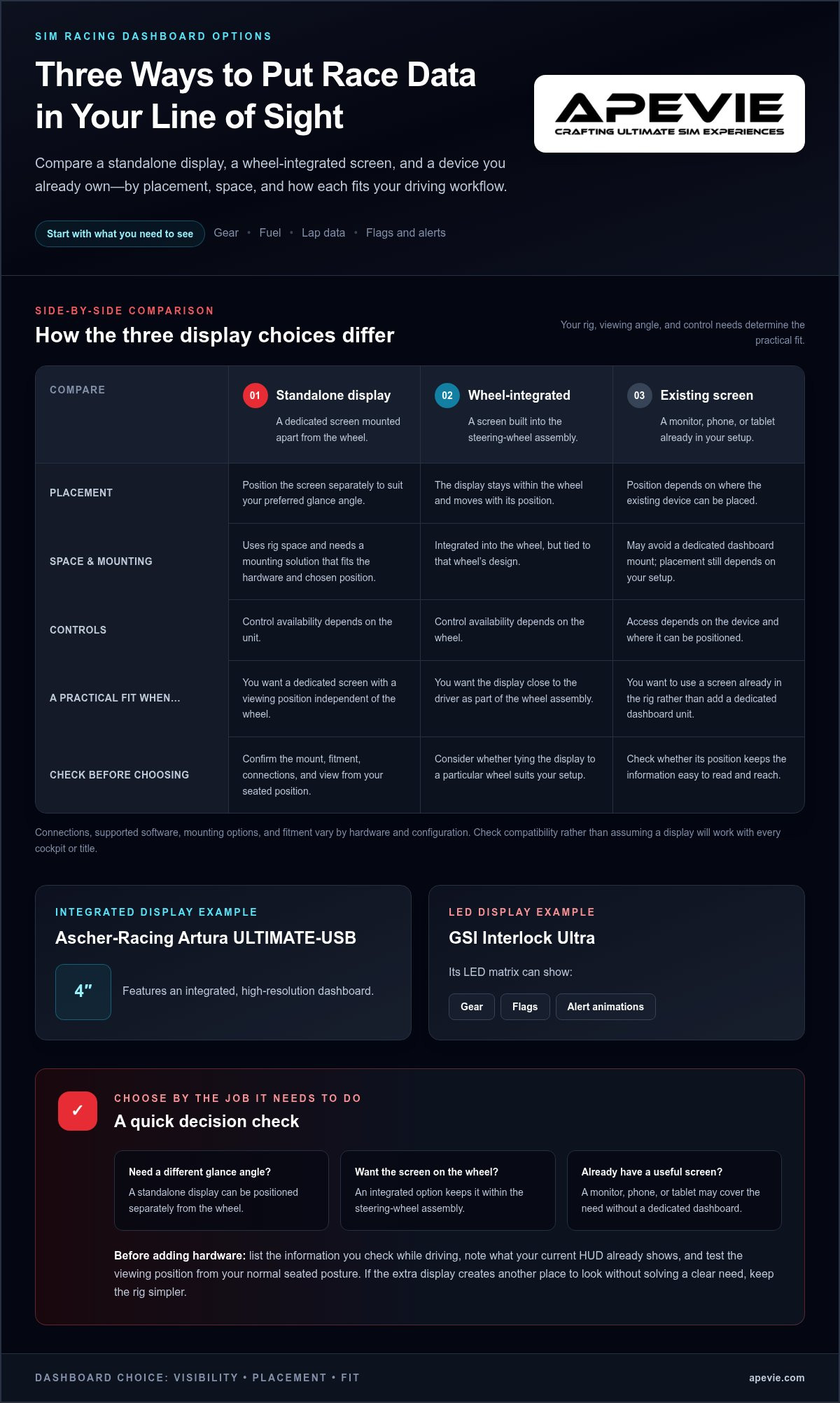
A standalone display gives you freedom to position a screen separately from the wheel, while an integrated dashboard keeps the display within the steering-wheel assembly. An existing monitor, phone, or tablet may also provide a screen without adding a dedicated unit. The best fit depends on your rig’s available space, preferred glance angle, control needs, and the specific hardware and software configuration.
Standalone dashboard: Mounted separately, with its own viewing position. It uses rig space and requires a suitable mounting solution. Controls depend on the unit.
Wheel-integrated display: The screen sits within the steering wheel, so its position follows the wheel. It keeps the display close to the driver, but ties it to that wheel’s design. Controls depend on the wheel.
Existing screen alternative: Uses a monitor, phone, or tablet already in the setup. It may avoid a dedicated dashboard mount, but screen position and access to controls depend on where it can be placed.
This comparison is a starting point, not a compatibility guarantee. Display connections, supported software, mounting options, and fitment vary by hardware and configuration. Before settling on a layout, consider how the screen will be supported, whether it obstructs another part of the rig, and how it looks from your normal seated position.
What a standalone sim racing dashboard is best suited to
A standalone dashboard suits drivers who want a dedicated screen positioned independently of the steering wheel. That flexibility can help if you prefer a fixed glance angle or don’t want your display tied to a particular wheel. The trade-off is space: you’ll need room for the screen and a mount that fits your rig and chosen position. Mount compatibility is hardware-specific, so don’t assume a display will attach directly to every cockpit; if pre-made adapters do not align, custom CAD and 3D printing services from FORMAQ Advanced Manufacturing can help produce bespoke brackets.
What an integrated steering-wheel display changes
A wheel-integrated display places information in the steering-wheel assembly, reducing the need to position a separate screen elsewhere. For example, the Ascher-Racing Artura ULTIMATE-USB has a 4-inch high-resolution dashboard with 350 lm brightness and 16-bit color. Its integrated format may suit a driver who wants the display on the wheel, but it isn’t a universal fit for every wheel or rig configuration. Consider wheel choice and viewing position together.
If you’re comparing wheel layouts as well as displays, The Best F1 Steering Wheels for Professional Sim Racing in 2026 is a related topic to explore. A screen’s position can change as you turn the wheel, while a separately mounted dashboard stays in place. Think about which arrangement feels natural from your driving posture, and whether adding a screen affects the space you need for your hands or other controls.
A custom dashboard for sim racing should fit the whole cockpit, not just the screen. Apevie’s expert consultation can help you consider dashboard, wheel, and rig choices as one setup.
How to Compare Custom Sim Racing Dashboards Before You Buy
A useful comparison starts with your driving, not a product feature list. Think about the cars and formats you race, the displays already in your rig, and the information you genuinely consult during a session. A custom dashboard for sim racing should fit those priorities and your cockpit, rather than duplicate readouts you can already see clearly.
Use this buyer framework to narrow your choices:
- Define your use case. Decide whether you need a dedicated place for race data, controls within reach, or both. Your answer helps distinguish a display from a button box or an integrated unit.
- Review your current screens. Note what your main monitor or other displays already show, then identify what’s hard to read or access from your normal driving position.
- Compare layout and size. Favor a screen layout that makes essential information easy to recognize. A larger display isn’t automatically more useful if it takes space without improving visibility.
- Plan placement and connections. Consider where the display will sit relative to the wheel, how it will mount, and how its cables will reach connection points without obstructing your setup.
How to assess display layout, controls, and visibility
Assess the layout from your seated position, with your hands on the wheel and your view directed toward the track. If you need to lean or make a large head movement to read a screen, its position may not suit your cockpit. Keep the display focused on relevant readouts; decorative graphics and rarely used data can make information harder to pick out.
Separate display functions from button-box functions. A screen presents information, while physical buttons and switches let you operate selected functions. An integrated steering wheel may combine a display and controls, while a standalone screen may be dedicated to viewing data. Compare what each component actually does, rather than treating every dashboard as an all-in-one control solution.
Look beyond the product image as you compare formats. Check how the screen is held, where its connections sit, and whether the layout leaves room for controls you use regularly. These practical details help you judge whether a display suits your intended arrangement before committing to an installation style.
How to check mounting and system fit
Measure available space before choosing a standalone unit. Account for the screen’s position beside or above the wheel, any nearby monitor, and the room needed to reach controls. A wheel-mounted display has a different relationship to the driver because it moves with the steering wheel. The wider considerations in The Ultimate Sim Rig Guide: Building a Professional Foundation in 2026 are useful when evaluating how a new component fits the overall rig.
Fitment and software support depend on the selected hardware and configuration. Read the product documentation for exact mounting requirements, supported connections, and software compatibility instead of assuming that a display will work with every wheelbase or simulator. Plan cable routing at the same time: a connection that is difficult to reach or a cable that interferes with movement can make an otherwise suitable installation awkward to use.
- Standalone displays: offer independent placement, but require space and a suitable mount.
- Integrated displays: keep the screen on the wheel, but tie its location to that wheel’s design.
There’s no universal winner. Choose the format that satisfies your information needs while fitting your rig’s space, mounting options, and connection layout.
How to Plan a Dashboard Setup Around Your Driving Style
A dashboard layout should reflect what you do in the car, not simply fill available screen space. Plan it around the information you use to make decisions, then arrange and test the display from your actual driving position. This keeps the cockpit purposeful and helps prevent duplicate readouts from competing for attention.
Start with the information you need while driving
Think about the data or alerts you actively check during a session. Separate essential glanceable information from details you consult only before or after a stint. Then verify that the software and hardware you plan to use support the data you want to display. Capabilities vary by product and configuration, so confirm them in the relevant documentation.
- Write down your decisions. Consider what you need to know while braking, approaching traffic, responding to a flag, or managing a race stint. Connect each item to a decision you make, rather than adding information because it happens to be available.
- Sort information by urgency. Place frequently checked data in the most immediately readable area of your layout. Keep secondary details elsewhere, or leave them out if they add clutter without helping you respond during the session.
- Remove unhelpful duplication. Compare the planned dashboard with your monitor’s existing HUD and other screens. Repeating a readout can be useful if it improves visibility, but duplicate information without a clear reason takes up space and makes the layout harder to scan.
Position and configure the display for quick recognition
Set the display position while seated as you normally drive, with your hands on the wheel and sightlines clear. Arrange important information so you can locate it quickly, using a consistent layout rather than scattering similar items across the screen. The right position depends on the cockpit and display, so assess it from your own rig instead of relying on a generic mounting diagram.
- Mock up the viewing position. Before finalizing a mount, consider where the display will sit relative to the wheel and your main screen. Check that it remains visible from your usual posture and doesn’t obstruct the track view or access to controls.
- Configure a restrained first layout. Start with the essential readouts you identified. Keep labels and visual groupings distinct enough to recognize at a glance, and avoid filling unused areas with decorative elements just to make the display look busy.
- Test during practice. Use the layout in a practice session and notice which information you actually look at, which items are difficult to read, and whether the screen draws your attention away from driving. Adjust its position or arrangement based on those observations, then test again.
If you’re bringing a dashboard, wheel, and rig together, Apevie’s expert consultation and white-glove installation can help with planning a premium simulator setup. Discuss your simulator setup with Apevie.
Apevie’s Approach to Custom Sim Racing Dashboard Setups
A dashboard choice makes the most sense as part of the full driving position. The wheel determines where an integrated display sits, while the rig and monitor arrangement affect what else can fit comfortably within your view. For a custom dashboard for sim racing, consider those relationships together rather than choosing a screen in isolation.
What the Ascher-Racing Artura ULTIMATE-USB brings to a wheel setup
The Ascher-Racing Artura ULTIMATE-USB offers an integrated 4-inch high-resolution dashboard, with 350 lm brightness and 16-bit color. Because the display is part of the wheel, it places its information at the steering position rather than requiring a separate dashboard mount. Whether that placement suits you depends on your wheel choice, seating position, and preferred glance angle.
It also has 21 RGB shift LEDs. These are a separate wheel feature, not a specification of the dashboard itself. That distinction matters when comparing products: the screen presents information, while the shift LEDs provide a different visual cue. Consider each feature in relation to how you drive, and avoid treating a longer feature list as automatically more useful.
Include the wheel and its mounting arrangement in your planning. Quick-release adapters aren’t included in standard packages; they must be selected separately. Account for that when planning how the wheel will connect to your setup.
When a turnkey simulator build can simplify the decision
Choosing a dashboard alongside a wheel and rig involves more than comparing display specifications. The parts need to form a considered driving position, with the screen where you can read it and the surrounding components arranged for your intended use. Apevie’s expert consultation brings dashboard, wheel, and rig decisions into one build discussion, whether you’re refining an existing setup or planning a premium simulator from the beginning.
Apevie’s white-glove installation service supports the physical setup of a simulator while the display choice is considered alongside the rest of the build. No single dashboard format suits every driver, so focus on how its placement and features fit your chosen configuration, rather than assuming an integrated screen is inherently better than a standalone display.
If you want a complete solution, Apevie’s turnkey racing simulator packages bring the broader build into view. You can also explore parts for a focused upgrade or use professional consultation to discuss how dashboard and wheel choices fit your rig. Choose the route that matches the work your setup needs, then let the information you use on track guide the final configuration.
Make Your Next Dashboard Choice With Confidence
Your next step is to use what you’ve learned in the cockpit: note what you look for, where your attention goes, and whether your current layout makes those moments straightforward. Those observations give you a practical brief for choosing a custom dashboard for sim racing, whether you’re refining an existing rig or planning a new one.
Let your driving priorities guide the decision, not a feature list alone. A considered setup should feel coherent with the way you race and leave room for the hardware that matters most to you.
Explore Apevie’s turnkey simulator builds, premium parts, and professional consultation to plan a setup that fits your goals. Your next rig can start with a clearer view of what you need.
Frequently Asked Questions
Is a custom dashboard for sim racing worth it?
A custom dashboard for sim racing is worth considering if it reduces a recurring task, such as opening an in-game menu to check session information. During a few representative races, note which checks interrupt your workflow and whether seeing that data elsewhere would help. If you rarely consult those details or already access them easily, a dedicated display may not add enough practical value for your setup.
Can a sim racing dashboard work with any steering wheel?
No, a dashboard isn’t automatically compatible with every steering wheel. Some displays connect and mount independently, while others are built into a specific wheel. For a wheel-mounted option, check both the physical mounting arrangement and the product’s connection requirements. Also distinguish wheel compatibility from game support: a display may physically attach to a setup while its software or data connection remains unsuitable for your intended use.
What information should I display on a sim racing dashboard?
Choose readouts that match the demands of the races you enter. An endurance driver may value tire temperatures or relative gaps, while a sprint racer may focus on immediate alerts and timing. These are examples, not universal requirements. Consider which decisions you make during a lap, then select data that informs those decisions. If a readout doesn’t change what you do, it may not need space on the display.
Do I need a separate dashboard if my steering wheel has a display?
Not always. A separate screen can make sense if it serves a distinct role rather than repeating the wheel’s readouts, such as showing session information you want visible beyond the steering position. If the wheel display already covers your essential needs, another screen may simply duplicate them. Decide what unique task the additional display would handle before adding it to the cockpit.
Can I use a tablet as a custom sim racing dashboard?
Yes, a tablet can display sim racing data through suitable dashboard software. SimHub Dash and SIM Dashboard are examples of companion apps used for this purpose. Before relying on a tablet, check that your chosen app supports the game and data you want, then consider how it will stay powered and secured in your setup. A tablet’s screen and mounting arrangement should suit your available space.
How do I mount a dashboard to a sim racing rig?
Identify the dashboard’s mounting interface and the attachment points on your rig before purchasing a bracket. Compare the documented hole pattern or mount type with the hardware you plan to use, and account for nearby monitor supports and controls. Keep access to connection ports in mind during installation. Once mounted, secure loose cables so they don’t catch on moving or frequently handled parts of the cockpit.
Does a sim racing dashboard work with every racing game?
No, game support depends on the dashboard software and the data a particular title makes available. SimHub supports over 100 games, including Assetto Corsa Competizione, iRacing, and Le Mans Ultimate, but support for a game doesn’t guarantee every data field or feature works in the same way. Check the software’s compatibility information for each title you plan to race.