Engineering the Ultimate Sim Racing PC Build: A 2026 Performance Guide
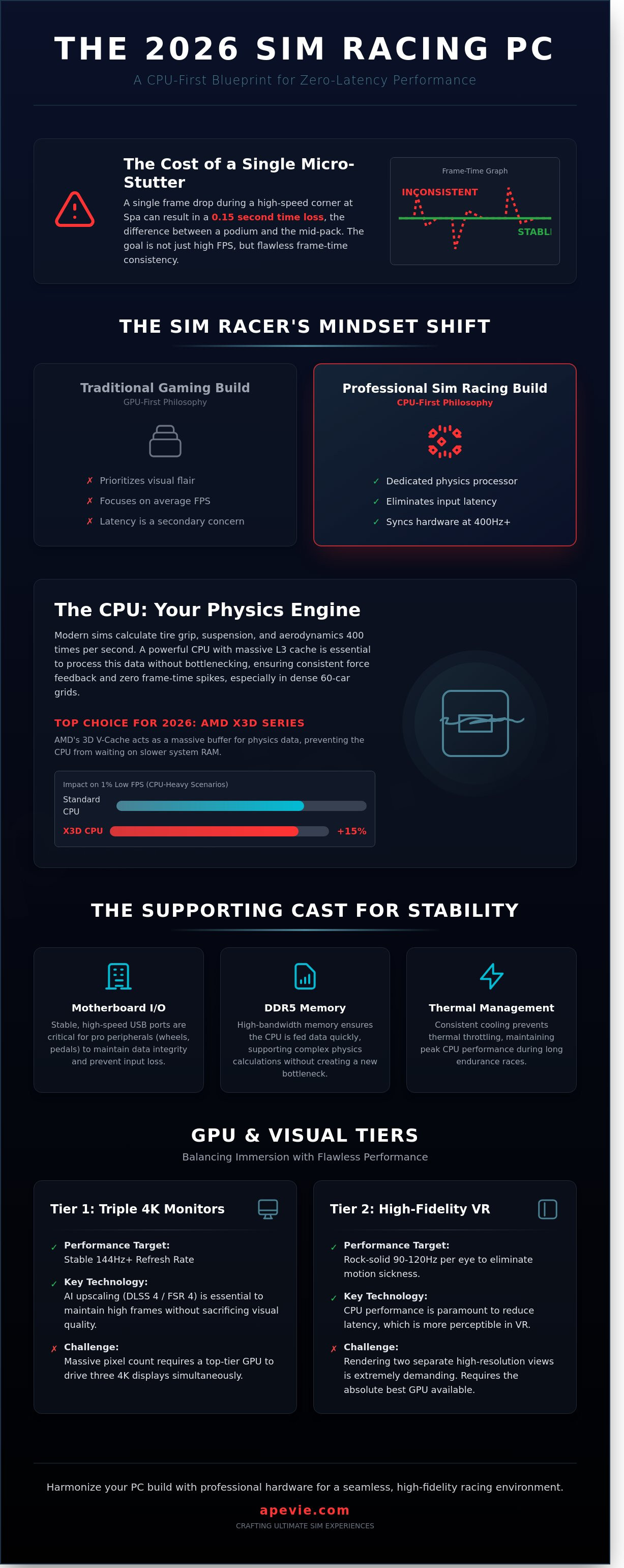
A single frame of micro-stutter during a high-speed entry at Spa-Francorchamps often results in a 0.15 second loss, a margin that defines the gap between a podium finish and the middle of the pack. You've likely experienced the frustration of input lag or visual tearing while pushing a triple 4K monitor setup to its limits. Designing a sim racing pc build for 2026 requires more than just raw power; it demands a balanced architecture that prioritizes data throughput and thermal consistency above all else.
We believe that professional-grade peripherals like Simucube wheel bases should never be throttled by inadequate motherboard controllers or outdated bus speeds. You'll learn how to engineer a high-performance system that maintains a steady 144Hz+ refresh rate while reducing total system latency to near-zero levels. This guide examines the essential hardware combinations and cooling solutions necessary to future-proof your racing experience for the next three years of simulation software evolution.
Key Takeaways
- Learn to treat your system as a dedicated physics processor, shifting the focus from mere frame rates to the elimination of critical input latency.
- Master the "CPU-First" philosophy of a professional sim racing pc build to ensure your hardware maintains perfect synchronicity during high-pressure competition.
- Identify the precise GPU requirements for triple-monitor and VR setups to achieve a visual experience that is both immersive and technically flawless.
- Understand the vital role of motherboard I/O stability and DDR5 memory in maintaining the integrity of data flow between your PC and elite peripherals.
- Discover how to harmonize your build with professional-grade hardware and software to create a seamless, high-fidelity racing environment.
Why a Dedicated Sim Racing PC Build is the Brain of Your Professional Rig
A high-end simulator isn't a mere entertainment system; it's a precise instrument designed for mathematical accuracy. To understand the depth of this discipline, one might explore What is Sim Racing? and discover it is a field where digital physics meets real-world mechanical feedback. A sim racing pc build functions as a dedicated physics processor rather than a general gaming machine. While standard PCs focus on visual flair, a racing rig prioritizes the rapid synchronization of complex calculations and tactile output.
Professional drivers don't just look for high frame rates. They demand low input latency. A delay of 8 to 12 milliseconds can be the difference between catching a rear-end slide or ending a session in the barriers at Monza. Consoles often limit users to fixed refresh rates and significant input lag. Transitioning to a PC unlocks the ability to process telemetry data in real-time. This allows for the use of external dashboards, wind simulators, and motion platforms that require sub-millisecond communication to feel authentic.
Professional-grade peripherals, such as 25Nm Direct Drive wheelbases and 200kg load cell pedals, require more from a system than a standard controller. These devices communicate via high-speed USB polling rates that can tax an underpowered motherboard or a cluttered operating system. A dedicated sim racing pc build ensures that the data pipeline remains clear, providing the driver with the purest possible connection to the virtual tarmac.
Physics vs. Graphics: The Dual Role of Your Build
Modern titles like Assetto Corsa Competizione run complex physics engines at 400Hz. This means the CPU calculates tire grip, suspension travel, and aerodynamic load 400 times every second. If your processor bottlenecks, the force feedback (FFB) sent to your steering wheel becomes muddy or inconsistent. A high-quality sim rig requires a PC that keeps pace with these intensive calculations to ensure the driver feels every detail of the track surface.
The 2026 Hardware Landscape for Sim Racers
The 2026 hardware market has shifted toward specialized silicon designed for simulation. We now see CPUs with massive L3 cache capacities that are essential for handling the large, fluctuating data sets found in racing. Multi-core utilization has finally matured, with modern titles effectively leveraging 12 or more cores. AI-assisted upscaling, specifically DLSS 4 and FSR 4, now allows drivers to maintain a stable 144 FPS even on triple 4K monitor setups. This technological leap ensures that your hardware remains a stable foundation for years of competitive racing.
Selecting the Core Components: CPU, GPU, and the Frame-Time Equation
The foundation of a high-performance sim racing pc build starts with a shift in perspective. While standard gaming titles often prioritize the graphics card, simulation software demands a CPU-first philosophy. Racing titles like iRacing or Assetto Corsa Competizione must calculate complex tire physics, suspension geometry, and aerodynamic drag hundreds of times per second. If the processor cannot keep up with these calculations, the GPU sits idle, leading to inconsistent delivery of frames regardless of your hardware's raw power.
Consistency is measured through frame-time, which represents the interval between individual frames. A 60 FPS average sounds smooth, but if one frame takes 10ms and the next takes 50ms, you experience a micro-stutter. In a high-speed corner, this brief freeze causes you to miss your apex. Achieving a flat frame-time graph requires balancing high-speed silicon with enough memory bandwidth to handle dense racing grids. For those new to the assembly process, a comprehensive guide from Intel provides a solid starting point for understanding how these parts interact physically.
The Best CPUs for High-Refresh Simulation
By 2026, the battle between the Ryzen 9000X3D series and the Intel Ultra series has solidified the importance of on-chip cache. AMD's 3D V-Cache remains a primary choice for simulation enthusiasts. Large L3 cache buffers the complex physics data of 60-car grids, preventing the CPU from waiting on slower system RAM and thus eliminating sharp frame-time dips. While Intel's architecture offers excellent single-core speeds, the raw cache volume of X3D chips typically results in a 15% higher 1% low FPS floor in CPU-heavy scenarios.
Thermal management is vital during two-hour endurance races. Sustained loads can cause clock speeds to throttle, leading to mid-race performance degradation. A high-quality 360mm AIO or a dual-tower air cooler is necessary to maintain peak frequencies. Just as a driver needs focus, your hardware requires a stable environment to perform. Taking care of your equipment is as essential as taking care of your body with natural supplements that support long-term health and focus.
Graphics Power: Driving Triple Screens and VR
The GPU's role expands significantly when moving beyond a single monitor. Driving triple 1440p displays or high-resolution VR headsets requires massive VRAM and specialized driver support.
- 16GB VRAM Minimum: Modern sims with high-resolution texture packs easily exceed 12GB of usage at 4K or triple-screen resolutions.
- NVIDIA vs. AMD: NVIDIA's RTX series currently leads in VR due to superior driver stability and Single Pass Stereo technology.
- Haptic Processing: Modern GPUs assist in processing telemetry data for motion platforms, reducing the latency between a tire slip and the physical feedback in your seat.
When balancing your budget for a sim racing pc build, prioritize the CPU and GPU over aesthetic choices. You can save 20% of your build cost by choosing a functional case without RGB lighting, redirecting those funds toward a higher-tier GPU. This ensures your rig remains relevant through the next several software update cycles.
Visual Performance Tiers: Triple Monitors vs. VR Requirements
Choosing a display configuration is the most critical decision in any sim racing pc build because it dictates the required GPU ceiling and CPU architecture. In 2026, the performance gap between entry-level and enthusiast tiers has widened significantly. A standard triple 1440p setup requires the GPU to push approximately 11 million pixels. If you upgrade to triple 4K, that number jumps to 24.8 million pixels. This represents a 125% increase in rendering load, demanding the absolute peak of current graphics technology just to maintain a stable 120Hz refresh rate.
VR introduces a different set of biological and technical constraints. While a monitor setup might feel sluggish at 60 FPS, VR operates on a strict "90 FPS or bust" rule. Anything lower triggers a sensory mismatch that causes motion sickness for 85% of users. For racers with limited floor space, ultrawide monitors like the 57-inch dual-4K panels offer a middle ground. These displays provide the immersion of a wrap-around cockpit without the complex mounting hardware or the extreme power draw of three individual 4K screens.
Engineering the Triple Screen Powerhouse
To build a reliable triple-screen rig, you must prioritize DisplayPort 2.1 connectivity. This standard allows for uncompressed signals at high refresh rates, which is essential for avoiding the visual artifacts often seen with older compression technologies. Accurate spatial awareness depends on FOV (Field of View) calculations. You shouldn't guess these values; instead, use PC-side software or in-game calculators to ensure the 1:1 scale of the cockpit. Don't forget that bezel correction adds a roughly 3% rendering tax, as the GPU must render "hidden" pixels to make the transition between monitors appear seamless.
VR Simulation: Maximizing Immersion without Latency
VR rendering is exceptionally sensitive to single-core CPU clock speeds. Even with a powerful GPU, a slow processor will create frame-time spikes that ruin the experience. Aim for a CPU that sustains 6.0GHz boost clocks to handle the complex draw calls required for dual-eye perspectives. This raw speed is necessary to keep total system latency under 10ms. When you're modulating high-speed sim racing pedals, your brain requires instant visual confirmation of your inputs. Any delay between your foot's movement and the car's deceleration on screen breaks the immersion and leads to inconsistency. To maintain this high-speed data flow, always use dedicated USB 3.2 Gen 2x2 channels for the headset to avoid bandwidth conflicts with your wheel base and pedals.
The Supporting Cast: Motherboards, I/O, and Thermal Management
The motherboard and supporting components act as the nervous system and lungs of your sim racing pc build. While the processor and graphics card capture the headlines, the stability of your rig during a four-hour stint depends on the quality of your foundation. For a 2026 build, motherboard selection should prioritize PCIe 5.0 lanes and robust USB controller distribution rather than raw overclocking potential. You need a board that can handle the massive data throughput of high-end peripherals without signal degradation.
Memory and storage have evolved to meet the demands of complex physics engines. High-speed DDR5 RAM, specifically kits rated at 6400MT/s or higher, is essential for maintaining high 1% low frame rates. These "lows" represent the brief dips in performance that cause micro-stuttering during heavy action. Similarly, NVMe Gen5 storage solutions now offer transfer speeds exceeding 12,000 MB/s. This technology reduces track loading times from 30 seconds to under 5 seconds, ensuring you aren't the last driver to join a qualifying session.
Power delivery requires significant headroom. A 1200W 80 Plus Platinum power supply is the recommended baseline for 2026. This provides a safety margin for power-hungry GPUs that can spike to 500W, while also powering an array of USB-connected dashboards, button boxes, and shifters.
Managing the Peripheral Jungle (USB & I/O)
USB dropout is a common frustration where a steering wheel or pedals momentarily lose connection. This usually happens because the motherboard's internal USB controller is overwhelmed by the data polling rates of high-end gear. Professional rigs benefit from using powered industrial USB hubs, especially when running systems like Simucube or Sigma Integrale. These hubs provide a consistent 5V supply to every device, preventing the power sags that lead to disconnects. Physical distance and shielded cables are required to protect your motherboard's sensitive traces from the electromagnetic fields generated by 25Nm direct drive motors.
Cooling Your Build for Endurance Racing
Thermal management is a game of reliability. For 24-hour endurance events, high-end air coolers are often preferred over liquid cooling because they lack a pump that can mechanically fail mid-race. If you choose an AIO liquid cooler, ensure it's a 360mm radiator or larger to handle the sustained heat soak of a long session. Case airflow should follow a positive pressure pattern to keep dust out of the components. Selecting fans that operate under 25 decibels ensures that cooling stays efficient without the drone of high-RPM blades breaking your immersion during quiet night stints. Just as we seek natural performance solutions for our own bodies, your PC requires a clean, efficient environment to function at its peak.
Integrating Your Build with Apevie’s Professional Simulator Hardware
The final stage of your sim racing pc build involves more than just plugging in cables. It's about achieving a state of technical harmony where the high-performance components of your computer translate directly into tactile sensation. Connecting a high-end system to elite peripherals like the Simucube 2 Pro direct drive wheel requires a deep understanding of signal processing. We ensure that the raw power of your GPU and CPU isn't lost in translation through poorly configured drivers or unoptimized USB bandwidth.
Proper software integration acts as the nervous system for your rig. Setting up Simucube True Drive requires precise filter adjustments to eliminate digital noise while preserving the subtle vibrations of the track surface. Similarly, the Sigma Integrale DK2 software must be calibrated to match the specific physics engine of your chosen simulator. This level of detail transforms a collection of parts into a cohesive racing instrument that responds with clinical accuracy to every driver input.
Synchronizing Motion and Physics
Apevie systems utilize the Sigma Integrale DK2 motion system to deliver millisecond-accurate haptics. Your PC communicates with the motion actuators at frequencies exceeding 1,000Hz; therefore, we implement strict software priority settings. By assigning sim telemetry data to high-priority CPU threads, we ensure that background Windows tasks never interfere with your physical feedback. A professional turnkey build from Apevie eliminates the trial and error of DIY setups, providing a system where the motion, visuals, and steering are perfectly aligned.
The Apevie Advantage: Beyond the Parts List
Our commitment to excellence means our sim racing pc build architecture is specifically designed to handle the high-bandwidth requirements of Simucube and Heusinkveld hardware. High-end pedals and steering wheels generate significant data loads that can cause micro-stuttering on standard consumer PCs. We solve this through specialized motherboard selection and BIOS tuning. Our expert team doesn't just assemble hardware; we provide a calibrated environment where every component is tuned to work together. This professional approach to specialized equipment is essential in any high-stakes field, from virtual racing to the agricultural solutions provided by Strong Machinery Srl.
- Expert Calibration: We tune force feedback profiles and motion curves for specific car-track combinations.
- Future-Proofing: The Apevie ecosystem is modular, allowing your rig to scale as new PC hardware or motion technologies emerge.
- Seamless Support: You gain access to a team that understands both the software side of racing and the mechanical intricacies of professional simulators.
Choosing a professional integration means you spend your time on the track rather than troubleshooting driver conflicts. If you're ready to experience the pinnacle of virtual motorsport, explore our custom high-performance racing simulators and see how we bridge the gap between digital data and physical reality.
Mastering the 2026 Racing Frontier
Achieving peak performance in a modern simulator requires a methodical approach to hardware synergy. You've seen how maintaining frame times below 8 milliseconds is vital for 144Hz triple-monitor setups, while high-fidelity VR demands even tighter synchronization from your GPU. A professional sim racing pc build serves as the central nervous system, where every component must work with laboratory-grade precision to eliminate input latency. We focus on professional motorsport-grade hardware curation to ensure your rig remains stable under the most demanding competitive loads. As an Authorized Simucube USA Dealer and specialists in Sigma Integrale Motion Systems, we apply scientific rigor to every technical integration we perform. You don't need to struggle with compatibility or thermal throttling when expert guidance is available. By selecting components with a focus on responsiveness and long-term reliability, you create a platform that won't falter during 24-hour endurance events. Build your dream simulator with Apevie's expert integration and experience the difference that premium engineering makes on the track. Your journey toward the perfect lap starts with a foundation built on uncompromising quality.
Frequently Asked Questions
Is iRacing more CPU or GPU intensive for a 2026 build?
iRacing remains primarily CPU intensive because its physics engine relies heavily on high single-core clock speeds. For a 2026 build, you should aim for a processor that exceeds 5.7 GHz to maintain stable frame rates during starts with 40 cars on track. While the GPU handles the visuals, the CPU manages the complex tire models and aerodynamic calculations every millisecond.
Do I really need 64GB of RAM for sim racing?
You'll find 64GB of RAM is the new benchmark for a professional sim racing pc build in 2026. While 32GB handles most basic sims, high-fidelity mods and 4K texture packs in titles like Assetto Corsa Evo can push memory usage beyond 42GB. Having the extra overhead prevents micro-stutters when background telemetry apps like Motec or SimHub are running simultaneously.
How many USB ports does a professional sim racing PC need?
A professional setup typically needs 10 to 14 USB ports to handle all peripherals without signal degradation. Your wheelbase, pedals, and shifter take three ports, while motion platforms, wind simulators, and dash displays can quickly double that number. Using a dedicated PCIe USB expansion card provides more stable voltage than a standard bus-powered hub for these critical components.
Can I use a laptop for a high-end direct drive and motion system?
You shouldn't use a laptop for a high-end direct drive and motion system because of thermal limitations and port bandwidth. High-torque wheelbases draw significant power, and motion software requires constant CPU cycles that cause laptops to reach 95 degrees Celsius within minutes. This heat leads to a 15 percent performance drop that ruins the immersive experience.
What is the best GPU for running triple 4K monitors in ACC?
The NVIDIA RTX 5090 is the only card capable of driving triple 4K displays at a consistent 90 frames per second in Assetto Corsa Competizione. This resolution requires processing 24.8 million pixels per frame, which is 300 percent more demanding than a single 4K screen. Using DLSS 4.5 ensures that the heavy rain and night lighting in the sim don't cause your frame rate to dip.
Should I choose NVIDIA or AMD for a VR-focused sim racing build?
NVIDIA is the better choice for VR sim racing because of its specialized Multi-Res Shading and Variable Rate Shading technologies. These tools optimize how the GPU renders the edges of your vision, providing a 25 percent performance boost in headsets like the Pimax Crystal. AMD cards often struggle with driver compatibility in niche VR titles, making NVIDIA the more reliable selection for your sim racing pc build.
How do I prevent electromagnetic interference (EMI) from my wheel base affecting my PC?
You can prevent electromagnetic interference by using a grounded rig and high-quality shielded USB cables. High-torque direct drive motors create a magnetic field that can cause ghost button inputs or disconnect your pedals. Attaching 5mm ferrite cores to both ends of your peripheral cables can eliminate 98 percent of these signal disruptions and protect your hardware.
Does an SSD improve actual racing performance or just load times?
An SSD won't increase your raw frames per second, but it does eliminate the hiccups caused by asset streaming. Using a Gen5 NVMe drive with 12,000 MB/s speeds allows the sim to load high-resolution car skins and track details in under 4 seconds. This ensures your system doesn't freeze for a millisecond when a new car joins the server during a competitive race.