Mastering Advanced Force Feedback Settings for Professional Direct Drive Systems
What if the reason you're losing 0.4 seconds in the final sector isn't your racing line, but a software filter masking the physical limit of your tires? Most drivers invest in 25Nm Direct Drive hardware only to find themselves overwhelmed by complex interfaces like True Drive, where a single misaligned slider leads to vague steering or violent oscillations on the straights. It's a common frustration to feel that your premium equipment is delivering a rubbery sensation rather than the sharp, communicative feedback you expected.
You deserve a setup that provides a transparent, sophisticated connection to the car's physics. By mastering advanced force feedback settings, you'll learn how to translate raw telemetry data into professional-grade steering feel, eliminating clipping in high-speed corners and ensuring every oversteer cue is predictable. This guide explores the scientific principles behind damping, friction, and inertia to help you build a profile that mimics the authentic, mechanical resistance of a real-world racing rack. We'll show you how to turn raw digital signals into a tactile, high-fidelity experience that rewards every input with absolute clarity.
Key Takeaways
- Understand the evolution from artificial vibration to high-fidelity telemetry, allowing you to capture the authentic physics of the race track.
- Discover how digital filters and damping parameters create a fluid, weighted steering feel that replicates the mechanical resistance of a real vehicle.
- Implement the "Unity" principle to balance hardware torque and software scaling, ensuring you never lose critical detail to signal clipping.
- Master the use of professional telemetry tools to monitor signal health and fine-tune your advanced force feedback settings for maximum clarity.
- Gain insights into the essential synergy between premium direct drive hardware and rigid chassis design for ultimate simulation precision.
What Are Advanced Force Feedback Settings?
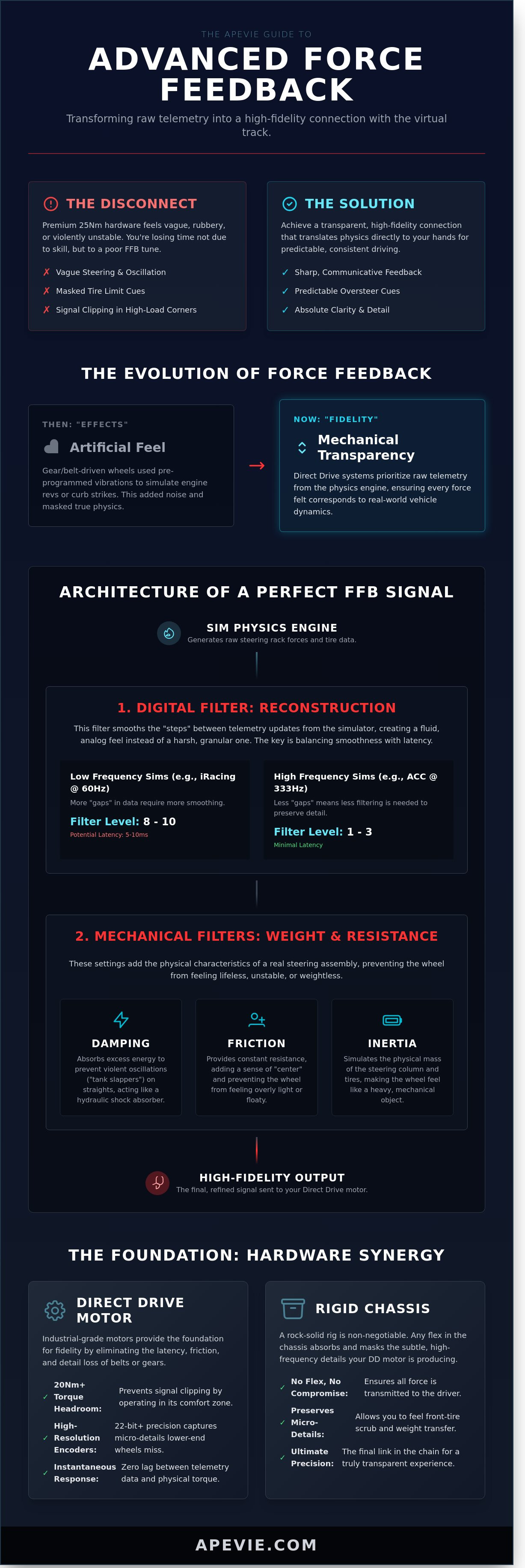
Advanced force feedback settings are the digital filters and motor parameters that interpret simulator telemetry into physical torque. In the early days of sim racing, "effects" like artificial rumbling were used to compensate for weak hardware. Today, the industry has shifted toward fidelity, prioritizing the raw data generated by the physics engine. This evolution requires a new tuning philosophy for those using high-end Direct Drive systems. Instead of adding layers of artificial feel, the goal is mechanical transparency. You want to feel what the steering rack feels, without the interference of the motor's own internal friction or software-induced dampening.
The shift from "effects" to "fidelity" represents a fundamental change in how we perceive virtual racing. Older gear-driven wheels relied on pre-programmed vibrations to simulate engine revs or curb strikes. Modern professional racing ignores these canned effects in favor of raw steering rack data. This approach prioritizes the integrity of the physics engine, ensuring that every Newton-meter of torque felt at the wheel corresponds to a real-world physical force. By refining these advanced force feedback settings, you ensure that the wheel acts as a transparent medium rather than a barrier between you and the car.
Signal vs. Noise: The Core Challenge
Simulators generate vast amounts of data, but not all of it is useful for performance. Drivers must distinguish between game-generated vibrations and actual steering rack forces. Digital artifacts often mask critical information, such as the subtle vibration of front-tire scrub or weight transfer. Professional systems rely on haptic technology fundamentals to maintain signal integrity throughout the hardware chain. High-resolution encoders, often 22-bit or 24-bit precision, capture micro-details that lower-end wheels simply cannot reproduce. This clarity allows a driver to sense the exact moment the front axle loses grip, leading to more consistent lap times and better tire management.
Why Industrial Motors Change the Game
Direct Drive (DD) systems utilize industrial-grade motors to eliminate the latency and friction inherent in belts or gears. This hardware allows for infinite detail and instantaneous response. Torque headroom is a vital metric here; a motor capable of 20Nm or more provides the range needed for linear signal reproduction without clipping. When a motor operates within its comfort zone, it maintains the integrity of the physics engine even during high-load cornering. By using advanced force feedback settings to manage these motors, you achieve a level of tactile accuracy that mirrors real-world motorsport. FFB fidelity is the ratio of meaningful telemetry to motor-induced vibration.
The Architecture of a Perfect FFB Signal
Achieving a lifelike feel requires more than raw torque. It demands a sophisticated understanding of how digital data translates into physical resistance. When adjusting advanced force feedback settings, you're essentially sculpting a stream of telemetry into a tactile language. This process relies on mathematical models that govern how energy moves through the motor to simulate the complex forces of a racing tire. It's about finding a balance between raw information and mechanical refinement.
Reconstruction and Signal Smoothing
Simulators send telemetry updates at varying frequencies. iRacing delivers data at 60Hz, while Assetto Corsa Competizione operates at 333Hz or higher. Simucube's reconstruction filters act as a bridge, filling the gaps between these digital "steps" to create a fluid, analog sensation. A higher filter level, typically between 8 and 10, is necessary for lower-frequency titles to prevent a notched, granular feel. For high-frequency titles, a lower setting of 1 to 3 preserves the sharpest details. You're balancing the purity of the signal against the mechanical harshness of digital updates. Excessive smoothing can introduce 5 to 10 milliseconds of latency, which might delay your reaction to a sudden slide.
Mechanical Filters: Damping, Friction, and Inertia
Real steering columns aren't weightless; they possess physical mass and internal resistance. Damping is your primary tool for preventing "tank-slappers," those violent oscillations that occur on long straights when the wheel begins to over-correct itself. It absorbs excess energy, behaving much like a hydraulic shock absorber in a steering rack. Friction provides a sense of "center" and prevents the wheel from feeling floaty or overly sensitive to minor inputs. Inertia adds the perceived weight of the steering assembly and tires, making the wheel feel like a heavy, mechanical object rather than a hollow plastic toy.
These settings are deeply rooted in the engineering principles of force feedback, where controlling the motor's response to external torque is vital for stability. Without these filters, the motor reacts too quickly to every tiny telemetry spike, leading to an artificial buzz that masks the car's actual behavior. Proper calibration ensures that every movement feels deliberate and grounded in physics.
Hardware vs. Software: Where to Apply the Tune
Achieving a transparent feel in your simulator requires a fundamental understanding of the "Unity" principle. You should always set your hardware's maximum torque to 100% within its native driver software. This approach ensures you're utilizing the full dynamic range of the motor without losing signal resolution. You then scale the intensity down within the simulator's internal menus. By prioritizing hardware strength first, you allow the advanced force feedback settings to translate physics data into physical resistance with the highest possible fidelity.
The relationship between in-game gain and wheelbase gain is a delicate balance. If the software gain is set too high, you'll encounter signal clipping. This occurs when the game engine demands more force than the hardware can physically provide, resulting in a "flat" feeling where subtle road textures and weight transfers disappear. The engineering foundations for these interactions are explored deeply in the design and control of haptic systems, which highlights how signal architecture affects mechanical stability. While the steering wheel is your primary data source, remember that total cockpit feedback requires harmony between all inputs. You can learn how to balance your braking and throttle inputs in The Ultimate Guide to Sim Racing Pedals.
Optimizing the Game Engine Settings
Synchronization is the first step toward professional accuracy. Ensure your software rotation degrees match your hardware, typically 900 or 1080 degrees, to maintain a 1:1 steering ratio. If you're using a Direct Drive system, "Minimum Force" settings should be set to 0%. This legacy feature was designed to help older gear-driven wheels overcome internal friction; on a modern DD system, it only introduces artificial noise. For iRacing users, enabling "Linear Mode" is mandatory for a professional experience. It ensures the force you feel is directly proportional to the physics engine's output without any non-linear curves clouding the feedback.
Simucube True Drive Optimization
The True Drive interface serves as the brain for the Simucube 2 Pro and Ultimate wheelbases. It's a powerful tool that allows for granular adjustments to damping, friction, and inertia. When you're preparing for a long session, the "Safe Torque" feature provides a necessary layer of protection by limiting peak forces until the system detects active driver control. You don't need to spend hours trial-testing every slider. The Simucube Paddock feature allows you to browse and import professional profiles directly into your software. These community-rated baselines offer a "pure source" for your setup, allowing you to focus on driving rather than troubleshooting technical parameters.
Troubleshooting: Clipping, Oscillations, and Deadzones
Achieving a high level of immersion requires more than just raw power; it demands a clean signal. Even the most expensive direct drive bases fail to deliver realism if the advanced force feedback settings are misconfigured. When your hardware receives a signal that exceeds its physical capabilities, the nuances of the track surface disappear, replaced by a dull, heavy resistance. Precision in your software setup ensures that every vibration from the curb and every shift in tire grip reaches your hands without distortion.
The Science of Clipping
Clipping represents a digital bottleneck where the game engine requests more torque than your motor can provide. Imagine a wave where the peaks are chopped off, creating a flat plateau of maximum force. Clipping is the primary cause of 'vague' feeling during high-load cornering. To identify this, you should monitor telemetry tools like iRacing's 'F' box. If the bar turns red during a high-speed turn, you're losing vital data. You can fix this by increasing the 'Max Force' setting in-game, which effectively lowers the output gain to fit the signal within the motor's 20Nm or 25Nm limit. This adjustment preserves the dynamic range, allowing you to feel the difference between a 70% load and a 100% load.
Stability Control and Safety
High-torque wheelbases can become unstable if the feedback loop is too aggressive. This often manifests as oscillations, where the wheel shakes violently when you let go on a straight. You can eliminate this behavior by applying a small amount of damping (usually 5-10%) or friction. Modern software also includes 'Hands-off detection' to automatically reduce power during a crash, protecting your wrists from sudden 20Nm spikes. For those using older titles with lower internal refresh rates, a 'Notchy' feel is common. This happens when the motor's 1000Hz update rate exposes the gaps in a 60Hz or 360Hz game signal. Increasing the reconstruction filter to a level of 5 or 6 will smooth these steps into a fluid, natural motion.
Maintaining physical stamina during long-endurance stints is just as important as the rig's mechanical health. If you find your muscles fatiguing after 45 minutes, consider reducing the overall strength while keeping the detail high. Just as you prioritize premium performance solutions for your body's recovery and focus, your FFB settings should support a balance of intensity and long-term sustainability. Fine-tuning a 'Notch Filter' can also remove specific resonant frequencies, typically around 40Hz to 60Hz, that cause unwanted vibrations in your cockpit frame without sacrificing the underlying road feel.
- Clipping: Check the 'F' box; if it's red, increase 'Max Force' to restore detail.
- Oscillations: Add 5% damping to stabilize the wheel during high-speed straights.
- Notchiness: Raise the reconstruction filter to bridge the gap between game and motor refresh rates.
- Safety: Enable hands-off detection to prevent injury during high-impact collisions.
Professional Integration: The Apevie Philosophy
Apevie Simulators approaches sim racing with the same precision and respect for quality that defines our commitment to professional excellence. We believe that a simulator isn't just a collection of parts; it's a unified system where the hardware must be capable of translating every digital nuance. To truly master advanced force feedback settings, you need a foundation that doesn't compromise the signal. This starts with industrial-grade components that provide a pure, uninterrupted flow of data from the software to your hands.
The synergy between a Simucube 2 Pro and a rigid aluminum profile chassis is foundational. While entry-level gear often loses detail through plastic flex or mechanical dampening, a professional build ensures that 100% of the torque reaches the driver. This rigidity allows for a more transparent tuning process. You aren't just adjusting sliders to make the wheel heavy; you're calibrating a high-fidelity instrument to reflect the exact physics of a GT3 or Formula car.
The Role of High-End Components
Professional integration focuses on consistency and signal purity. We utilize the Simucube 2 Pro because its 25Nm of peak torque and 22-bit angle sensors provide a level of detail that consumer-grade bases cannot match. This hardware ensures zero thermal throttling during a 24-hour endurance race, maintaining a consistent feel from the first lap to the last. High-end components provide several technical advantages:
- Direct Drive Fidelity: Zero-latency response times ensure that advanced force feedback settings like road texture and tire slip are felt instantly.
- Structural Integrity: Using Gomez Sim Industries (GSI) or Cube Controls wheels eliminates mechanical play. These wheels use CNC-machined aluminum and 5mm carbon fiber plates to preserve the FFB signal's integrity.
- System-Wide Tuning: A professional setup requires a holistic approach. We tune the software, the wheelbase, and the physical cockpit as a single unit to eliminate unwanted vibrations or resonance.
Achieving the Ultimate Sim Experience
Moving beyond the steering wheel, true immersion involves the entire body. Apevie Simulators integrates Sigma Integrale motion systems to bridge the gap between tactile feedback and physical G-forces. These systems operate with a 100Hz response rate, providing immediate cues for weight transfer and suspension travel. It's a level of immersion that helps professional drivers develop muscle memory that translates directly to the real track.
Apevie Simulators' custom builds offer a turnkey solution for those who demand the highest standards without the trial and error of DIY assembly. Every rig is calibrated by experts who understand the science of haptics. If you're ready to move beyond standard configurations, consulting with our specialists is the next step. We help you refine your professional sim racing setup to ensure every component, from the motion actuators to the steering wheel, works in perfect harmony.
Elevating Performance Through Precision Calibration
Achieving a professional-grade simulation experience requires more than just high-end hardware; it demands a deep understanding of signal integrity. By eliminating clipping and managing oscillations through software-side filtering, you ensure that every bit of telemetry reaches your hands without distortion. Data from professional sim racing engineers suggests that refining your advanced force feedback settings can reduce lap time variability by up to 15 percent over a full race distance. This level of technical clarity transforms a generic vibration into a detailed map of the track's surface and tire slip angles. It's the difference between guessing where the limit is and feeling it with absolute certainty. As an Authorized Simucube USA Dealer, we specialize in professional-grade PC simulation setups that provide this laboratory-level precision. We curate elite hardware from GSI and Heusinkveld to ensure your equipment never acts as a bottleneck to your talent. You'll find that when the hardware and software work in harmony, the immersion becomes a natural extension of your own senses.
Explore Professional Simucube Hardware at Apevie Simulators
Your journey toward a more authentic and rewarding driving experience starts with the right tools and the knowledge to master them.
Frequently Asked Questions
What is the best FFB strength for a Simucube 2 Pro?
Set the Simucube 2 Pro to its maximum 25Nm torque within the True Drive software and adjust the game's output to avoid signal clipping. This configuration provides the widest possible dynamic range for the motor. According to manufacturer specifications, the 25Nm peak torque allows for 1:1 replication of GT3 steering forces, which typically peak around 15Nm. Keeping the software at 100% ensures you utilize the full 24-bit resolution of the encoder.
How do I stop my steering wheel from oscillating on straights?
Increase the Damping or Friction settings in your wheel's control software to add mechanical resistance that counteracts self-alignment loops. Oscillations usually occur when the motor reacts too quickly to small center-point corrections. Setting damping to 10% or adding 5% friction provides the necessary weight to stabilize the shaft. High-end direct drive systems often require these advanced force feedback settings to prevent the "death wobble" at speeds exceeding 200 km/h.
Is it better to set FFB strength in the game or the wheel software?
You should set your wheel software to 100% strength and use the in-game gain or strength slider to reach your desired intensity. This method preserves the signal-to-noise ratio and prevents digital clipping. When you lower software torque, you limit the hardware's ability to produce sudden, high-frequency spikes. Professional drivers often leave software at 25Nm and set iRacing's Max Force to 45Nm to ensure a linear response across the entire torque curve.
What does a reconstruction filter actually do in sim racing?
A reconstruction filter smooths the low-frequency signal sent by the simulation to fill the gaps between data updates. Most sims send telemetry data at 60Hz or 400Hz, but a Simucube 2 Pro processes at 22,000Hz. The filter uses an algorithm to predict the curve between these data points. A setting of 5 on a scale of 10 effectively removes the "notchy" feeling caused by digital steps without introducing more than 1ms of latency.
Can high force feedback settings damage my hands or wrists?
High force feedback can cause acute injuries like sprains or chronic conditions like carpal tunnel syndrome if used without proper ergonomic form. A 25Nm motor can exert enough force to break a thumb during a crash if you don't release the rim. Data from sports medicine studies suggests that repetitive exposure to vibrations above 5 m/s² can lead to nerve damage over time. Always use a 90-degree elbow bend to distribute the load through your shoulders.
Why does my force feedback feel heavy but lacks detail?
Your signal is likely clipping, which happens when the game's output exceeds the maximum torque your wheel base can produce. When a signal clips, the peak forces flatten into a solid bar of maximum torque, erasing the subtle vibrations from curbs or tire scrub. Use a telemetry tool like Motec or an in-game FFB meter to ensure your advanced force feedback settings don't push the signal into the red zone more than 2% of the time during a lap.
Should I use the same FFB settings for every car in iRacing?
You must adjust the Max Force setting for every individual car in iRacing because each vehicle has a unique steering rack ratio and downforce level. A Dallara P217 generates significantly more steering torque than a Mazda MX-5. If you use a static setting, the prototype will clip while the Mazda feels limp. Use the Auto function in the iRacing FFB tab after driving 2 clean laps to calculate the specific output for that car's physics model.