Simucube Bundles for Sim Racing: Prices and Force Feedback
The biggest discount doesn’t automatically make a Simucube bundle the right choice. What matters is whether the wheelbase, steering wheel, and quick release form a setup that suits your rig and driving style, and whether the bundle offers better value than choosing components separately. One configuration pairs a Simucube 3 wheelbase with a Simucube Savu Pro steering wheel and Simucube Link Quick Release.
It’s reasonable to want force feedback that feels informative without becoming tiring or obscuring the car’s signals. This guide explains how to compare simucube bundles, assess the included hardware, and adjust force feedback to suit your preferences. It also covers how the wheelbase, steering wheel, and mounting setup affect overall fit, helping you weigh the trade-offs before choosing a premium sim-racing system.
Key Takeaways
- Compare the bundle’s included components with the parts you would otherwise choose separately to judge whether its pricing and discount suit your build.
- Learn which force feedback settings can be adjusted to shape steering feel around your driving preferences.
- Identify the wheelbase, steering wheel, and quick release included in the featured bundle before planning the rest of your setup.
- Review PC compatibility and cockpit mounting needs, including the profile dimensions required for a compatible rig mount.
Bundle pricing and discounts
A bundle’s value depends on the components you need, not the discount label alone. Compare its contents with the parts you would choose individually.
Bundle Contents
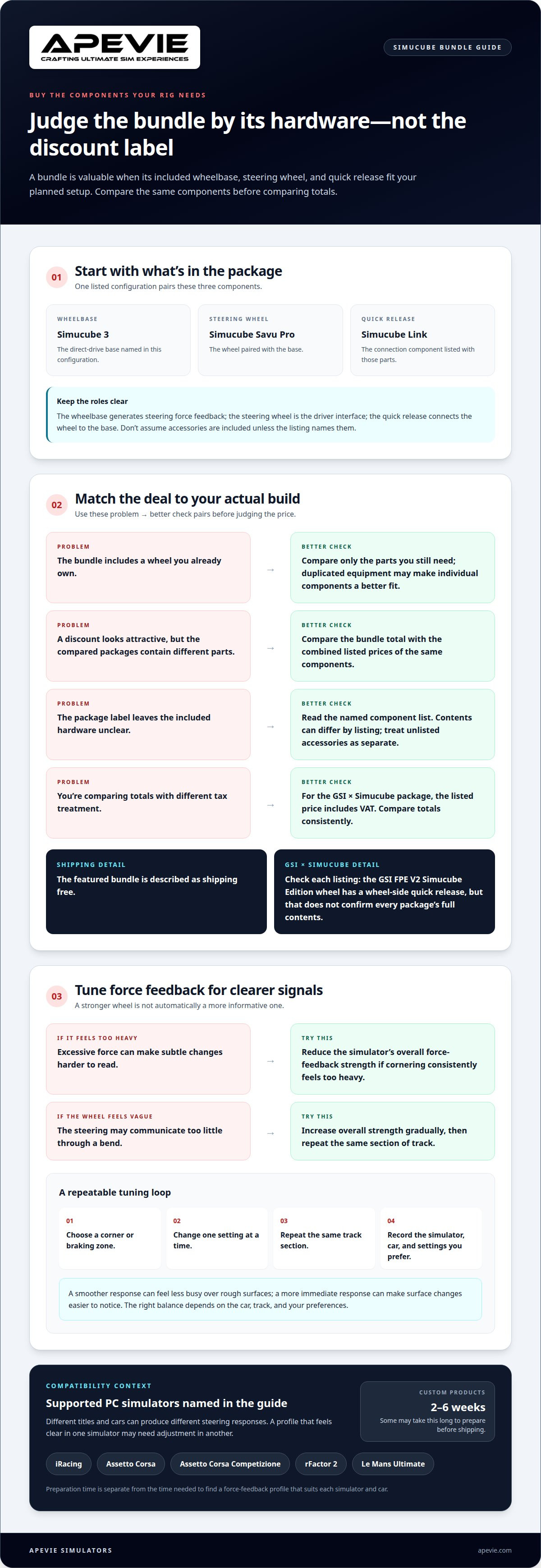
A Simucube 3 wheelbase, Simucube Savu Pro steering wheel, and Simucube Link Quick Release make up one bundle configuration. Treat those as a package: the steering wheel and quick release are part of its value, not optional extras.
Before comparing totals, list the components your rig needs. A bundle is a better fit when its contents match your planned setup. If you already own a compatible wheel, factor that into how much value you place on a package that includes one.
Bundle Discount Options
A discount matters only against the same component selection. Compare the bundle’s listed total with the combined listed prices of its Simucube 3 base, Savu Pro wheel, and Link Quick Release. This gives you a like-for-like comparison rather than relying on a promotional label.
For a GSI × Simucube bundle, check the exact products included before judging its value. The package price is listed with VAT, so use consistent tax treatment when comparing it with another total. Don’t count a discount as savings on components you wouldn’t otherwise buy.
Use a simple test: note the components you already own, then compare the parts you still need with the bundle contents. If it includes useful components you planned to buy, the combined value may suit your build. If it duplicates equipment, choosing components individually may be a better fit. Shipping terms can also affect the comparison; the featured bundle is described as shipping free. Check that its configuration matches the wheelbase, steering wheel, and quick release you intend to use. A different configuration changes what you are comparing.
Force feedback and customizable settings
Force feedback should communicate grip, load, and loss of traction without drowning out detail. With a Simucube 3 wheelbase, the feel you prefer depends on both your simulator’s output and your chosen settings. A firm steering weight can feel engaging, while excessive force can make subtle changes harder to read.
Simucube 3 supports PC simulators including iRacing, Assetto Corsa, Assetto Corsa Competizione, rFactor 2, and Le Mans Ultimate. Because each title and car can produce a different steering response, a profile that feels clear in iRacing may need adjustment in Assetto Corsa Competizione. Treat settings as a starting point, not a universal recipe.
Start with the simulator’s overall force-feedback strength. If cornering consistently feels too heavy, reduce it; if the wheel communicates little through a bend, increase it gradually. Change one setting at a time, then repeat the same corner or braking zone. This makes the comparison more useful and helps you identify which adjustment improved the signal.
Next, consider how much detail you want to feel. A smoother response may feel less busy over rough surfaces, while a more immediate response can make surface changes easier to notice. The right balance depends on the car, track, and your preferences. Compare the same section of track after each change.
Note which simulator, car, and settings you prefer. For example, record whether a GT car feels controlled through a fast corner, then compare the result with an open-wheel car. This helps distinguish personal preference from a setup that simply feels stronger, and gives you a repeatable way to refine force feedback across titles.
For buyers choosing a built-to-order or custom setup, allow for preparation time as well as tuning time: some built-to-order or custom products may take 2-6 weeks to prepare before shipping. That lead time is separate from finding a force-feedback profile that suits each simulator and car.
What is included in each Simucube bundle?
Included hardware can differ by listing, so compare the named components rather than relying on the package label. One configuration pairs a Simucube 3 wheelbase with a Simucube Savu Pro steering wheel and Simucube Link Quick Release. For Simucube bundles, that component list identifies the main parts of this particular setup.
- Simucube 3 wheelbase: the direct-drive base named in this configuration.
- Simucube Savu Pro steering wheel: the steering wheel paired with the base.
- Simucube Link Quick Release: the quick-release component listed with those parts.
Each component has a distinct role: the wheelbase generates steering force feedback, the steering wheel provides the driver interface, and the quick release connects the wheel to the base. Knowing the difference helps you identify what a package covers without assuming it includes extra accessories.
GSI × Simucube is another named package. The GSI FPE V2 Simucube Edition steering wheel has a quick release on the wheel side. That feature describes the wheel’s connection, but it doesn’t establish the complete contents of every GSI × Simucube listing. Read each component description individually.
For a practical comparison, note which listed parts you own and which you still need. If you have a wheel, check whether the package’s wheel and connection hardware suit your setup. If you need a wheelbase and steering wheel together, look for both by name in the package description. Comparing simucube bundles this way helps distinguish a suitable combination from one that duplicates equipment. Treat accessories as separate unless the package description lists them as included.
Treat that figure as the listed price for the named bundle, not as proof that any particular component is included. Before comparing it with another package, check the component names and confirm which items the description identifies. This keeps the comparison tied to the package as presented and avoids assuming a wheel, base, quick release, or other accessory is included unless the listing says so. Compare the listed contents with the equipment you own and still need.
What PC, cockpit, and mounting requirements do Simucube bundles have?
Simucube 3 works with major PC simulators, including iRacing, Assetto Corsa, Assetto Corsa Competizione, rFactor 2, and Le Mans Ultimate. The software titles are clear examples of its PC use, but they don’t establish a particular computer’s minimum specifications. Match the PC to the simulator you intend to run, then consider the wheelbase and display equipment as part of the complete setup.
When choosing a cockpit, consider the wheelbase’s mounting requirements and the forces you’ll feel through the steering wheel. A rigid, properly assembled rig helps keep the wheelbase secure while driving. Fanatec GT Cockpit, GT Simulator Cockpit, and Open Wheel Simulator Cockpit are examples of cockpit categories. Choose a layout that suits your seating position and driving style.
Mount compatibility depends on the rig’s profile and hole pattern, not simply its name. A Pro Sim Racing wheel sim-rig mount for the Simucube Quick Release is designed for 4040 aluminum profile rigs with 40 mm hole spacing. That detail gives you a practical comparison point: check the profile dimensions and hole spacing against the mount’s requirements before planning its position.
Use this sequence to assess a proposed setup:
- PC: identify whether your intended simulator is iRacing, Assetto Corsa, or another supported title.
- Cockpit: select a GT or open-wheel layout that fits your driving position.
- Mount: compare your aluminum profile and hole spacing with the Simucube mount design.
A 4040 profile with 40 mm spacing matches the stated mount design; a different rig pattern requires a different mounting approach. Keep the simulator, cockpit, and wheelbase mount in view as one system, so the chosen bundle fits the equipment around it.
Apevie Simulators: Simucube 3 Wheel Base
Apevie Simulators offers the Simucube 3 Wheel Base for buyers building a premium PC racing setup. It’s a relevant next step if you’ve compared bundle components and want to plan the wheelbase within a complete simulator rather than choosing it in isolation. Your cockpit, steering wheel, pedals, and preferred driving position all shape how the finished system fits together.
For a broader build, Apevie Simulators also offers a Custom High-Performance racing simulator. It’s suited to buyers who want the wheelbase considered as part of the complete system. A custom build can coordinate core driving hardware and cockpit choices, rather than leaving you to resolve each fit and setup decision separately.
Other listed components can support different priorities. The Sigma Integrale DK2 Motion System is an option for a build that includes motion, while Heusinkveld Sim Pedals Sprint provide a specific pedal choice. These components address different parts of the simulator, so the useful decision is how each fits your driving goals and the setup you already own. A wheelbase alone may suit an existing rig; a custom simulator can make more sense when you’re planning several components together.
White Glove Simulator Installation Service is available when professional setup is part of your plan. It connects the hardware decision with installation, rather than treating delivery of components as the last step. Consider this route if you’re assembling a premium simulator or integrating the Simucube 3 Wheel Base into a larger build.
For guidance on a Simucube 3 setup, contact Apevie Simulators to discuss your build.
Frequently Asked Questions
Why Choose the Simucube Bundle?
A Simucube bundle can simplify the selection of core components, but its value depends on your setup. For a first direct-drive system, a package may offer a clear starting configuration. Experienced racers with existing hardware may get more value from selecting only what their rig needs. Consider your current wheel, connection hardware, and simulator before deciding whether a preselected package suits your plans.
How much do Simucube bundles cost in the US?
There isn’t one US price for every configuration. The total depends on the products in the package, the currency used in its listing, and applicable checkout charges. Compare the complete amount for the configuration you want rather than assuming that a price listed in another currency converts directly to your final US total. Simucube bundles can vary in composition, which affects the comparison.
Are Simucube bundles discounted compared with buying components separately?
Some packages may offer a discount, but the label alone doesn’t show whether you save. Compare the package total with the separate prices of the same components, using consistent currency and tax treatment. Then account for parts you already own: a lower total may still be poor value if it includes duplicates. This like-for-like comparison makes it easier to judge whether a package suits your build.
What warranty, shipping, and return policies apply to Simucube bundles in the US?
The Simucube bundle ships free. Customers have 30 days after receiving an order to request a return; if the return is accepted, the buyer pays return shipping.