Which Simucube Wheel Base Fits Your Rig and Force Feedback Needs
More torque doesn’t automatically make the better wheel base. A useful Simucube wheel base comparison starts with what you can feel and fit: the Simucube 3 Pro delivers 25 Nm of peak torque, matching the Simucube 2 Pro, while the Simucube 2 Sport is rated at 17 Nm. The right choice depends on more than the headline number.
If you’re considering the Simucube 3 Pro, it’s reasonable to expect a clear upgrade over older models. But generation, force-feedback response, mounting space, and the way you use your rig all shape the decision, especially when Fanatec DD1 and DD2 are also on your shortlist.
This comparison will help you weigh those trade-offs without treating maximum torque as the whole story. We’ll look at how Simucube 2 Sport and Pro compare with the Fanatec bases, what changes between Simucube 2 and 3, and which details matter for your rig and driving preferences.
Key Takeaways
- Choose a wheel base by balancing torque with the force-feedback response you prefer, not by peak output alone.
- Compare Simucube 2 and Simucube 3 features against your priorities to decide whether a newer generation suits your setup.
- Match the base’s mounting pattern and dimensions to your rig before settling on a model.
- Use the Fanatec DD1 and DD2 comparison to weigh driving feel and cross-title consistency against your preferences.
Torque and force-feedback characteristics
Peak torque sets the wheel base’s maximum steering force, but it doesn’t tell you everything about its feedback. Simucube models also differ in response and in how force changes are conveyed through the wheel.
Torque and Force-Feedback Smoothness
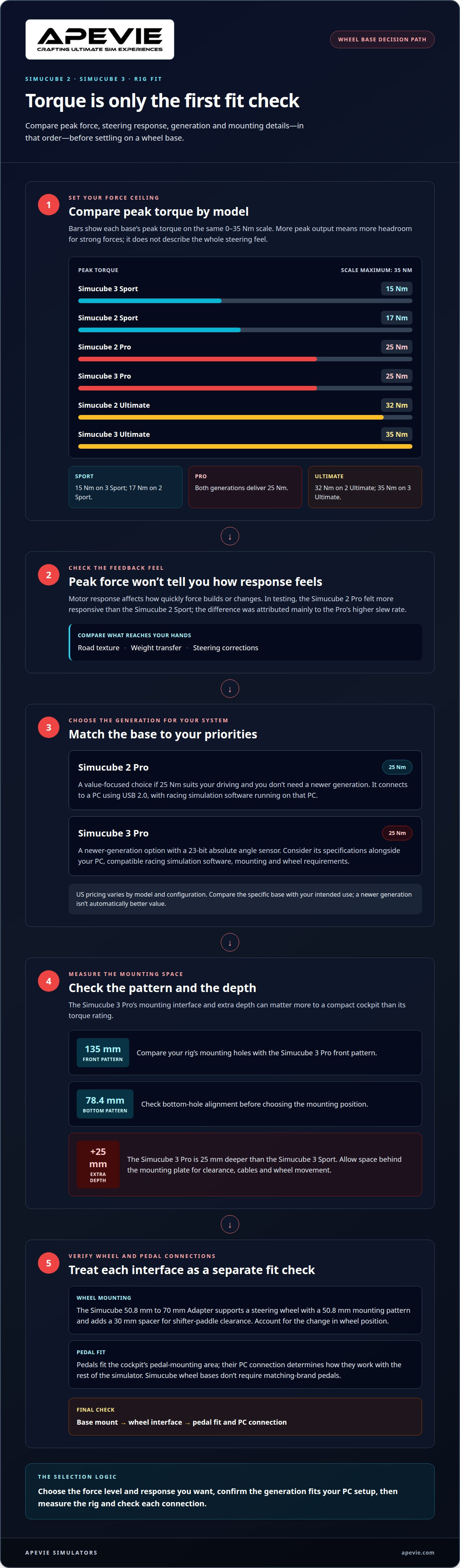
The Simucube 3 Sport peaks at 15 Nm, while the Simucube 2 Sport reaches 17 Nm. Both Pro models deliver 25 Nm, giving them more headroom for strong forces than either Sport. At the top end, the Simucube 2 Ultimate provides 32 Nm, and the Simucube 3 Ultimate reaches 35 Nm. A simucube wheel base comparison is most useful when you weigh peak output alongside smooth transitions and clear responses to changing forces.
Motor Design and Force-Feedback Feel
A motor’s response affects how quickly force builds or changes, not just how hard it can pull. In testing, the Simucube 2 Pro felt more responsive than the Simucube 2 Sport, with the difference attributed mainly to its higher slew rate. That finding offers a practical example of why torque figures alone don’t capture steering feel. For a simucube wheel base comparison, consider how each base conveys road texture, weight transfer, and steering corrections.
| Wheel base | Peak torque | Comparison point |
|---|---|---|
| Simucube 3 Sport | 15 Nm | Lowest output in this group |
| Simucube 2 Sport | 17 Nm | More peak torque than 3 Sport |
| Simucube 2 Pro | 25 Nm | More responsive than 2 Sport in testing |
| Simucube 3 Pro | 25 Nm | Matches 2 Pro’s peak torque |
| Simucube 2 Ultimate | 32 Nm | Below 3 Ultimate’s peak output |
| Simucube 3 Ultimate | 35 Nm | Highest peak torque in this group |
Choose by the force level and response you want to feel: compare the Sport models for lower peak output, the Pro models for 25 Nm, and the Ultimate models for maximum torque.
Choosing between Simucube 2 and Simucube 3
Generation matters, but value also depends on the force level, PC setup, warranty, and installation you need. Compare how each option fits your complete rig rather than choosing by model number alone.
Simucube 2
The Simucube 2 Pro is a practical value choice if its 25 Nm output suits your driving and you don’t need a newer generation. US pricing varies by model and configuration, so weigh the specific base against your intended use. Simucube 2 connects to a PC using USB 2.0; you’ll also need racing simulation software running on that PC.
Warranty coverage can vary across the Simucube 2 range, so check the terms for your model. For safe use, secure the base to a suitable rig and follow the installation instructions. Keep warranty details and support information with your purchase records.
Simucube 3
The Simucube 3 Pro makes sense if you’re building around newer-generation hardware and its specifications fit your setup. US pricing depends on the model and configuration, so compare the base’s features with your needs rather than assuming a newer generation is automatically better value. A PC running compatible racing simulation software remains central to a PC-based setup.
For either generation, plan the PC, simulator software, mounting, and wheel as one system. The Simucube 3 Pro’s 23-bit absolute angle sensor is one specification to consider alongside those practical requirements. The Simucube 2 Pro may suit racers focused on value, while the Simucube 3 Pro may appeal to buyers prioritizing newer hardware. Follow installation guidance and handle the wheel carefully during setup.
Mounting patterns and rig fit
Rig compatibility starts at the mounting interface, not the torque rating. The Simucube 3 Pro has a 135 mm front pattern and a 78.4 mm bottom pattern, so bracket alignment matters before you choose a mounting position.
Depth also affects fit. The Simucube 3 Pro is 25 mm deeper than the Simucube 3 Sport, which can change clearance around a monitor, wheel rim, or cockpit crossbar. Measure the available space behind the mounting plate, including room for cables and steering-wheel movement. A compact rig may make that extra depth more important than a difference in peak torque.
Steering wheels and quick releases need a compatible shaft connection and mounting pattern. The Simucube 50.8 mm to 70 mm Adapter supports steering wheels with a 50.8 mm mounting pattern and adds a 30 mm spacer for shifter-paddle clearance. That spacer can help when a wheel’s paddles sit close to the base, but it also changes the wheel’s position relative to the driver.
Pedals don’t attach to the wheel base’s shaft. Their fit depends on the cockpit’s pedal-mounting area, while their PC connection determines how they work with the rest of the simulator. Simucube wheel bases don’t require matching-brand pedals, so check the base mount, wheel interface, and pedal connection separately.
- Compare your rig’s mounting holes with the Simucube 3 Pro’s 135 mm front or 78.4 mm bottom pattern.
- Allow for the Pro’s additional 25 mm depth compared with the Sport.
- For a 50.8 mm wheel, use the adapter and account for its 30 mm spacer.
- Choose pedals by cockpit fit and PC connection, not by the wheel-base mounting pattern.
Simucube 2 Sport and Pro compared with Fanatec DD1 and DD2
The clearest distinction in this comparison is consistency across games, not another torque ranking. Fanatec wheel bases were reported to deliver more consistent driving experiences across different sim titles than Simucube 2 bases. That may matter if you switch between racing games and want familiar steering behavior without adjusting your expectations for each title.
Simucube’s model families include Sport, Pro, and Ultimate versions across the Simucube 2 and Simucube 3 generations. For the specific question of Simucube 2 Sport and Pro versus Fanatec DD1 and DD2, compare the models’ published specifications with the kind of feedback and title-to-title consistency you prioritize. Their differences are covered earlier; here, the practical distinction is how each platform feels in your own game rotation.
A reported consistency advantage doesn’t mean every driver will prefer Fanatec’s feel. If you mainly race one simulator, a stable experience across several titles may matter less than the steering response you prefer in that game. If you regularly switch titles, consistency becomes a more important selection criterion. Treat this as a choice between priorities, not a search for a universal winner.
Testing found no reliability problems with the Simucube 2 bases, Fanatec DD1, or Fanatec DD2. That result offers useful context, but it doesn’t determine which base matches your driving preferences. Use this simucube wheel base comparison to focus on the distinction that matters most to your routine:
- Favor the Fanatec DD1 or DD2 if consistent driving behavior across different sim titles is central to your setup.
- Consider the Simucube 2 Sport or Pro if your choice depends more on the Simucube model’s specific force-feedback character.
- Compare the published specifications for the exact models you’re considering, then weigh them against your regular games.
The practical takeaway is straightforward: Fanatec has the reported cross-title consistency advantage, but the best fit depends on your preferred steering feel and the games you play.
Apevie Simulators: Simucube 3 Wheel Base
Apevie Simulators offers the Simucube 3 Wheel Base for drivers choosing a current-generation direct drive option. The Simucube 3 Pro produces 25 Nm of peak torque, matching the Simucube 2 Pro, so the decision isn’t simply about gaining more maximum force. Rig dimensions, wheel mounting, and the feedback characteristics you prefer still matter.
A Simucube wheel base may suit you if you’re building a premium PC simulator around direct drive, rather than upgrading torque alone. A complete setup also needs a cockpit that supports the base, a compatible steering wheel, and pedals suited to your driving. Planning these components together helps align your base choice with your rig’s space and hardware.
Apevie Simulators can pair the base within a Custom High-Performance racing simulator. Depending on the build, other components may include a Sigma Integrale DK2 Motion System or Heusinkveld Sim Pedals Sprint. These serve different roles: the wheel base provides steering feedback, the motion system adds movement, and the pedals register braking and throttle input. A balanced build considers how those elements fit together, rather than treating peak torque as the sole measure of performance.
Consider the Simucube 3 Pro if 25 Nm meets your force-feedback needs and you’re selecting components for a new or carefully planned rig. If you’re comparing it with a Simucube 2 Pro, weigh the generation and physical fit alongside the shared peak-torque figure. That makes the choice more specific to your setup and driving priorities.
For help considering a Simucube 3 setup or a complete racing simulator, contact Apevie Simulators.
Frequently Asked Questions
Looking at the Simucube 3 Pro?
The Simucube 3 Pro is worth considering if you need to adjust the distance between the base and steering wheel. Its Shaft Extension Kit is available in either a 100 mm or 200 mm extension. That can help tailor wheel position to a particular cockpit layout, especially when the base’s mounting location affects how comfortably you reach the rim.
Simucube 3 Pro Review: Is It Worth Upgrading From the Simucube 2 Pro?
It may be worth upgrading if the Simucube 3 setup better suits how you want to connect your rig. The Simucube Link Hub uses one USB port to connect a setup, which is a practical consideration when planning your PC connections. If your current arrangement already works well, compare that setup benefit with the effort of replacing a functioning base.
What is the difference between Simucube 2 and Simucube 3 wheel bases?
The generations have different release histories: Simucube 2 Sport, Pro, and Ultimate were released in June 2019, while the Simucube 3 Ultimate is scheduled to become available in 2026. That context can help frame a generation choice, but it doesn’t replace model-by-model comparison. Think about whether you’re choosing among established Simucube 2 models or planning around the newer lineup.
Which Simucube wheel base offers the best value for most sim racers?
The Simucube 2 Pro may offer good value if its 25 Nm output suits your driving and you don’t need newer-generation hardware.
How much do Simucube wheel bases cost in the US?
How do Simucube 2 Sport, Pro, and Ultimate compare in peak torque and slew rate?
The Simucube 2 Sport delivers 17 Nm, the Pro 25 Nm, and the Ultimate 32 Nm. The Pro felt more responsive than the Sport in testing, mainly because of its higher slew rate; no slew-rate comparison for the Ultimate is provided.