Cube Controls Steering Wheel Buyer Guide: Elite Sim Hardware Tested (2026)
A premium steering wheel can hide the detail of a powerful direct-drive base if the mount or cockpit flexes under load. That’s why choosing a Cube Controls steering wheel isn’t just about display size or button count. The wheel’s rigidity, connection method, and fit with your base all matter.
If you’re weighing an F-Core against an F-PRO or CSX-3, or sorting through wired USB, Bluetooth, quick releases, and adapters, start with your driving habits and current hardware. The right choice depends on what you race, what you already own, and whether you want one rim that feels natural across several car classes.
This guide compares Cube Controls models, paddle and control layouts, and the mounting details that affect compatibility with systems such as Simucube and Fanatec. You’ll also learn how to calibrate dual-clutch paddles and tune a bite point in CubeSet, so you can choose a wheel that suits your driving style and configure it with confidence.
Key Takeaways
- Assess chassis rigidity alongside your wheelbase’s torque. Flex can soften the force-feedback detail reaching your hands.
- Check the 50.8mm and 70mm bolt patterns, then confirm the complete quick-release path before mounting a Cube Controls steering wheel.
- Use CubeSet to calibrate dual-clutch paddles, then tune the bite point for your chosen car and launch technique.
- Match wheel diameter, grip shape, and control layout to your main racing discipline instead of choosing by features alone.
- Compare each model’s controls and display needs with the way you race to avoid paying for features you won’t use.
What Defines a Cube Controls Steering Wheel in Professional Simulation?
A Cube Controls steering wheel is built around a practical question: can you operate its controls cleanly while the wheelbase transmits detailed force feedback through your hands? The answer depends on more than the finish. Chassis stiffness, grip shape, button placement, paddle feel, and the connection to your PC all influence how confidently you can drive.
Cube Controls brings Italian motorsport-inspired ergonomics to PC sim racing. Carbon-fiber faceplates and machined aluminum structures feature across the range, though construction varies by model. The F-Core, for example, has a 4 mm-thick carbon-fiber front plate. A rigid wheel helps preserve tactile feedback, but it still needs a secure quick release and a cockpit mount that doesn’t flex under load.
Controls are part of the same equation. A clearly defined button press can help prevent accidental inputs when your hands are working hard. A well-positioned rotary encoder lets you make adjustments without searching for the control mid-corner. In simulation, the wheel also connects driver inputs, telemetry, and software. The broader principles behind that relationship are outlined in Modeling and Simulation in Engineering.
Formula Architecture Versus Grand Touring Ergonomics
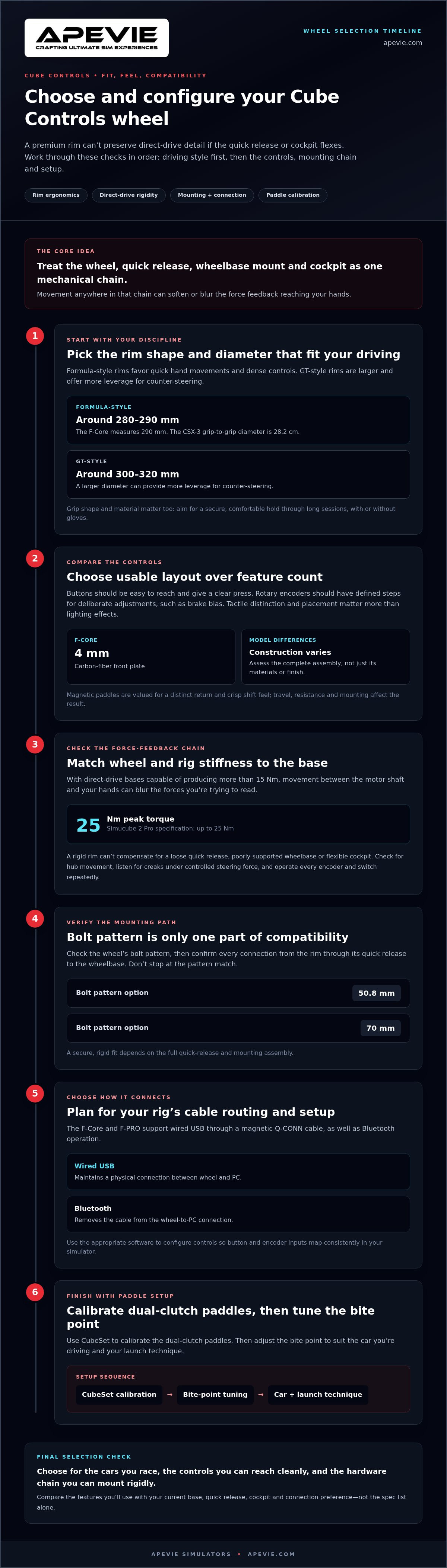
Formula-style rims commonly have compact diameters around 280 to 290 mm, supporting quick hand movements and dense control layouts. The F-Core measures 290 mm, while the CSX-3’s grip-to-grip diameter is 28.2 cm. GT-style wheels are often larger, around 300 to 320 mm, offering more leverage for counter-steering. Grip material and shape matter as well. Choose a form that stays secure and comfortable through long sessions, with or without gloves.
The Mechanics of Zero-Play Magnetic Shifters
Magnetic paddle mechanisms are valued for a distinct return and crisp shift feel. That feel comes from paddle travel, magnetic resistance, and the way the assembly is mounted, not simply from the presence of magnets. Sensor designs and adjustment options can vary by wheel and configuration, so don’t assume every model uses identical hardware. If the paddle stops or return tension are adjustable, set them to a repeatable stroke that suits your hand position.
Connectivity also affects everyday use. The F-Core and F-PRO support wired USB through a magnetic Q-CONN cable as well as Bluetooth operation. Wired use maintains a physical connection between the wheel and PC; Bluetooth removes that cable. Consider your rig’s cable routing and preferred setup, then configure the controls in the appropriate software so button and encoder inputs map consistently in your simulator.
Evaluating Build Quality: Materials, Rigidity, and Direct Drive Torque
A strong wheel chassis is more than a cosmetic detail. With direct-drive bases capable of producing more than 15 Nm, the wheel, quick release, and cockpit need to work as a stiff mechanical chain. The Simucube 2 Pro, for example, is specified at up to 25 Nm of peak torque. Movement anywhere between the motor shaft and your hands can blur the forces you’re trying to read.
That movement is torsional flex: the wheel structure twists slightly under load, absorbing or delaying some of the force instead of transmitting it directly. It can act like an unintended damper, softening rapid changes in the signal. The effect depends on the entire assembly, so a rigid rim can’t compensate for a loose quick release, poorly supported wheelbase, or flexible cockpit. Apevie’s sim rig guide explains why the supporting structure matters as much as the wheel.
Carbon Fiber Weaves Versus Molded Engineering Plastics
Carbon fiber and molded polymers shouldn’t be judged by appearance alone. A well-supported carbon plate can resist bending across its face, while a molded housing’s performance depends on its shape, thickness, and reinforcement. Some designs also use aluminum at load-bearing interfaces. Focus on how the wheel connects to its hub and whether the assembled rim stays quiet and firm during strong inputs. No material guarantees rigidity on its own.
Rotary Encoders and Backlit Tactile Switches
Build quality also includes the controls you operate under pressure. A rotary encoder should have defined steps so you can make deliberate adjustments, such as changing brake bias, without confusing adjacent settings. Buttons should provide a clear press and sit within reach of your thumb without requiring you to loosen your grip. Backlighting can make labels easier to see, but layout and tactile distinction matter more than lighting effects.
Total Wheel Mass and Rotational Inertia
Mass matters because the wheelbase has to accelerate and slow the attached rim as it changes direction. Greater rotational inertia can make that response feel less immediate, particularly during rapid corrections, although the effect depends on the wheelbase, rim diameter, and mass distribution. Don’t assume there’s a universal weight threshold. Compare complete configurations, including the quick release and accessories, and assess how the rim feels on your base.
For a practical inspection, check for movement at the hub, listen for creaks while applying controlled steering force, and operate every encoder and switch repeatedly. A Cube Controls steering wheel should feel like a secure extension of the wheelbase, but the result also depends on a rigid rig. Apevie pairs Cube Controls hardware with direct-drive systems and aluminum-extrusion rigs, with attention to mounting and integration.
Ecosystem Compatibility: Direct Drive Mounting and Connection Protocols
A Cube Controls wheel’s bolt pattern is only one part of compatibility. You also need a quick release that matches the wheelbase shaft, a secure mechanical connection, and a reliable way to send button, encoder, and display inputs to the PC. Treat these as separate checks. A wheel can fit a hub mechanically while still needing an adapter or a different connection method to work with a particular base.
Cube Controls wheels use 50.8 mm and 70 mm bolt patterns. These standard interfaces support a range of hubs and quick releases, including Simucube setups, but they don’t make every wheelbase a direct fit. Asetek users also need a compatible hub or quick release. Fanatec direct-drive bases require a third-party adapter, such as the Fanatec Podium Hub or a compatible SRM adapter, to enable force feedback.
Standard 50.8 mm vs. 70 mm PCD Quick Release Systems
PCD means pitch circle diameter, the diameter of the imaginary circle passing through the mounting holes. Before assembly, compare the wheel’s hole pattern with the hub’s pattern, then confirm that the quick release fits the wheelbase shaft. A bolt that’s too long can bottom out or damage components. One that’s too short may not secure the connection properly. Use the hardware and bolt engagement specified for the parts in your setup instead of guessing.
For a clean installation, check that the hub seats flat, fasteners tighten evenly, and the assembled wheel has no rotational play. A rigid connection helps preserve steering detail. A loose interface can introduce movement even when the wheel itself is well built. These pairing details matter as much as pedal and control choices. See our sim pedal guide and the mounting considerations in our F1 steering wheel guide.
USB Coiled Cable Management and Wireless Setup
Wired and wireless connections suit different rig priorities. On models such as the F-Core and F-PRO, a magnetic Q-CONN USB cable provides a wired connection to the PC, while Bluetooth allows wireless use. The cable needs enough slack to move with the wheel without catching on the rig or pulling at the connector. Secure it along the cockpit and leave a controlled loop near the wheel.
Wireless removes the cable between the wheel and PC, but the wheel still needs a compatible connection path. Simucube wireless setups use a Simucube-specific adapter. With either mode, configure the wheel in CubeSet and verify that buttons, rotary encoders, and any display inputs register consistently before driving. If a wired wheel disconnects intermittently, check the connector seating and cable routing first. Then test the USB connection directly at the PC to isolate the cause before adding hubs or extensions.
Apevie integrates Cube Controls wheels with direct-drive bases and aluminum-extrusion rigs as part of complete PC simulator setups. Choose the quick release and connection method as a matched system, not as an afterthought.
Dual-Clutch Systems: Launch Control Calibration and In-Game Setup
Dual-clutch paddles can make standing starts more repeatable, but only when each paddle’s range is calibrated and the simulator reads the intended axis. On compatible Cube Controls wheels, Hall-effect magnetic sensors provide continuous paddle-position readings rather than a simple on/off signal. You can assign one paddle as the launch clutch and use the other to meter clutch release around the configured bite point.
The bite point is the clutch engagement level you hold before launch. Too little engagement can bog the car; releasing too much clutch too quickly can overwhelm available grip and spin the driven wheels. The right setting depends on the car and conditions. Treat calibration as a starting point, then adjust through controlled practice instead of relying on one setting for every vehicle.
Step-by-Step Dual-Clutch Bite Point Calibration
Use CubeSet for the wheel’s initial calibration, not the simulator’s control menu. Enable the clutch paddles, disable the bite-point setting for calibration, move each paddle through its full travel, and save the calibration. With the axes calibrated, set the bite point in CubeSet by adjusting the slider that controls the slave clutch’s slip percentage. The specific paddle role can depend on the configuration, so confirm which axis is assigned to each clutch.
Next, open the simulator’s control settings and bind the clutch axes separately. Check that each displayed input moves smoothly from released to fully pressed, without a reversed direction or unwanted overlap. In iRacing, ACC, or another title, use its control screen to verify the assignment. Names and menu layouts vary by version. Avoid binding both paddles to the same clutch axis unless that’s the intended behavior.
Test launches in practice before relying on the setup in a race. Hold the launch paddle at the bite point, release it as required by your chosen mapping, and modulate the second paddle smoothly. If the car bogs, adjust engagement in small increments. If the tires spin, reduce the clutch release rate or revise the bite-point setting, then repeat under similar conditions.
Troubleshooting and Alternative Mappings
- An axis doesn’t register: Check the paddle in Windows Game Controllers, then confirm that the same axis responds in CubeSet. If it works there but not in-game, clear duplicate or stale bindings and assign the axis again.
- Input jumps or behaves backward: Recalibrate with the bite point disabled, save, and inspect the in-game axis direction before changing other settings.
- Considering another use: Lower paddles may be assignable to a handbrake or other analog functions when the wheel, driver software, and simulator support that mapping. Check each axis independently and adjust available curves in the manufacturer’s utility.
Consistent launches with a Cube Controls steering wheel come from a clean sequence: calibrate in CubeSet, map each axis in the simulator, then adjust the bite point through repeatable tests. Explore Cube Controls wheel options and professional integration with Apevie Simulators.
Selecting Your Ideal Rim: Buying Decision Framework and Elite Alternatives
The best wheel is the one that suits the cars you drive most, not the one with the longest feature list. Before comparing displays or button counts, consider rim diameter, grip shape, paddle position, and whether the wheelbase connection fits your setup. A Cube Controls steering wheel built for compact, rapid inputs may feel less natural during a long GT stint than a larger, rounder rim.
Match Wheel Geometry to Your Main Racing Class
For open-wheel and prototype racing, a compact butterfly-style rim supports quick hand movements and keeps frequently used controls close to your thumbs. The F-Core’s 290 mm diameter is one example. GT, touring, rally, and drift drivers may prefer a D-shaped or round rim in the 300 to 320 mm range, offering more leverage for counter-steering and sustained corrections.
Before choosing, check whether you can reach the buttons and encoders without shifting your palms. Grip thickness and shape should stay comfortable through a full stint, including when you race without gloves. If you switch between classes regularly, prioritize a layout and diameter you can use confidently across them rather than optimizing for just one car.
Compare Controls, Not Just Categories
Formula-focused layouts typically concentrate rotary controls and short-reach inputs around the hands. GT-oriented designs may prioritize a broader grip and a different control arrangement. Think about what you adjust during a lap: brake bias and traction control should be reachable without an awkward grip change. A screen can be useful, but only if its information and placement fit your driving routine.
- Primarily open-wheel: Favor a compact rim, accessible rotary encoders, and paddles that feel natural from your normal hand position.
- Primarily GT or rally: Consider a larger D-shaped or round grip for leverage and comfort through varied steering angles.
- Mixed disciplines: Choose a shape and layout that remain comfortable in your most frequent cars, then weigh specialty controls against their everyday usefulness.
Compare alternatives by ecosystem and driving preference, too. Apevie Simulators offers the Cube Controls F-Core, alongside the Gomez Sim Industries Formula Pro Elite and Fanatec Formula steering wheel. They represent different control layouts and product ecosystems. Focus on the interface you prefer and your wheelbase’s mounting requirements instead of assuming one is universally best.
Plan the Wheel as Part of the Complete Rig
A rim is only one part of the steering system. Quick-release fit, wheelbase compatibility, USB or wireless setup, and cockpit rigidity all affect the finished experience. Apevie Simulators provides custom high-performance PC simulator builds, white-glove installation, and professional consultation to help match the wheel to the base and rig.
Before deciding, list your primary car class, preferred grip shape, essential controls, wheelbase, and mounting interface. Explore performance steering wheels for your rig, or work with Apevie Simulators to plan a compatible steering setup and turnkey build.
Choose a Wheel That Fits the Rig You’re Building
Your next steering wheel should suit the way you expect to race, not just the car you’re driving today. Consider whether you’ll focus on one discipline or move between open-wheel, GT, and rally cars. That decision helps narrow your options to a rim you’ll want to keep using as your interests change.
A Cube Controls steering wheel can be a considered part of that plan. Before choosing, decide which controls you’ll use most, what grip feels comfortable in your hands, and how you want your setup to develop over time.
Ready to choose a rim for your next build? Explore premium steering wheels at Apevie Simulators and plan a setup that fits your driving style. Apevie can help with parts, professional consultation, and turnkey simulator builds.
Frequently Asked Questions
Can I use a Cube Controls steering wheel on any direct drive wheelbase?
No. Compatibility depends on the exact wheelbase, connection method, and controls you need to use. Before buying, note your base model and whether the wheel’s buttons, encoders, and display need to connect through a hub, USB, or a wireless receiver. Compare those requirements with the wheel configuration. Mechanical attachment alone doesn’t mean every electronic function will work in your simulator.
Do Cube Controls wheels work on PlayStation or Xbox consoles?
They’re intended primarily for PC simulation, so don’t assume a Cube Controls wheel will work on PlayStation or Xbox. Console compatibility depends on the complete hardware chain and platform support, not just whether the wheel has a USB connection. If console play is essential, confirm support for the specific wheelbase and wheel combination before purchasing. Apevie Simulators specializes in PC-based professional simulation hardware.
What is the main advantage of magnetic paddle shifters over standard mechanical switches?
Magnetic paddles can provide a consistent return feel that helps you recognize a completed shift without looking down. To compare paddle feel, drive several laps with your normal grip and note whether you can find and release each paddle naturally while cornering. A standard mechanical switch may still register shifts reliably. The difference you notice most is often the paddle’s travel and feel, rather than lap time alone.
How does the dual-clutch bite point system improve standing race starts?
It gives you more control over clutch engagement at launch, which can help make starts more consistent when the car’s power and available grip call for careful modulation. It doesn’t remove the need to manage throttle or guarantee a clean getaway. Judge your setup by repeatability: if starts alternate between bogging and wheelspin, the clutch input may not suit that car’s launch characteristics or the available grip.
Is a wireless steering wheel as reliable as a coiled USB connection during competition?
Either connection can be suitable for competition when configured correctly, but reliability depends on the specific wheel and setup. Don’t make your first test during a race. Run a full practice session, check that every control continues to register, and restart the simulator once to confirm the setup reconnects as expected. If you encounter dropouts, isolate whether they affect the wheel connection or only a particular control.
How do I choose between a 280mm formula wheel and a 320mm GT wheel?
Judge the fit from your seated driving position, not from a product photo. With your hands in your usual grip, check whether you can reach essential controls and operate the paddles comfortably through the steering angles you use most. A compact formula rim may suit a dedicated open-wheel focus; a larger GT rim may feel more natural across mixed disciplines. Comfort through a full stint is a useful deciding test.
What maintenance is required to preserve elastomer and suede wheel grips?
After driving, remove surface dust and perspiration with a clean, dry microfiber cloth. For suede, use a soft suede brush gently and only when the grip is dry. Avoid soaking either material or applying household cleaners, which may alter its feel or finish. Store the wheel away from prolonged direct sunlight and follow the care instructions supplied for its specific grip material.