6DOF Motion Platform Buying Guide for Sim Racing
Six axes don’t automatically make a motion rig feel more convincing. A 6dof plattform can add forward and backward surge, side-to-side sway, and vertical heave to the familiar pitch, roll, and yaw. What matters is whether those cues communicate useful information while you drive. If you’re comparing platforms, the key question is whether six directions of movement support your goals or simply add complexity to your rig.
This guide explains what each axis can represent on track and how six-axis motion differs from simpler systems that focus on tilting cues. You’ll also learn why control software, adjustability, VR use, and the rest of your simulator matter as much as the axis count. Use the comparisons and decision steps below to judge whether 6DOF suits your driving goals and complete setup, rather than choosing by the number of axes alone.
Key Takeaways
- Identify which driving cues matter to you before choosing a 6dof plattform; six axes alone don’t guarantee a better fit.
- Compare 6DOF with 2DOF and 3DOF by movement directions, intended use, and integration requirements.
- Consider how the control system and simulation software translate telemetry into adjustable motion cues.
- Plan the platform alongside your cockpit, wheel, pedals, displays, and software to create a coherent simulator.
- Use a step-by-step decision process, from driving goals to full system configuration, to judge whether six-axis motion suits your setup.
What a 6DOF Motion Platform Adds to a Sim Racing Rig
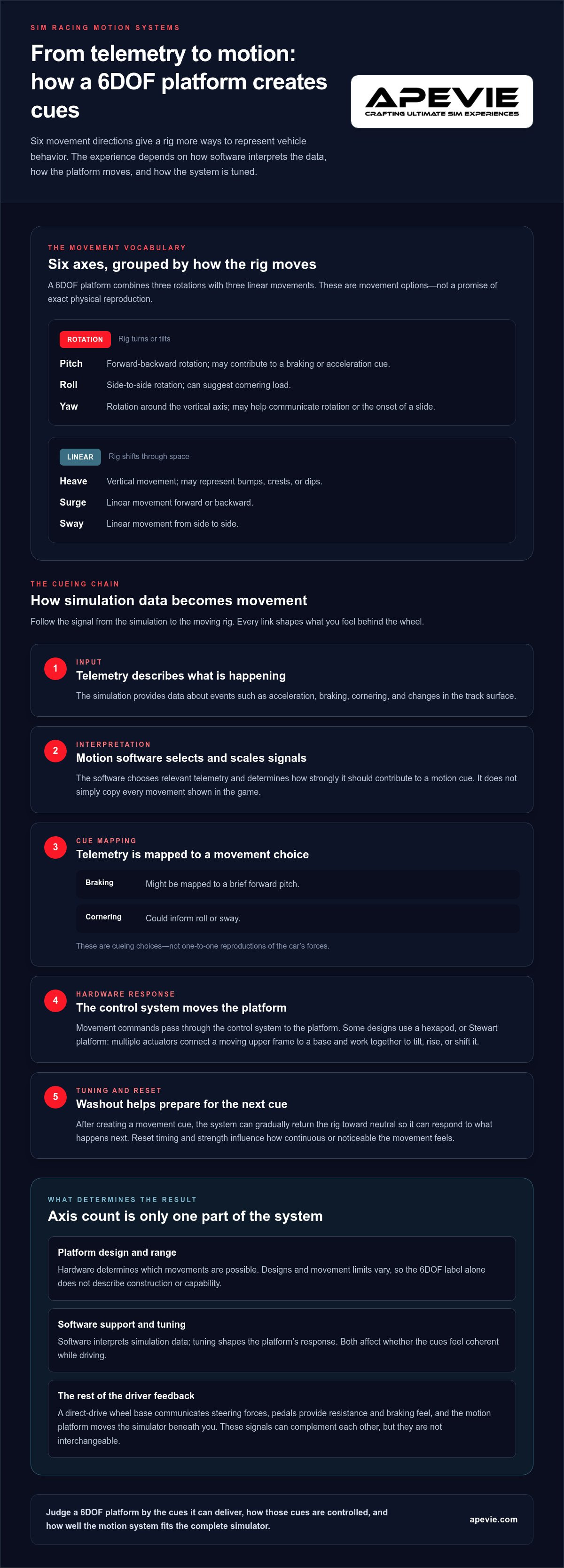
A 6DOF platform can move a simulator in six directions: three rotational movements and three linear, or translational, movements. That gives the motion system more ways to represent vehicle behavior than a platform with fewer movement axes. But axis count describes what the hardware can do, not how realistic or useful its cues will feel.
Featured-snippet definition: A 6DOF motion platform moves a simulator in three rotational directions, pitch, roll, and yaw, and three linear directions, heave, surge, and sway. The result depends on how simulation data is translated into movement, as well as the platform’s design and tuning.
What do pitch, roll, heave, sway, surge, and yaw mean?
Think of the rig as the reference point. Pitch is its forward-backward rotation, while roll is its side-to-side rotation. Heave moves the rig vertically. These axes can contribute cues associated with braking, cornering, and changes in track elevation.
Surge is linear movement forward or backward, and sway is linear movement from side to side. Yaw is rotation around the vertical axis, turning the rig left or right. Together, these directions give a platform more movement options for representing changes in the car’s motion. For a foundational overview of the motion simulator concept, including degrees of freedom, see the linked reference.
What motion cues can a 6DOF platform represent?
In a racing context, pitch may contribute to the sensation of braking or acceleration, roll can suggest cornering load, and heave can represent bumps, crests, or dips. Surge and sway can add linear movement cues, while yaw may help communicate rotation or the onset of a slide. These are possible interpretations, not exact reproductions of each sensation. Motion cueing software maps telemetry to physical movement, and its tuning and the system’s design shape the result.
Motion is only one part of the driver’s feedback. A direct-drive wheel base communicates steering forces through the rim, while pedals provide resistance and braking feel through your feet. A motion platform moves the simulator beneath you. Those signals can complement one another, but they aren’t interchangeable: movement alone doesn’t provide the same detail as force feedback at the wheel or pedal.
That’s why a 6dof plattform shouldn’t be judged by its axis count alone. Consider whether its cues suit your driving goals and how they’ll work with the rest of your simulator.
How a 6DOF Platform Creates Motion Cues
A 6dof plattform doesn’t simply copy every movement shown in the game. It receives simulation data, interprets selected vehicle and track signals, then turns them into controlled movement. How clearly a cue comes across depends on the whole chain: simulation software, motion-control system, platform mechanics, and tuning.
Six available axes describe the platform’s movement options; they don’t guarantee the quality of the cues you’ll feel. A broad range of movement is useful only if the hardware can perform the intended motions and the software maps them into cues that feel coherent while driving.
Stewart-platform mechanics and actuator movement
Some 6DOF platforms use a hexapod arrangement, often called a Stewart platform. In this design, multiple actuators connect a moving upper frame to a base. The actuators change position in coordination, allowing the frame to tilt, rise, or shift through combined movement rather than six isolated actions.
Not every 6DOF design uses the same layout, so the label alone doesn’t tell you the platform’s construction or movement limits. Its range affects which physical cues it can represent, while its mechanical design and control system determine how those movements are produced. Compare specifications with the manufacturer’s documentation instead of assuming all six-axis platforms behave alike.
Motion cueing, software, and feedback
The process starts with telemetry: data from the simulation that can describe events such as acceleration, braking, cornering, or changes in the track surface. Motion software selects and scales relevant signals, then sends movement commands through the control system to the platform. For example, braking data might be mapped to a brief forward pitch, while cornering data could inform roll or sway. These are cueing choices, not one-to-one reproductions of the car’s forces.
Washout is one way to manage motion within a platform’s limits. The system creates a movement cue, then gradually returns the rig toward a neutral position so it can respond to what happens next. The timing and strength of that reset affect how continuous or noticeable the movement feels.
Separate the platform’s physical capability from software support and setup quality. Hardware sets the possible range; software determines how simulation data is interpreted, and tuning shapes the response. A well-integrated motion system accounts for all three. Apevie’s expert consultation can help plan motion hardware as part of a complete simulator, rather than treating the platform as a standalone purchase.
6DOF vs. 2DOF and 3DOF Motion Platforms: What Should You Compare?
Choosing between 2DOF, 3DOF, and 6DOF isn’t a contest to see which number is largest. The right fit depends on the cues you want, how the platform handles them, and how well it integrates with your cockpit and software. A simpler system may suit a driver who mainly wants selected tilting cues. A 6dof plattform offers more movement directions, but those additional cues matter only if they support your goals.
| Platform type | Movement directions | May suit | Practical trade-off |
|---|---|---|---|
| 2DOF | Often two rotational directions, such as pitch and roll | Drivers prioritizing a focused set of movement cues | Fewer movement directions to integrate and tune, with a narrower range of possible cues |
| 3DOF | Three movement directions; the specific axes depend on the design | Drivers seeking selected motion beyond a basic two-axis setup | Offers another movement direction, but doesn’t provide the full range associated with 6DOF |
| 6DOF | Three rotational and three translational directions | Drivers who want a broader set of potential movement cues | More motion capability to configure, integrate, and plan around |
These are broad categories, not a substitute for checking a system’s actual configuration. Two platforms with the same DOF count may differ in which axes they use, how their software handles telemetry, and how movement can be tuned. Use the table as a starting point, then compare the manufacturer’s specifications and software support.
When does six-axis movement matter for sim racing?
Six-axis movement may be relevant if you want a wider vocabulary of cues, including linear motion alongside rotation. That could help you explore how the platform represents braking, cornering, or vehicle movement, but it doesn’t guarantee a more convincing experience. The value depends on cueing, tuning, the simulation, and whether the added movements contribute meaningfully to your driving or training goals.
Potential advantages: More movement directions to work with and greater scope for tailoring motion cues.
Potential drawbacks: More integration and tuning to consider, plus added capability that may not be useful if you only want selected cues.
What else should buyers compare besides degrees of freedom?
Look beyond the axis count. Compare supported simulation software, available tuning controls, rig compatibility, installation requirements, and the space needed for the complete setup. Consider the wheel, pedals, displays, and intended operating context as part of the same system. For background on how tactile effects complement motion, see this professional haptic system guide. For a neutral example of motion platform product categories, browse motion platform product categories.
How to Choose a 6DOF Platform for Your Simulator
More axes don’t automatically make a better fit. A 6dof plattform is worth considering when its additional movement cues support the way you drive and the platform can be integrated sensibly with your complete simulator. Work through the decision in order, from driving goals to the final system layout.
Start with driving goals and the complete rig
First, decide what you want motion to communicate. Are you looking for a broader set of vehicle cues for immersion, or are you focused on a particular driving or training use? Name the sensations that matter to you, then consider whether six movement directions are relevant to those goals. The axis count is a capability, not proof that the cues will feel right for your use.
Next, assess the rig as a connected system. The cockpit must support the intended motion, while the wheelbase and pedals need to remain well-positioned and usable as the simulator moves. Displays matter too: a monitor mounted to the moving rig behaves differently from one fixed independently. Plan the motion platform alongside the cockpit, controls, and visual setup rather than treating it as a standalone upgrade.
Plan software, compatibility, space, and installation
Before settling on a platform, map the connection between your PC, racing simulation, motion software, control system, and hardware. Check which software supports your intended titles and what tuning options are available. Use manufacturer information to confirm compatibility and installation requirements, and account for how the platform will sit in the room and interact with the rest of the simulator.
Use this decision sequence:
- Define the use: Identify the driving cues and simulation experience you want.
- Review the full rig: Include cockpit structure, wheelbase, pedals, displays, and seating position.
- Plan the software chain: Check how telemetry reaches the motion system and what you can tune.
- Measure the space: Consider platform placement, access, and the surrounding simulator layout.
- Set the final configuration: Choose components as a coordinated system, not as isolated purchases.
A custom setup benefits from early integration planning. Apevie’s expert consultation, custom simulator builds, and white-glove installation bring motion, cockpit, controls, and displays together as one considered system. Explore Apevie simulator solutions to plan a turnkey build or select components for your simulator.
Build a High-Performance Simulator Around the Right Motion System
A motion platform doesn’t operate in isolation. Its placement and movement affect how the cockpit, steering controls, pedals, displays, and PC-based simulation come together. Planning these parts as one system can prevent avoidable compromises. A 6dof plattform may offer a wider range of movement, but the complete rig still needs to suit your driving goals, available space, and chosen components.
What belongs in a complete motion simulator plan?
Start with the cockpit foundation, then account for the motion hardware and the equipment you’ll use while driving. A direct-drive wheelbase, pedal set, seat, and display arrangement each contribute to the final layout. The PC and simulation software belong in the plan too, since they generate and communicate driving data.
Component choices shape the build as a whole. Display placement needs to be considered alongside cockpit and motion-platform positioning, while the wheel and pedals need to remain accessible in your intended seating position. Apevie offers the DOF Reality Motion Platform as part of its motion hardware selection. Compare its manufacturer specifications with your intended configuration rather than inferring the platform’s capabilities from its product name.
Professional planning can bring these decisions into one coherent configuration. Apevie’s custom, PC-focused simulator builds and expert consultation consider the cockpit, controls, displays, and motion system together, with white-glove installation for the completed simulator.
When is a custom turnkey build the right next step?
A turnkey approach can make sense if you’re choosing several premium components at once, building around motion from the outset, or prefer one planned system rather than sourcing and coordinating every part independently. It can also help when your current rig needs a redesign to accommodate a new platform, displays, or controls.
Apevie’s turnkey racing simulator packages bring custom simulator planning and professional hardware selection together, while white-glove installation supports the physical setup. The goal is to make decisions with the full simulator in view, without assuming that a particular motion configuration suits every driver. For help planning a build around your goals, motion hardware, and complete rig, plan a custom simulator build.
Choose Motion That Fits the Simulator You Want to Build
A 6dof plattform gives a simulator six movement directions to work with, but axis count alone doesn’t determine how useful the cues feel. Software, tuning, and system design shape the result. Compare 6DOF with simpler motion options according to the driving feedback you want, then consider how the platform will integrate with your cockpit, controls, displays, and PC-based simulation.
The strongest choice is the one that makes sense for your complete rig, not simply the one with the most axes. Apevie builds custom high-performance, PC-focused racing simulators and offers professional-grade motion and racing hardware, expert consultation, and white-glove installation to help coordinate the system.
Ready to plan a simulator around your driving goals and preferred components? Plan your high-performance simulator with Apevie. With a considered build plan, you can move forward with greater clarity and confidence.
Frequently Asked Questions
What does 6DOF mean in a motion platform?
6DOF means six degrees of freedom: three rotational directions and three linear directions. Pitch is forward-backward rotation, roll is side-to-side rotation, and yaw is rotation around the vertical axis. Heave moves vertically, surge moves forward or backward, and sway moves side to side. A platform can combine these directions to create motion cues, but the label describes available movement, not a guaranteed level of realism.
Is a 6DOF platform worth it for sim racing?
A 6DOF platform can be worth considering if you want a broad range of motion cues in a serious simulator. Whether that range is useful depends on your driving goals, the platform’s cueing and tuning, and how it fits with your cockpit, controls, software, and displays. Compare the motion you want with the demands of integrating the system. Don’t choose solely because six axes sounds more capable.
How does a 6DOF motion platform work?
A 6DOF motion platform uses a control system to turn simulation data into coordinated movement across the platform’s available axes. Some systems use multiple actuators working together, though designs vary. Motion cueing determines how driving events are translated into physical movement within the platform’s limits. Hardware capability matters, but software support, tuning, and integration with the rest of the simulator also shape the cues you feel.
What is the difference between a 3DOF and a 6DOF platform?
The labels describe the number of independent movement directions available, though the specific configuration can vary by platform. A 6DOF system can provide three rotational directions and three linear directions; a 3DOF system provides fewer. In practice, the difference matters most if the additional directions support the cues you want. Compare configurations, software, and integration needs rather than assuming that a higher axis count guarantees a better experience.
Can a 6DOF platform work with any sim racing rig?
Compatibility depends on the specific motion system, cockpit structure, software, and other hardware in your simulator. Plan for physical placement and how the platform will integrate with your controls and displays, then use manufacturer compatibility information to guide the configuration. Apevie Simulators builds custom PC-focused simulators and provides expert consultation to coordinate components as a complete system.
Does 6DOF automatically make a simulator more realistic?
No. Six movement directions expand the range of cues a platform can represent, but they don’t guarantee that those cues will feel convincing. Software support, motion cueing, tuning, and system integration all influence the result. A well-matched setup starts with the driver’s goals and the behavior they want the simulator to communicate. Treat the DOF label as a description of movement capability, not a quality rating.
What should I consider before choosing a 6DOF platform?
Start with the driving experience and motion cues you want, then assess your complete simulator. Consider the cockpit, wheelbase, pedals, displays, PC-based simulation software, physical space, and installation requirements. Check how the motion system integrates with those components instead of evaluating it in isolation. For a premium build, Apevie’s expert consultation can help plan custom simulator hardware as a coordinated system, with turnkey packages and white-glove installation.