Heusinkveld Accessories: A Practical Sim Racing Buying Guide
The most useful Heusinkveld accessory may be the one you decide not to buy. A handbrake, shifter, pedal component, or mount earns its place when it suits your driving and fits the hardware already in your rig. Choosing among Heusinkveld accessories means looking beyond the product list to the job each item will do.
A new control can make your setup more suitable for a particular discipline, while a mounting component can address a placement problem. But similar-looking options may serve different purposes, and pedal parts aren’t automatically interchangeable between product lines. A mismatch can leave you with an add-on that doesn’t solve the problem you bought it for.
This guide compares options by driving style, existing equipment, and mounting needs. It covers what adjustable resistance on the Heusinkveld Handbrake means in practice, how the MagShift and MagShift Mini differ as controls, and what to check before choosing pedal or mounting components. Use the decision steps to confirm fit with your pedals, shifter, wheel, and rig before you buy.
Key Takeaways
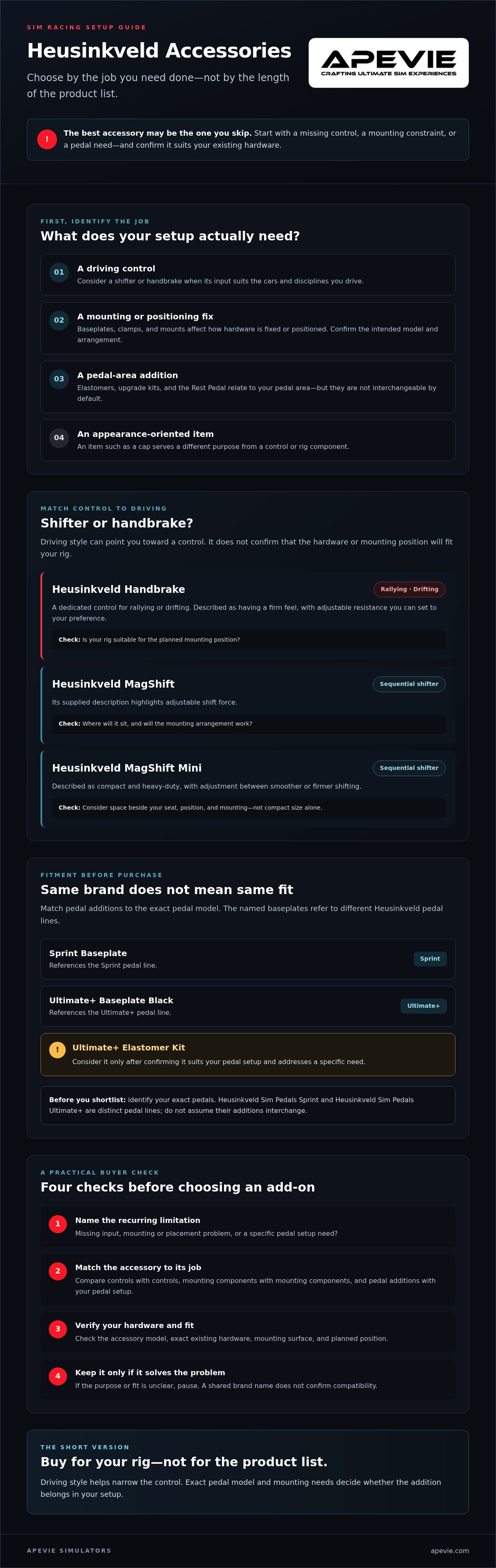
- Start with the problem you want to solve, whether it’s a missing control, a mounting constraint, or a pedal setup need.
- Compare Heusinkveld accessories by intended use, then shortlist controls such as the Handbrake, MagShift, or MagShift Mini accordingly.
- Match pedal additions to the exact pedal model: the Sprint Baseplate and Ultimate+ Baseplate Black reference different pedal lines.
- Before buying, check the accessory model, your existing hardware, mounting surface, and planned position. A shared brand name doesn’t confirm compatibility.
- Consider the Ultimate+ Elastomer Kit only after confirming it suits your pedal setup and addresses a specific need.
Heusinkveld Accessories: What Does Your Sim Racing Setup Actually Need?
Before adding hardware, name the limitation you want to fix. Are you missing a control for a particular discipline, struggling to mount a component securely, or looking for a pedal-related addition? Heusinkveld accessories have different roles, so the useful choice depends on your current rig and driving habits, not just on what looks appealing in a product listing.
Use these categories to build an initial shortlist:
- Driving controls: shifters and handbrakes add inputs for specific driving preferences and disciplines.
- Installation and positioning: baseplates, clamps, and mounts help determine how hardware is fixed or positioned. Confirm the intended model and mounting arrangement before choosing.
- Pedal-related additions: elastomers, an upgrade kit, and the Rest Pedal relate to your pedal area, but they aren’t interchangeable by default. Check the exact pedal model and product description.
- Personal or appearance-oriented items: an item such as a cap may be desirable, but it serves a different purpose from a control or rig component.
This distinction matters because a functional upgrade should address an issue you encounter repeatedly. A general overview of Sim racing can help newer buyers understand the discipline, but choosing an accessory still comes down to the cars and hardware they actually use.
Group accessories by the job they do
Separate an accessory’s role from its brand. A shifter or handbrake is an additional driving control; a baseplate, clamp, or mount is an installation component; elastomers, the upgrade kit, and the Rest Pedal belong in the pedal-related category. Grouping items this way helps you compare options that do similar jobs, rather than treating every item in a collection as an equivalent upgrade.
Start with driving style and current hardware
Think about which disciplines make up most of your sessions: rally, drifting, GT, touring, or classic racing. Then note the exact Heusinkveld pedals and controls already in your rig. Apevie Simulators offers Heusinkveld Sim Pedals Sprint and Heusinkveld Sim Pedals Ultimate+, so identifying your pedal line is a practical first step before considering pedal accessories.
Use one simple test: does this part address a limitation you encounter repeatedly? A control that suits your driving, a mount that solves a placement problem, or a pedal addition confirmed for your hardware may have a clear purpose. If you’re interested only because the item looks useful beside your equipment, pause and verify what it does and whether it fits before buying.
Heusinkveld Shifter and Handbrake Accessories: Match Controls to Your Driving
A shifter or handbrake makes sense when it suits the cars and disciplines you drive. The Heusinkveld MagShift and Magshift Mini are sequential-shifter options with adjustable shift feel. The Heusinkveld Handbrake adds a separate control for rallying or drifting. Compare their intended roles and adjustment details, then check the mounting requirements for your rig. Driving style can help identify what you need, but it doesn’t confirm that a product will fit your setup.
When to consider the Heusinkveld Handbrake
If rallying or drifting is a regular part of your sim time, a handbrake can provide a dedicated input for those disciplines. The Heusinkveld Handbrake is described as having a firm feel and adjustable resistance, which you can set to your preference. Before choosing it, decide where you’d place it and verify that your rig and intended mounting position are suitable.
Choosing between MagShift and Magshift Mini
Both models are sequential shifters, but their supplied descriptions highlight different details. The MagShift has adjustable shift force. The compact, heavy-duty Magshift Mini lets you adjust between smoother or firmer shifting. Consider the space beside your seat and where you want the shifter positioned. Don’t assume compact size alone settles whether the mounting arrangement will work.
| Product | Intended role | Supplied adjustment detail | Fitment check |
|---|---|---|---|
| Heusinkveld Handbrake | Additional control for rallying or drifting | Adjustable resistance; described as having a firm feel | Confirm rig suitability and planned mounting position |
| Heusinkveld MagShift | Sequential shifting | Adjustable shift force | Check mounting space, placement, and product requirements |
| Heusinkveld Magshift Mini | Compact, heavy-duty sequential shifting | Adjustable between smoother or firmer shifting | Check available space and intended position before selecting |
Use the table to narrow your choices, not as a compatibility guarantee. Before adding any of these Heusinkveld accessories, identify the exact product, review its mounting requirements, and compare them with your rig. You can browse Apevie’s Heusinkveld accessories as you check which control best matches your driving and installation needs.
Will Heusinkveld Accessories Fit Your Rig? Check Mounts, Pedals, and Connections
A product can suit your driving style and still be wrong for your rig. Before ordering Heusinkveld accessories, check the exact model, the hardware you own, and how the part will attach and sit in your setup. A shared brand or category name isn’t proof of compatibility.
Use this pre-purchase check:
- Identify the exact accessory. Distinguish the specific baseplate or Magshift Mini mount you’re considering instead of relying on a general category description.
- Note your existing hardware. Record the pedal model and, for a control mount, the shifter or other component it’s intended to hold.
- Inspect the mounting surface. Establish whether you’re attaching the component to a rig, table or desk, or aluminium profile.
- Decide on placement. Check the intended angle and position against your available space and how you sit in the cockpit.
Choose the correct Heusinkveld pedal mounting component
The Sprint Baseplate is a mounting option for Sim Pedals Sprint when you aren’t mounting the pedals directly to the rig. The Ultimate+ Baseplate Black is identified as a baseplate option for Sim Pedals Ultimate+. These names refer to different pedal lines. Confirm your exact model and mounting arrangement before ordering rather than assuming one baseplate will suit both.
If your rig already provides a direct mounting arrangement, consider whether a separate baseplate is needed. Match the component to both your pedal model and the way you plan to install it.
Select a Magshift Mini mount for the intended position
Choose according to the planned mounting location: the angled mount is for an angled position, the table clamp for table or desk mounting, and the vertical mount for a vertical aluminium-profile position. These options address different placement needs, but they don’t establish that a mount will fit every rig or surface. Compare the product details with your setup before selecting one.
If fitment is uncertain, verify the details with Apevie or the manufacturer. Check the physical mounting arrangement and any connection requirements stated for the specific product. Don’t infer a match from a product photo or from the fact that both items are Heusinkveld-branded. Review the Heusinkveld accessories selection alongside your hardware model and mounting plan before deciding.
Standout Heusinkveld Accessories: Build a Shortlist Around Your Setup
Build your shortlist around the job each part does, then narrow it according to your existing controls and pedals. Heusinkveld accessories include driving inputs, pedal components, and comfort or appearance items. They don’t all serve as performance upgrades, so compare each one against the need you’re trying to address.
Shortlist accessories for controls and pedal setup
The Heusinkveld Handbrake is a control option with adjustable resistance. For sequential shifting, the MagShift offers adjustable shift force, while the compact, heavy-duty Magshift Mini lets you choose a smoother or firmer shifting feel. Compare those described functions with your preferred control style, then confirm the intended mounting setup.
Pedal additions need a precise model check. The Sprint Baseplate is intended for Sim Pedals Sprint when they aren’t mounted directly to the rig; the Ultimate+ Baseplate Black is for Sim Pedals Ultimate+. The Ultimate+ Elastomer Kit provides replacement or renewal elastomers for Ultimate+ brake pedals. The Classic Ultimate Upgrade Kit, by contrast, is intended for classic Ultimate pedals and brings innovations described as seen on Ultimate+. Don’t confuse it with an Ultimate+ accessory.
Consider practical additions beyond core controls
The Rest Pedal is a footrest intended to steady the driver and help avoid accidental pedal presses. The Steering Wheel Adapter converts 50.8 mm steering wheel hubs to a 70 mm pattern, so check your wheel’s hub before considering it. The Heusinkveld Cap is apparel, not a rig or driving-performance upgrade.
Use the shortlist to narrow your options, then confirm the product details for your specific setup. Review Apevie’s Heusinkveld accessories alongside your exact pedal or control model before choosing.
How to Buy Heusinkveld Accessories Without Choosing the Wrong Add-On
A short final check can prevent an accessory from becoming a mismatch in your rig. Don’t choose Heusinkveld accessories solely because they appear in the same brand collection. Products can serve different purposes and be intended for particular hardware or mounting arrangements.
Avoid common accessory buying mistakes
- Check the mount against your rig. Don’t assume a mount fits every cockpit or pedal model. Compare its stated mounting use with your rig’s surface and the position you have available.
- Distinguish similar controls. Adjustable shifting feel on two shifters doesn’t make them interchangeable. Choose based on the control you want, then verify the model’s mounting requirements.
- Confirm the pedal generation. Before buying a replacement or upgrade component, identify the exact pedal model and version. Sprint, Ultimate+, and classic Ultimate references aren’t interchangeable labels.
If a product description doesn’t resolve fitment or configuration questions, pause before ordering. Contact Apevie or check with the manufacturer, and provide the exact accessory name, your existing hardware model, and how you intend to mount it. This makes it easier to check the details that matter rather than relying on a broad category label.
Browse the collection with a clear shortlist
Start by choosing a category based on the job you need done: an additional control, a mounting component, or a pedal-related part. Then compare the exact model and supplied product description with your hardware. If pedal feel and consistency are part of your decision, broader reading about sim racing pedals may help clarify your priorities. For mounting choices, a guide to professional sim rig foundations can provide context for planning the cockpit as a whole.
Before you commit, run through this checklist:
- Intended use: What specific limitation or need will the accessory address?
- Exact hardware: Which pedal, shifter, or other component do you already own?
- Mount position: Where will the accessory sit, and what surface will support it?
- Confirmed compatibility: Have you verified the fitment details for your exact setup?
Once those answers line up, you can compare options with a clear reason for each choice. Browse Heusinkveld accessories at Apevie to compare the listed products with your shortlist.
Choose the Upgrade That Fits Your Rig
The right Heusinkveld accessories solve a specific, recurring need, whether that’s adding a control, improving your pedal setup, or addressing how a component mounts. Start with your driving style, then confirm the exact hardware model and intended mounting position before buying. A shared brand name alone doesn’t establish fit.
Keep the key distinctions in mind: shifters and handbrakes serve different driving needs, while pedal components are tied to particular pedal lines. If the product details don’t answer a compatibility question, verify them with Apevie or the manufacturer before ordering.
Apevie specializes in premium PC-based sim racing hardware and custom simulator solutions, and offers Heusinkveld Sim Pedals Sprint and Heusinkveld Sim Pedals Ultimate+. To check the listed accessories against your setup, browse the Heusinkveld accessories collection.
A considered upgrade can make your rig work better for the driving you actually do. Choose carefully and confirm the fit before you buy.
Frequently Asked Questions
Which Heusinkveld accessories should I buy first?
Start with the accessory that addresses a specific, recurring need in your setup. If you regularly drive disciplines where a handbrake is useful, consider that control. If a component is awkwardly positioned, investigate a suitable mount. For pedal parts, identify your exact pedal model first. The most useful Heusinkveld accessories aren’t necessarily the most feature-rich ones. They’re the ones that suit your driving, existing hardware, and rig.
What is the difference between Heusinkveld MagShift and Magshift Mini?
Both are sequential-shifter options, but their supplied descriptions emphasize different details. The MagShift has adjustable shift force. The Magshift Mini is described as compact and heavy-duty, with adjustment between smoother or firmer shifting. Compare those characteristics with your preference, available space, and intended shifter position. Neither description establishes that the models are interchangeable or that either fits every mounting arrangement, so verify fitment before choosing.
Is the Heusinkveld Handbrake suitable for rally and drifting?
Yes, the Heusinkveld Handbrake is intended as a control option for rallying or drifting. Its supplied description notes a firm feel and adjustable resistance, which you can set to your preference. Before buying, consider whether a dedicated handbrake suits the cars you drive and where it would sit in your cockpit. Check the product’s mounting requirements against your rig instead of assuming it will fit.
Which Heusinkveld baseplate do I need for my pedals?
Match the baseplate to the pedal line: the Sprint Baseplate is for Sim Pedals Sprint when you aren’t mounting the pedals directly to the rig, while the Ultimate+ Baseplate Black is for Sim Pedals Ultimate+. Confirm the exact pedal model and your mounting arrangement before ordering. The names refer to different pedal lines, so don’t choose based on appearance or assume one baseplate works with both.
Can I mount the Heusinkveld Magshift Mini to a desk or aluminium profile?
The listed Magshift Mini mounting choices include a table clamp for table or desk mounting and a vertical mount for a vertical aluminium-profile position. An angled mount is described for an angled position. Those descriptions help narrow the options, but they don’t confirm compatibility with every desk, profile, or rig. Check the specific product details and your planned placement before purchase, and ask Apevie or the manufacturer if fitment remains unclear.
What does the Heusinkveld Ultimate+ Elastomer Kit replace?
The Heusinkveld Ultimate+ Elastomer Kit is described as replacement or renewal elastomers for Ultimate+ brake pedals. Check that your pedals are the Ultimate+ model before selecting the kit. A similar name or shared brand doesn’t confirm compatibility with another pedal line or generation. If you’re unsure which version you own, confirm the pedal model and the kit’s current product description with Apevie or the manufacturer before ordering.
Do Heusinkveld accessories improve sim racing performance?
They can make a setup more suitable for your needs, but an accessory doesn’t automatically make you faster. A handbrake may add a useful control for rally or drifting, while a correctly matched mount can address a positioning need. The practical benefit depends on your driving, current hardware, and fitment. Choose accessories to solve a real limitation, then evaluate whether the change improves your comfort, control, or consistency over time.