Motion Turn-Key Packages: How to Choose the Right Simulator in 2026
The package with the most degrees of freedom isn’t automatically the right simulator for your racing goals. Motion turn-key packages differ in more than how the rig moves. The motion configuration, cockpit, wheel base, pedals, display, and installation scope all affect what you’ll receive and how the system fits your space and driving style.
A complete package can reduce guesswork, but product names and feature lists don’t always make clear what’s included and what’s optional. This guide explains how to compare motion configurations, understand the practical difference between a moving seat and a moving cockpit, and identify which hardware matters most for your use case. We’ll also cover what to confirm about compatibility, setup, and package contents, so you can assess options such as Sigma Integrale DK2 and DK2+ systems as part of a complete simulator, not just as motion hardware.
Key Takeaways
- Compare motion turn-key packages as complete simulator configurations, not by motion platform alone.
- Use DOF labels to understand configuration differences, not as a standalone measure of simulator quality.
- Check which cockpit, controls, display, and other hardware are included, selectable, or need confirmation.
- Set your driving priorities first, then separate essential components from optional upgrades before comparing packages.
- AS1 and AS2 are listed 6DOF examples. Confirm current variants and package contents before choosing.
What Makes Motion Turn-Key Packages Different from a Parts Build?
A motion platform is only one part of a racing simulator. A turn-key package is a coordinated system built around a selected configuration, which may combine the cockpit, motion system, seat, controls, display, and computer. The exact combination matters: the label “turn-key” doesn’t confirm that every component is included or that the simulator will arrive fully assembled.
A package can reduce the number of separate products you need to research and compatibility questions you need to resolve. Still, check what’s included. Confirm the motion hardware, wheel base, pedals, display, computer, and any setup or installation scope against the specific product and variant. For background on motion platforms and related terminology, see this overview of the motion simulator.
What should a buyer expect from a turn-key simulator?
Think of the package as a defined configuration, not a promise of a fully installed system. A listing might specify the cockpit and motion system while leaving the seat, controls, display, or computer as selectable options or separate items. Check the product details and confirm any unclear inclusions before ordering. Also ask what “turn-key” means for that listing: components selected to work together, assembled, installed, or some combination of those steps.
Who benefits most from a complete motion package?
A complete configuration can suit buyers who want a coherent system without making every component decision from scratch. It can also work for experienced racers who already know the combination they want, such as motion hardware paired with a particular wheel base and pedal set, but prefer to source those elements as a coordinated build.
For example, Apevie lists a Sigma Integrale DK2 Motion System, Simucube 3 Wheel Base, Heusinkveld Sim Pedals Sprint, and Fanatec GT Cockpit among its offerings. These are examples of available product categories, not confirmation that they come together in a specific package. Verify the exact package contents and selectable options.
Building from individual parts remains a valid alternative. Experienced builders may prefer choosing each cockpit, motion component, wheel base, and pedal set themselves, especially if they have established preferences or existing equipment. This gives them direct control over component selection, but also puts more responsibility on them to check fit and compatibility. Motion turn-key packages trade some component-by-component freedom for a more clearly defined starting configuration. Neither approach is inherently better; the right choice depends on how much research and system coordination you want to handle.
How Motion Configuration Shapes the Feel of a Turn-Key Simulator
A DOF, or degrees-of-freedom, label describes a motion system’s configuration. It helps distinguish packages, but it isn’t a score for realism, quality, or suitability. The U.S. Department of Transportation’s overview of driving simulators in transportation research discusses systems ranging from no motion to full motion, illustrating why motion should be considered in relation to a simulator’s purpose. For racing, assess the full setup, including the platform, cockpit, controls, and intended use, rather than choosing by DOF count alone.
Compare the stated configuration, then verify the details
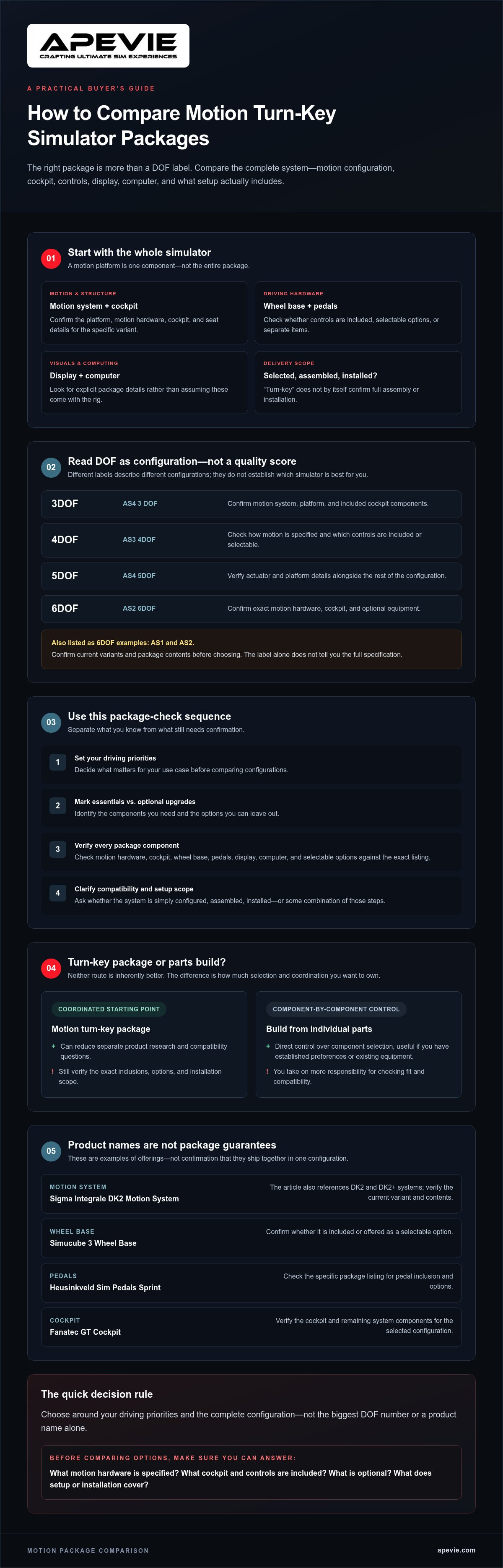
The available collection examples include 3DOF, 4DOF, 5DOF, and 6DOF configurations. This table records only what each supplied product name confirms. Check the current listing for the motion hardware and package contents.
Configuration | Collection example | What to verify
3DOF | AS4 3 DOF | Confirm the motion system, platform, and included cockpit components.
4DOF | AS3 4DOF | Check how the motion system is specified and which controls are included or selectable.
5DOF | AS4 5DOF | Verify the listed actuators and platform details, along with the rest of the configuration.
6DOF | AS2 6DOF | Confirm the exact motion hardware, cockpit, and any optional equipment for this variant.
These examples describe different configurations, not a universal progression from “basic” to “best.” Packages with different DOF labels can also vary in cockpit, controls, and other components. Read each listing as a complete system specification and ask about anything it doesn’t make clear.
Compare the listed system and package, not just the brand
Apevie’s supplied package information identifies both Qubic System and Sigma Integrale motion systems, but those names alone don’t establish which hardware or accessories are included in a particular configuration. Check the selected product for its stated motion system, platform and actuator details, cockpit, and controls. Don’t assume a brand name means the same configuration across listings. For background on how haptics fit into simulation, read Apevie’s professional haptic systems guide.
Use Apevie’s motion turn-key packages as a starting point, then verify current variants and included hardware before selecting a system.
Compare the Whole Package: Cockpit, Controls, Display, and PC
A motion configuration is only one part of a simulator’s fit. The cockpit provides the physical foundation; the wheel base, steering wheel, and pedals shape your controls; and the display and computer affect how you see and run the simulation. A sophisticated research driving simulator, such as the National Highway Traffic Safety Administration’s NADS, illustrates how simulation systems serve a defined purpose. For a racing package, assess the listed components against your requirements rather than assuming the motion label tells the whole story.
Match the cockpit and controls to your racing preferences
Apevie’s product information includes cockpit options and components from Simucube, Fanatec, Heusinkveld, Gomez Sim Industries (GSI), and Cube Controls. It also names Apevie X1 and Apevie RTR, but the supplied information doesn’t confirm which exact cockpit or controls belong to each package. Don’t infer a bundle from a product name. Check the selected variant’s listing for the cockpit, wheel base, steering wheel, and pedals. For more on cockpit foundations, see Apevie’s professional sim rig guide.
| Package element | Confirmed examples | Verify on the selected listing |
|---|---|---|
| Cockpit | Fanatec GT Cockpit; aluminum extrusion sim rig | Which cockpit and seat are included, and whether they suit your intended driving position. |
| Wheel base and steering wheel | Simucube 3 Wheel Base; Fanatec Wheel Base; GSI Formula Pro Elite; Cube Controls F-Core | The exact wheel base and steering wheel combination, including what is included versus optional. |
| Pedals | Heusinkveld Sim Pedals Sprint; Heusinkveld Sim Pedals Ultimate+ | Which pedal set is specified for your variant. For a closer look at pedal considerations, see Apevie’s guide to sim racing pedals. |
| Display and PC | Triple monitor and ultrawide curved monitor setups are listed as offerings | Whether a display or computer is part of the package, the display type, and compatibility with the system. |
Check display and PC details before comparing bundles
Some supplied package descriptions identify a monitor configuration or PC, while others don’t. Treat an unspecified item as unconfirmed, not included. Ask what display type is offered, whether a computer is included, and which compatibility details apply to the selected configuration. This is especially important if you already own a PC, wheel base, or display and want to know whether it can be used with the package.
To compare motion turn-key packages on equal terms, record each confirmed component, mark optional items separately, and note unanswered questions. Apevie’s motion simulator package listings can help you review available configurations, but confirm current contents and variants before ordering.
A Buyer Decision Framework for Avoiding Motion Package Mistakes
A well-matched simulator starts with your requirements, not the longest feature list. Before comparing motion turn-key packages, separate what you need to race from upgrades you might appreciate but don’t require. This makes it easier to find a package that fits your goals and identify unanswered questions before ordering.
Five checks to make before selecting a package
- Define your driving priorities. Note the racing disciplines you focus on, your preferred seating style, and how integrated you want the finished system to be. A setup for one driving position may not suit every cockpit configuration.
- Write down your must-haves. Specify the motion system, cockpit, seat, wheel base, steering wheel, and pedals you require. Mark upgrades or alternate components as optional, so a package doesn’t look like a better fit simply because it lists more equipment.
- Match motion to the whole system. Treat the DOF label as one configuration detail, then compare the stated motion hardware and cockpit with your intended use. Don’t use the label as a complete performance comparison.
- Check the rest of the build. Verify the display type, whether a PC is included, and what mounting hardware or other equipment comes with the selected variant. Product photos and similar package names don’t confirm inclusion or compatibility.
- Confirm fulfillment and setup scope. Ask what happens after purchase. Verify delivery details, what is assembled, whether installation is included, and what setup support applies to that specific package. Don’t assume “turn-key” means the same process for every listing.
Common buying mistakes with motion turn-key packages
Choosing by DOF alone is a common shortcut, but it leaves out the cockpit, controls, and included components that determine whether the system suits your needs. Similarly named packages can also have different configurations or selectable options. Compare the details for the exact variant you plan to order, and get unclear inclusions confirmed instead of relying on a product image or general category description.
A premium package can include components you don’t need or omit a part you assumed was standard. That doesn’t automatically make it the wrong choice. First distinguish required hardware from optional upgrades and check whether you can use existing equipment. If a required component or setup detail remains unclear, pause before comparing listings on features alone.
Once you’ve narrowed your priorities, review Apevie’s motion turn-key package listings and confirm the current configuration, included hardware, and delivery and installation scope for the specific option you’re considering.
Which Apevie Motion Turn-Key Package Fits Your Priorities?
Use the listed configurations to narrow your research, not to assume a model name tells you everything about the current build. These examples show differences in stated motion systems and wheel bases. They don’t establish a performance ranking or confirm that every component is included in every current variant.
Standout collection examples to compare
- AS1 6DOF Racing Simulator: The supplied listing description names an S35 motion system and Simucube 3 Ultimate wheelbase. Confirm these components remain part of the selected variant and check the rest of its hardware list.
- AS2 6DOF Racing Simulator: The supplied description names a Qubic System QS-S25 and Simucube 3 Pro wheelbase. Like AS1, it is listed as 6DOF, but the named motion system and wheelbase differ. Compare those specifications and the remaining package contents directly. The shared DOF label doesn’t mean the builds are otherwise alike.
- AS X1 Turn-key Motion Simulator: Its supplied description names a Sigma Integrale DK6+ and selectable triple-display descriptions. Verify which display option applies to the configuration you’re considering, along with the included controls and other hardware.
- AS4 3 DOF RTR Turn-Key Motion Simulator: The supplied information identifies Qubic System or Sigma Integrale motion options. Confirm which option is selected and check the exact motion-system and cockpit details for that variant.
AS1 and AS2 are both listed as 6DOF examples, but their stated system and wheelbase details differ. The AS X1 and AS4 descriptions name different motion configurations and display or system options. Treat each as a prompt for product-level comparison, not as a guarantee of current availability or a complete inventory.
Confirm the final configuration and take the next step
AS5 RES-TECH is another named collection example, but the supplied details here don’t establish its specific components or configuration. Check its current product listing rather than inferring specifications from the name. For any option, verify the selected variant, motion system, cockpit, seat, wheel base, steering wheel, pedals, display, PC, and which items are included or optional.
Apevie Simulators offers a White Glove Simulator Installation Service, but its scope can depend on the specific package. Before ordering, confirm whether assembly, delivery, installation, and setup apply to your selected build, and clarify any unanswered compatibility questions. Then compare Apevie Simulators motion turn-key packages against your priorities and request guidance before purchase if you need help assessing a configuration.
Choose the Configuration You Can Confirm
The right simulator isn’t necessarily the one with the highest DOF label or the longest equipment list. Choose based on your racing priorities, then check the exact motion system, cockpit, controls, display, and PC details for the variant you’re considering. Treat unlisted components and setup services as questions to resolve before ordering, not assumptions.
That careful comparison is what makes motion turn-key packages useful: they give you a coordinated configuration to evaluate while letting you focus on whether its confirmed components suit your needs. Apevie’s collection includes examples featuring Qubic System and Sigma Integrale motion configurations. Apevie also offers white-glove simulator installation. Confirm the scope for your specific package before purchase.
Compare Apevie motion turn-key packages and review the current listing details before choosing. With your must-haves clear and the remaining questions answered, you can move forward toward a simulator built around the way you want to race.
Frequently Asked Questions
What is included in a motion turn-key simulator package?
A motion turn-key simulator package may combine a cockpit, motion system, seat, controls, display, or PC, but the exact contents depend on the listing and selected variant. Check the current product page for included components, selectable options, and display and computer details. Don’t assume every system includes the same hardware or arrives preinstalled. If a package detail isn’t stated, ask Apevie to clarify it before you decide.
What is the difference between 3DOF and 6DOF motion simulators?
3DOF and 6DOF describe different motion-system configurations, but the labels alone don’t specify every movement capability or the full rig setup. Compare the motion hardware and its stated capabilities alongside the cockpit and other package components. Check the selected product listing for confirmed specifications, and ask about anything it doesn’t explain. A higher DOF number by itself doesn’t tell you whether a simulator fits your goals.
Is a motion turn-key package worth it for sim racing?
It may suit you if you value a coordinated simulator configuration and want to reduce the work of selecting components individually. Suitability depends on your racing goals, preferred motion configuration, controls, and setup needs. Compare the complete package with your must-haves rather than judging it by the motion platform alone. Before deciding, confirm which hardware is included and what delivery, assembly, installation, or support applies to that specific package.
How do I choose the right motion simulator package?
Start by identifying the racing disciplines you enjoy and the kind of rig you want to use. Then compare the motion system, cockpit, seat, wheel base, steering wheel, pedals, display, and PC inclusion against those priorities. Check which components are standard and which depend on the selected variant. Finally, verify compatibility and the package’s delivery and installation scope with the seller so your expectations match the configuration you’re considering.
Do motion simulator packages include a PC and monitors?
Not necessarily. Some supplied Apevie package descriptions identify a PC, monitor, or display configuration, while others don’t specify these items. Don’t infer inclusion from photographs or a package name. Review the current listing and confirm whether a computer and monitor are part of your chosen variant. Also check the display type, mounting details, and relevant compatibility information before ordering, particularly if you plan to use equipment you already own.
Can I choose different components in a turnkey motion simulator?
Some collection listings describe variants or optional component choices, but selections can differ from package to package. Check the current listing for available motion systems, wheel bases, pedals, and displays, and confirm whether a requested substitution or upgrade is possible. Don’t assume every component can be changed. Apevie offers a White Glove Simulator Installation Service, so contact the company to clarify current configuration and package-specific options before making a purchase decision.