Does a Motion Simulator Reduce Lap Times? What the Evidence Shows
Motion can make a driver feel faster before making them faster. So, does a motion simulator reduce lap times? It can help, but the platform alone will not deliver a set time gain. Improvement depends on whether its cues help you read the car and repeat more effective inputs.
That distinction matters: extra movement can add immersion without fixing late braking, inconsistent turn-in, or weak corner exits. Haptics and motion may help you notice grip changes and develop a clearer feel for the car, but focused practice is what turns those cues into repeatable pace.
This article explores what evidence says about motion and haptic feedback, how simulator practice can transfer to track performance, and how reaction time and mental workload fit in. A realistic setup can support consistency, but it cannot replace deliberate practice, sound technique, or careful tuning.
Key Takeaways
- Motion and haptics can make changes in grip and vehicle behavior easier to sense, but their value depends on whether those cues improve your driving inputs.
- Consistent practice focused on one car, track, and skill helps turn useful simulator feedback into repeatable technique.
- Clear tactile cues may help with reactions and reduce the mental effort of interpreting what the car is doing, especially when visual attention is already busy.
- Compare a motion setup with a static rig by asking whether added movement helps you drive more consistently, not just whether it feels more immersive.
Haptics as a sim-racing training aid
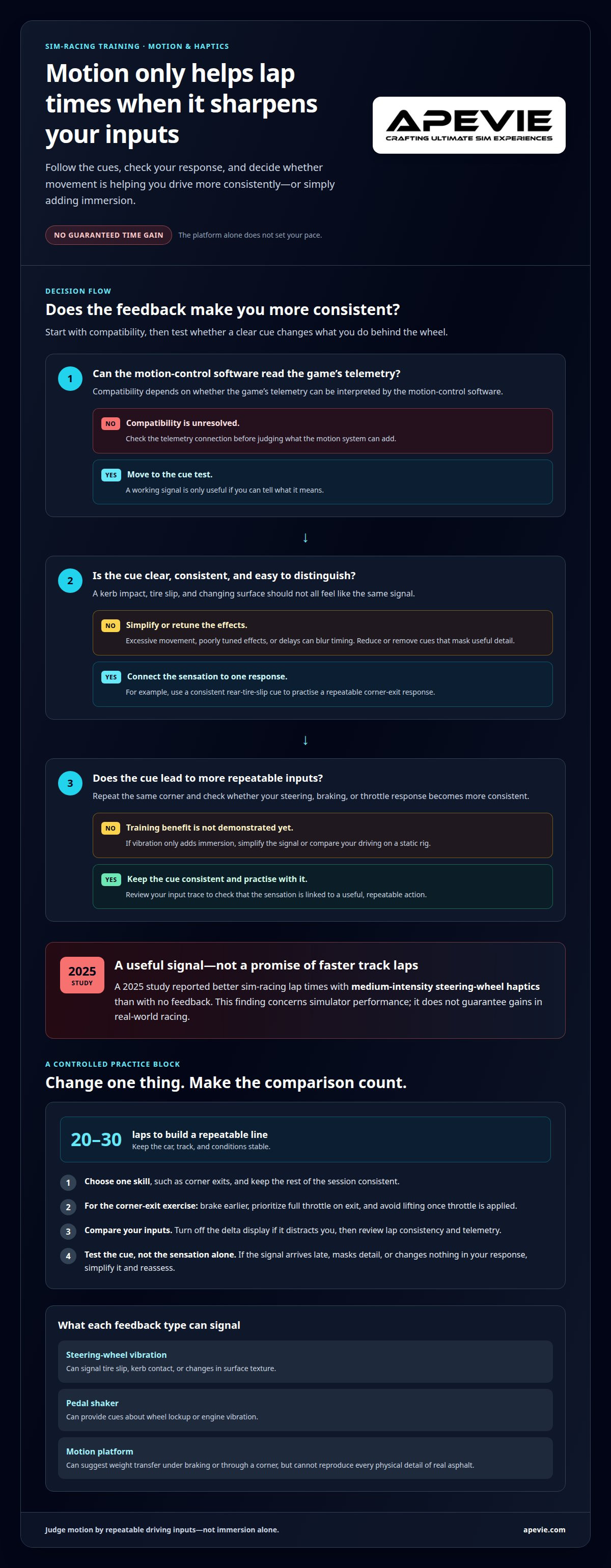
Haptic feedback translates vehicle behavior into physical cues. Steering-wheel vibration can signal tire slip, kerb contact, or changes in surface texture. A pedal shaker can provide cues about wheel lockup or engine vibration. These signals supplement what you see and help connect a sensation with an input. They work best when each cue is clear and consistent, rather than making every bump feel equally strong.
A motion simulator generally costs more than a static racing rig because it adds actuators, mounting, and control hardware. The total cost depends on the motion system and how it integrates with the rest of the simulator. Compatibility depends on whether the game’s telemetry can be read by the motion-control software. Telemetry tools follow the same principle: their output must match what the controller can interpret.
A 2025 study reported better sim-racing lap times with medium-intensity steering-wheel haptics than with no feedback. That finding suggests intensity matters: a cue should be noticeable without obscuring steering detail. Haptic prompts about a car ahead have also been examined as a way to support driving control. In practice, a subtle signal may help you anticipate a developing event, while an overly strong vibration can distract from the racing line.
This evidence concerns simulator performance, not guaranteed gains in real-world racing. Track transfer depends on whether a cue teaches a useful response, such as easing off the steering as front grip fades. Test that connection by repeating the same corner, reviewing your input trace, and checking whether your response becomes consistent. If vibration only adds immersion, it has not yet shown a training benefit.
Use haptics as feedback, not as a substitute for practice. Choose one cue, such as rear-tire slip on corner exit, and keep its meaning consistent. Run repeated laps in the same car and conditions, then compare steering and throttle traces. If the cue arrives too late or masks other detail, lower its strength or simplify the effect. The goal is a signal you can recognize, link to an action, and respond to without relying on the display alone.
Simulator training and track performance
Simulator practice transfers best when it targets a specific driving skill rather than a single fast lap. Professional drivers use simulators to rehearse circuits and vehicle responses, while surface cues can help connect practice with changing grip.
For example, a kerb strike at Road America may produce a jolt, while smooth pavement produces little disturbance. Motion can suggest weight transfer under braking or through a corner, but it cannot reproduce every physical detail of real asphalt. Treat those sensations as clues and compare them with steering, braking, and throttle inputs. Do not assume every vibration means lost grip.
Yes, professional race drivers use simulators to prepare and practise. A simulator can help you rehearse a circuit, braking points, and race procedures, but it complements rather than replaces on-track driving.
Limitations for Lap-Time Performance
A motion simulator can hinder lap-time training if its movement distracts from precise inputs or teaches sensations that do not match the car. Inconsistent feedback may lead drivers to change their line or lift off unnecessarily.
Excessive movement, poorly tuned effects, or delays between the game and platform can blur a cue’s timing. When practising a hairpin, for example, you need to distinguish tire slip from a kerb impact. If those signals feel alike, simplify the effects and compare your laps on a static rig.
Settings and Training Methods
Keep the car, track, and conditions stable while targeting one skill. That makes laps easier to compare and helps show whether a change in technique is working.
Choose one track, one car, one condition, and one skill, such as corner exits. Practice for 20-30 laps to build a repeatable line; brake earlier, prioritize full throttle on exit, and avoid lifting once throttle is applied during that exercise. Turn off the delta display if it pulls attention away from inputs, then review lap consistency and telemetry.
To practise reading surface changes, choose a corner with a clear contrast, such as a kerb beside smooth tarmac. Repeat the same approach and note whether motion cues change your steering or throttle response. Keep the session focused: a stable setup and a specific comparison reveal more than adding effects or changing several settings between laps.
Driver reaction time and mental workload
Yes, motion and tactile feedback may support consistent control by helping drivers notice cues sooner. A review of haptic assistive driving systems reports improved vehicle control, along with shorter reaction times and lower mental workload.
Imagine a virtual car slowing ahead: a distinct tactile alert can draw your attention while your eyes stay on the racing line. This may help you respond without searching the display for new information. The cue still needs to arrive at the right moment. A delayed alert can compete with the visual scene instead of helping you process it.
Motion can distract when the platform’s movement conflicts with the cockpit view. Strong movement through a corner that looks flat, for example, may draw your attention away from a braking marker. Such mismatches can also feel uncomfortable for some drivers. Keep movement restrained enough to support the visual picture, then assess whether it helps you stay focused through familiar sections.
Latency matters, too. If the car reacts before the platform, or the platform moves after the event, that mismatch can make an oversteer correction harder to judge. Keep graphics and input settings consistent during practice, then review telemetry for delayed steering corrections. This can help distinguish a driving error from feedback arriving out of sequence.
The Austin Hatcher Foundation study reported that 88% of users demonstrated increased focus and reduced fatigue during training lasting more than 30 minutes. This finding concerns training, not a guaranteed lap-time change. For your own sessions, compare attention and fatigue during a familiar run, especially when monitoring mirrors, braking markers, and traffic.
One estimate places conscious processing at about 50 bits per second, compared with about 100,000 bits processed subconsciously. These figures aren’t a driver-performance score. They illustrate why unnecessary prompts can burden attention. Reduce distracting displays, keep movement predictable, and let the racing line and nearby traffic remain your primary visual references.
Motion simulators and lap-time improvement
Does a motion simulator reduce lap times? It can help a driver interpret car behavior, but there’s no fixed time gain over a static rig. One driver reported a Skip Barber lap of 1:42.612 after trying motion, followed by an average of 1:43.0 after tuning the system. Those personal results don’t establish a controlled comparison.
Another participant compared GRID sessions, playing twice on a static simulator and 1.5 times after switching to motion. They felt somewhat faster, but reported no measured lap-time difference. A driver using 2DOF motion with four bass shakers felt safer and more consistent, then eventually faster. These experiences suggest motion may support repeatability, rather than provide an automatic pace increase.
But does a motion simulator reduce lap times across repeat sessions? That depends on whether movement helps you make better decisions consistently. During iRacing practice at Daytona, one driver improved from barely below 2:20 to the low 2:11 range. The change shows practice progress, but doesn’t isolate motion as the cause. Familiarity, setup, and technique also affect lap times.
Compare motion and static sessions with the same car, track, and conditions. Record several clean laps in each configuration, then compare average pace and the spread between laps. Drivers looking for a structured way to log stint times and plot performance trends can use spreadsheet dashboards from bizinfograph.com to visualize their testing data. A personal best may reflect one unusually clean lap; repeatable pace is a stronger sign that your inputs are becoming consistent.
Motion may help if it makes weight transfer or a developing slide easier to read. It can hurt your pace if movement unsettles your inputs or makes you hesitate. Tune the platform for clear, predictable cues, then repeat the same test. Keep your driving approach stable and change one variable at a time.
Judge the setup by how it changes your driving, not by how dramatic it feels. If your laps become more consistent over repeated sessions, motion may be helping. If immersion improves but driving errors remain, focused practice may be the more useful next step.
Apevie Simulators: Custom High-Performance racing simulator
Apevie Simulators is a natural next step if you’re building a simulator around focused practice and motion feedback. Its Custom High-Performance racing simulator can bring together a Sigma Integrale DK2 or DK2+ Motion System with Heusinkveld Sim Pedals Sprint, connecting platform movement and braking input in one considered setup.
Choose motion if you want physical cues to help you interpret weight transfer. If consistent pedal control is a priority, Heusinkveld pedals may be a relevant component for your build. The goal is a simulator configured around your training, not movement for its own sake. Consider your needs, available space, and driving style when deciding how to put the system together.
For a tailored discussion about a high-performance simulator build and motion options, contact Apevie Simulators.
Make Your Next Practice Session More Deliberate
Before investing in more movement, decide what you want your simulator to help you improve: steadier braking, more controlled corner exits, or clearer feedback when the car loses grip. Then judge the setup by whether it supports that goal, not by how dramatic it feels. To assess whether a motion simulator reduces lap times, connect the hardware to a specific driving habit and track your progress through repeatable sessions.
Apevie Simulators can build a Custom High-Performance racing simulator with a Sigma Integrale DK2 Motion System and Heusinkveld Sim Pedals Sprint. Those components give you a foundation to shape around your driving priorities, rather than treating motion as a shortcut to speed. A tailored setup makes sense when you’re ready to align your hardware with a more focused training approach.
Contact Apevie Simulators to discuss your setup, and take the next step toward more purposeful practice.
Frequently Asked Questions
Do motion simulators improve sim racing lap times compared with static rigs?
Motion can help, but its benefit depends on whether it reveals a driving error you can correct. Check sector times: if the setup helps you carry speed through a difficult sector, you may see an improvement there before your overall lap time changes. Motion does not change the game’s simulated car physics, so it cannot compensate for a poor line or braking point.
Which motion simulator features help drivers judge braking, cornering, and traction?
Look for adjustable motion cues that let you tune the platform’s response to braking, lateral load, and wheelspin. For example, compare when the braking cue starts with your brake trace, then adjust its timing until it clearly corresponds with deceleration. Make one change at a time. A cue is useful when you can connect it to a specific input or vehicle response, rather than treating movement as background noise.