


How to Set Up Sim Pedals for Professional Lap Time Consistency
You can invest in the fastest PC and the most immersive triple monitor setup, but your ultimate pace is actually dictated by the few centimeters of travel in your sim pedals. It's a hard truth that many enthusiasts overlook while chasing hardware specs. If you've ever felt the frustration of hitting a perfect lap only to blow the first corner on the next attempt, you know that inconsistency is the real enemy. Most drivers rely on visual cues alone, but professional-grade performance requires deep muscle memory built through consistent resistance and predictable feedback.
We understand that moving to high-end hardware like the Heusinkveld Ultimate+ or Fanatec ClubSport V3 often brings confusion over elastomers and deadzones. This article will show you how to master the technical setup, ergonomics, and calibration needed to unlock true braking precision. We will examine how to eliminate physical flex in your rig, achieve 1:1 input linearity, and fine-tune your pedal geometry to match your natural driving position. By the end, you'll have a setup that responds exactly as you intend every single time you hit the track.
Key Takeaways
- Learn why your brain processes pressure more accurately than travel distance and how to leverage this biological trait for consistent muscle memory.
- Compare the mechanical feedback of load cell and hydraulic sim pedals to determine which technology provides the precision your driving style demands.
- Master the "Straight Line" ergonomic rule to align your hardware with your leg's natural power arc for better control and reduced physical strain.
- Identify the common software calibration errors, such as signal clipping, that prevent you from achieving 1:1 input accuracy in your telemetry.
- Understand the advantages of professional turnkey integration when configuring high-end components like active pedals and complex hydraulic systems.
Understanding the Physics of Sim Pedals and Muscle Memory
In the world of high-performance simulation, your sim pedals serve as the primary telemetry input device. They aren't just game controllers; they are precision instruments that translate human force into digital deceleration. Understanding simulator pedal mechanics is essential because the brake pedal specifically dictates your ability to modulate weight transfer during high-speed transitions. While entry-level sets often use potentiometers to measure how far the pedal has moved, professional hardware like the Heusinkveld Sim Pedals Ultimate+ uses load cells to measure the actual force applied. This distinction is critical because the human brain is physiologically better at replicating a specific pressure than a specific physical distance.
The ultimate goal of this technical calibration is mastering threshold braking. This is the point where you apply the maximum possible braking force before the tires lock up or the ABS intervenes. Professional drivers live on this razor's edge. To do this consistently, you need a pedal that offers a hard "wall" feeling, which only high-end load cell or hydraulic systems can provide. This allows you to find the limit of grip and stay there lap after lap without the guesswork inherent in cheaper hardware.
Pressure vs. Travel: The Science of Consistency
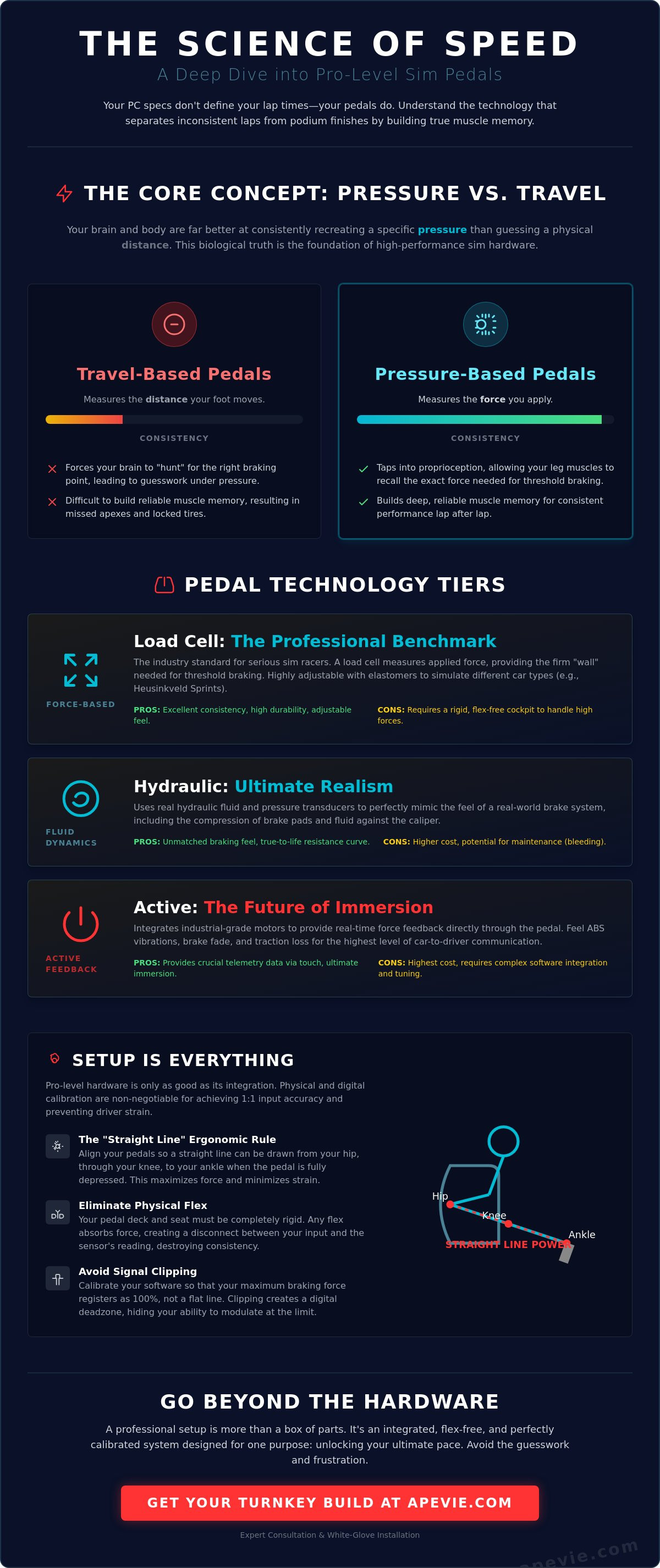
When you are hurtling toward a corner at 250 km/h, your brain shouldn't be "hunting" for a physical spot in the pedal's arc. Travel-based pedals force you to guess the distance, which leads to inconsistent braking points and missed apexes. Pressure-based systems tap into your proprioceptive sense. In high-stress scenarios, your leg muscles can recall the exact tension required to hit 80% brake pressure with remarkable accuracy.
Muscle memory in the context of a 100kg load cell is the body's ability to subconsciously reproduce a specific force through the calf and thigh muscles without needing visual confirmation from the screen. This physiological advantage allows you to focus your mental energy on racing lines and traffic rather than wondering if you've pressed the pedal deep enough.
The Role of Trail Braking in Lap Time Reduction
Consistency isn't just about the initial hit; it's about the release. Trail braking is the art of slowly bleeding off the brakes as you turn into the apex to keep the car's nose planted and the front tires loaded. High-end sim pedals provide a smooth "return to zero," allowing for a granular release that prevents the tires from snapping back to full grip too quickly. This level of control is exactly why load cell pedals are the ultimate consistency hack for serious drivers. Without this tactile feedback, your trail braking becomes a series of digital steps rather than a fluid curve, which inevitably costs you tenths of a second in every technical sector. Professional-grade pedal sets ensure that the mechanical resistance matches the digital output, creating a seamless connection between your intent and the car's behavior.
Choosing the Tech: Load Cell, Hydraulic, and Active Systems
Selecting the right hardware is where most enthusiasts make their biggest mistake. They often overspend on a high-torque wheel base while neglecting the component that actually dictates their lap time consistency. In high-end racing circles, the phrase "buy once, cry once" applies to your sim pedals more than any other part of the rig. A premium set won't just last for years; it provides the mechanical fidelity needed to drive at the limit without second-guessing your equipment. While a wheel base gives you information, your pedals are how you command the car, making them the most critical interface in your cockpit.
Load Cell Pedals: The Professional Benchmark
Load cell technology has long been the industry standard for serious drivers. These systems use a pressure sensor to measure the force you apply, rather than the physical distance the pedal moves. The Heusinkveld Sim Pedals Sprint has become a benchmark in this category for its balance of durability and adjustability. These pedals use high-quality elastomers to simulate the physical compression of brake pads against a rotor. By swapping these rubber-like inserts, you can change the "bite" and stiffness of the pedal to match anything from a GT3 car to a formula-style single seater. While load cells are virtually maintenance-free, they require a rigid, flex-free cockpit to handle the 60kg to 100kg of force required for professional-level modulation.
- Pros: Excellent muscle memory development, highly durable, and lower cost than hydraulic systems.
- Cons: Requires a sturdy mounting solution to prevent rig flex.
Hydraulic and Active Systems: Pushing the Limits
For those seeking the absolute peak of realism, hydraulic systems from manufacturers like Apex Sim Racing offer a distinct advantage. These pedals use real master cylinders and fluid lines to replicate the incompressible nature of a racing brake system. The tactile feedback is unparalleled, giving you a "soft" initial touch that hardens instantly as the pads meet the disc. However, the most significant shift in recent years is the Simucube ActivePedal. Unlike passive systems that rely on springs or fluid, the ActivePedal uses a powerful motor to create resistance. This allows you to feel telemetry-based effects, such as ABS pulses or traction control vibrations, directly through your foot.
The unique advantage of an active system is the ability to change the entire pedal feel via software in seconds. You can go from a soft street car pedal to a rock-hard F1 brake without ever picking up a wrench. These high-fidelity systems require a professional PC-based environment to handle the complex data loops required for real-time haptic feedback. If you are building a high-performance setup, a professional consultation can help you decide which technology aligns with your specific racing goals.
Bolting your sim pedals to a flimsy base is the fastest way to sabotage your performance. Even the most expensive load cell system is useless if the mounting plate flexes under pressure. Ergonomics is the foundation of a professional sim rig. If your seat moves or the pedal plate twists, your muscle memory has no fixed reference point. To achieve professional consistency, you must eliminate every millimeter of unwanted movement between your foot and the simulator's chassis.
The "Straight Line" Rule is the most critical ergonomic principle for high-force braking. Your brake pedal should be aligned directly in front of your leg's natural power arc. When you press the pedal, the force should travel in a straight line from your hip, through your knee, to the ball of your foot. If your leg is angled inward or outward, you're not just losing precision; you're also inviting joint fatigue. High-end sim pedals allow for lateral adjustment on the baseplate to ensure this skeletal alignment is perfect for your specific body type.
Seating position also dictates your pedal face angles. In a GT setup, you sit upright, meaning your pedals should be lower and more vertical to prevent ankle strain. Conversely, a Formula position places your hips lower than your knees, requiring the pedals to be raised and tilted significantly backward. Achieving this requires a rigid aluminum profile foundation. Professional builds often utilize 15mm thick steel or aluminum plates to ensure that 100kg of braking force translates entirely into telemetry rather than twisting the rig.
Pedal Spacing and Foot Alignment
Your driving style determines your pedal spacing. If you use two-foot braking, which is standard in modern GT3 and Formula cars, you should space the throttle and brake far enough apart to keep your hips square. This prevents the common "Sim Racer’s Knee," a form of iliotibial band syndrome caused by repetitive lateral strain. The height of the pedals relative to your seat’s hip point is equally vital. Ideally, the ball of your foot should be level with or slightly above your hips to maximize your leverage during threshold braking events.
Mounting Solutions for High-Force Pedals
Standard pedal plates included with entry-level cockpits are rarely sufficient for professional hardware. To capture every nuance of haptic feedback, you need a mounting solution that acts as a heat sink for mechanical energy. Many top-tier drivers look to Pro-Sim.co.uk for high-end mechanical mounting inspiration, as their designs prioritize absolute rigidity. A proper setup includes a dedicated heel rest that is physically connected to the pedal base. This ensures your heel remains locked in place, providing the stability needed to modulate the brakes with millimeter precision during the most intense qualifying laps.
Calibrating Software for 1:1 Input Accuracy
Hardware rigidity and geometry are the physical pillars of performance, but software calibration is the final bridge between your intent and the car's reaction. Calibrating your sim pedals correctly ensures that the physical pressure you have practiced translates into a predictable digital signal. Without this 1:1 mapping, even the most expensive load cell becomes a liability. Professional drivers don't rely on "plug and play" settings; they use specialized tools like DIView or manufacturer-specific utilities such as Heusinkveld SmartControl to define the raw data range before ever launching a simulation.
The most common mistake in software setup is setting the maximum force too low, which leads to "clipping." Clipping occurs when the software registers 100% braking force while you still have physical travel or pressure capacity left in your leg. This creates a massive dead zone at the top of your braking arc, making it impossible to modulate the car at the limit. To avoid this, you must set your 100% mark at the absolute limit of your comfortable, repeatable leg force while seated in your racing position.
Setting Deadzones and Max Force
A professional calibration workflow follows three distinct steps to ensure telemetry stability. First, establish a physical "rest" deadzone. This is a small buffer, typically 1% to 2% of the total range, that prevents "ghost inputs" caused by the weight of your foot resting on the pedal face. Without this, your car might suffer from slight brake drag on long straights, overheating the tires and killing your top speed.
Second, calibrate the 100% mark based on your maximum comfortable force. You should be able to hit this mark during an emergency "panic" stop without straining your back or shifting your hips in the seat. Finally, verify input stability in the telemetry view of your software. The signal bar should be rock solid without flickering. If the signal jumps, it often indicates electrical interference or a loose ground wire, which must be addressed before you can trust your muscle memory. For a deeper look at these technical nuances, explore The Ultimate Guide to Sim Racing Pedals.
In-Game Settings: iRacing, ACC, and Beyond
Once your raw Windows calibration is set, you must address in-game "Brake Force Factor" or "Gamma" settings. For load cell and hydraulic users, this value must almost always be set to 0.0 or "Linear." These legacy settings were designed to help users with cheap, travel-based pedals simulate a non-linear brake curve. Because your high-end sim pedals already provide a physical resistance curve through elastomers or fluid dynamics, adding software gamma creates a "double curve." This makes the final 20% of your braking feel extremely sensitive and unpredictable, which is the primary cause of missed apexes during trail braking.
In titles like Assetto Corsa Competizione, you should also sync your physical pedal travel with the virtual car’s master cylinder behavior. Some GT3 cars have a very short, stiff throw, while others are more progressive. Adjusting your output curves in SmartControl to match the specific car class you're driving can provide that final tenth of a second in consistency. If you find this level of technical tuning daunting, a professional turnkey build consultation can ensure your entire ecosystem is synchronized from the first lap.
The Professional Path: Turnkey Builds and Expert Consultation
Building a world-class racing environment requires more than just a collection of high-end parts. While individual components like sim pedals are the tools of the trade, a truly professional setup functions as a single, cohesive organism. Many enthusiasts find themselves trapped in a cycle of constant troubleshooting, where a new load cell set doesn't quite fit the existing rig or the software conflicts with a motion platform. A turnkey build from Apevie Simulators removes this friction, ensuring that every piece of hardware is curated and integrated to perform at an elite level. Professional drivers don't just buy parts; they invest in ecosystems that allow them to focus entirely on the track.
Apevie Simulators focuses on a "best-of-breed" philosophy. We don't just sell what's available; we curate specific combinations that we know produce results. This includes pairing the legendary precision of Heusinkveld Sim Pedals Ultimate+ with the structural rigidity of our aluminum extrusion rigs. We also integrate components from Gomez Sim Industries (GSI) and Cube Controls to ensure that your tactile inputs match the fidelity of your visual and motion cues. This holistic approach is the only way to achieve the haptic harmony required for professional-grade consistency.
White-Glove Installation and Support
The complexity of high-end hydraulic or active systems often leads to what we call the "cable nightmare." Beyond just aesthetics, poor cable management can lead to signal interference and electrical noise, which ruins the accuracy of your telemetry. Our white-glove service handles the entire physical build, but the real value lies in the ergonomic fitting. We don't just bolt the seat down; we adjust every angle and distance to your specific skeletal proportions, ensuring you can maintain maximum braking force without fatigue. If you encounter issues later, our team provides remote calibration services to keep your sim pedals and overall system in peak condition.
Curating Your Elite Simulator Ecosystem
Precision braking is only one part of the equation. To truly lower your lap times, your inputs must be supported by an immersive feedback loop. High-end pedals are the perfect complement to professional-grade F1 steering wheels, creating a cockpit that feels indistinguishable from a real race car. When these components are integrated with a Sigma Integrale DK2+ motion system, the haptic harmony is complete. You don't just see the ABS kick in; you feel the vibration in the pedal and the pitch of the chassis simultaneously. This level of immersion is the standard for those who refuse to compromise on their training tools. To start your journey, consult with an Apevie expert for your custom build and discover the difference that professional integration makes.
Mastering the Limit: Your Path to Professional Consistency
Achieving professional lap times is rarely about raw speed; it's about the ability to repeat a perfect performance corner after corner. We've explored how high-end sim pedals provide the physiological foundation for this consistency by tapping into your brain's superior ability to remember pressure over distance. By perfecting your pedal geometry and ensuring a linear software calibration, you've removed the technical barriers that lead to missed apexes and inconsistent trail braking. You aren't guessing anymore; you're driving with absolute precision.
The most sophisticated hardware only delivers its full potential when it's integrated into a rigid, professionally tuned ecosystem. As an authorized Simucube and Heusinkveld dealer, Apevie Simulators provides the expertise needed to synchronize your inputs with high-fidelity motion and curated professional-grade PC hardware. Our white-glove national installation service ensures that your ergonomics are perfect from the very first session, allowing you to focus entirely on your race craft. Build your dream professional simulator with Apevie and experience the stability that top-tier competition demands. The track is waiting for your most consistent performance yet.
Frequently Asked Questions
Do I really need load cell sim pedals to be fast?
Load cell technology is essential for professional consistency because it allows your brain to build muscle memory based on pressure rather than physical distance. While you can technically be fast with potentiometer-based pedals, you will struggle to replicate the same braking force lap after lap. Professional sim pedals like the Heusinkveld Sprint provide the tactile resistance needed to find the limit of grip reliably during high-speed transitions.
How much force should I set my brake pedal to require?
Your maximum brake force should be set to the highest level you can comfortably and repeatedly apply without shifting your hips or straining your back. For a GT3 setup, many drivers find a range of 60kg to 80kg ideal. Formula cars often require higher resistance. The key is ensuring your software 100% mark matches your physical peak force to avoid signal clipping during panic stops.
Can I use high-end sim pedals on a desk setup?
High-end sim pedals are not suitable for desk use because the force required to operate them will cause your chair to roll or the pedals to tip. Professional hardware requires a rigid aluminum extrusion rig or a heavy steel mounting plate to function correctly. Without a fixed foundation, you lose the precision and haptic feedback that these premium components are designed to provide in a cockpit environment.
What is the difference between 12-bit and 16-bit pedal resolution?
Pedal resolution refers to how many digital steps the sensor can detect across the pedal's travel. A 12-bit system offers 4,096 steps, while a 16-bit system provides 65,536 steps. While 12-bit is often sufficient, 16-bit resolution offers smoother signal processing. This extra granularity is particularly beneficial during the delicate release phase of trail braking, where microscopic changes in pressure dictate the car's rotation into a corner.
How often do hydraulic sim pedals need maintenance?
Modern hydraulic systems are remarkably robust and typically only require a visual inspection of the seals and fluid levels every 12 to 24 months. Unlike older DIY setups, professional units are designed for longevity. You might occasionally need to lubricate the pivot points with a dry PTFE spray; however, the hydraulic circuit itself is usually a closed, maintenance-free system for several years of heavy use.
Why does my brake pedal feel different in iRacing compared to Assetto Corsa?
The difference often stems from how each simulator handles input curves and master cylinder simulation. iRacing generally expects a linear input, while Assetto Corsa might have default Brake Gamma settings that alter the signal. It's vital to set your in-game brake factor to linear when using load cells to ensure the software isn't adding a secondary curve to your already mechanical resistance.
Should I use a clutch pedal if I only race GT3 or Formula cars?
A clutch pedal is not strictly necessary for modern GT3 or Formula cars since they use semi-automatic gearboxes and often feature dual-clutch paddles on the steering wheel. However, a dedicated third pedal is still valuable for standing starts or if you enjoy driving historic content. If your focus is purely on modern competition, a two-pedal set allows for more ergonomic spacing and better leg alignment.
Are Simucube ActivePedals worth the investment for a hobbyist?
The value of the Simucube ActivePedal lies in its ability to simulate real-time haptic effects like ABS pulses and engine vibrations directly through your foot. For a hobbyist, this immersion adds a layer of realism that passive systems cannot match. Additionally, the ability to change the pedal's entire mechanical feel via software without swapping springs or elastomers makes it a highly versatile tool for multi-discipline racers.