Simucube 3 Wheel Base Settings: The Professional Tuning Guide for 2026
If you think 35 Nm of peak torque on the Simucube 3 Ultimate is simply about physical resistance, you're missing the digital revolution happening inside the Simucube Tuner 3.1 software. Dialing in the perfect Simucube 3 wheel base settings is no longer just about smoothing out a raw signal; it's about translating complex telemetry into a language your hands instinctively understand. Many serious racers find themselves overwhelmed by the new Simucube Link Hub ecosystem, often settling for a "notchy" or overly dampened feel that masks the car's true limit. It's difficult to translate real-world car physics into software sliders without a clear roadmap.
This professional tuning guide will show you how to master the sophisticated telemetry-based filters to achieve unmatched realism and consistency in your simulator. We'll provide a clear, plug-and-play understanding of core filters alongside title-specific profiles for major sims like iRacing and Assetto Corsa Competizione. You'll learn how to extract maximum detail from the high-resolution 23-bit absolute angle sensor without the frustration of signal clipping or muddy feedback. By the end of this guide, your hardware will finally provide the transparent, high-performance communication that professional-grade equipment promises.
Key Takeaways
- Understand why the Simucube Link Hub is the essential central nervous system for your setup, providing a cleaner signal by isolating the wheel base from USB interference.
- Learn to calculate the optimal Simucube 3 wheel base settings for steering range and max torque to prevent signal clipping and ensure linear force delivery.
- Master the new Telemetry-Based Effects (TBE) to translate raw in-game data, like ABS activation and gear shifts, into tactile vibrations through the steering column.
- Discover title-specific configurations for iRacing and Assetto Corsa Competizione that eliminate high-frequency chatter while maintaining the car's natural weight.
- Identify how cockpit flex can unintentionally dampen your force feedback and why a rigid mounting solution is critical for preserving fine telemetry details.
Mastering the Simucube 3 Architecture and Link Hub Setup
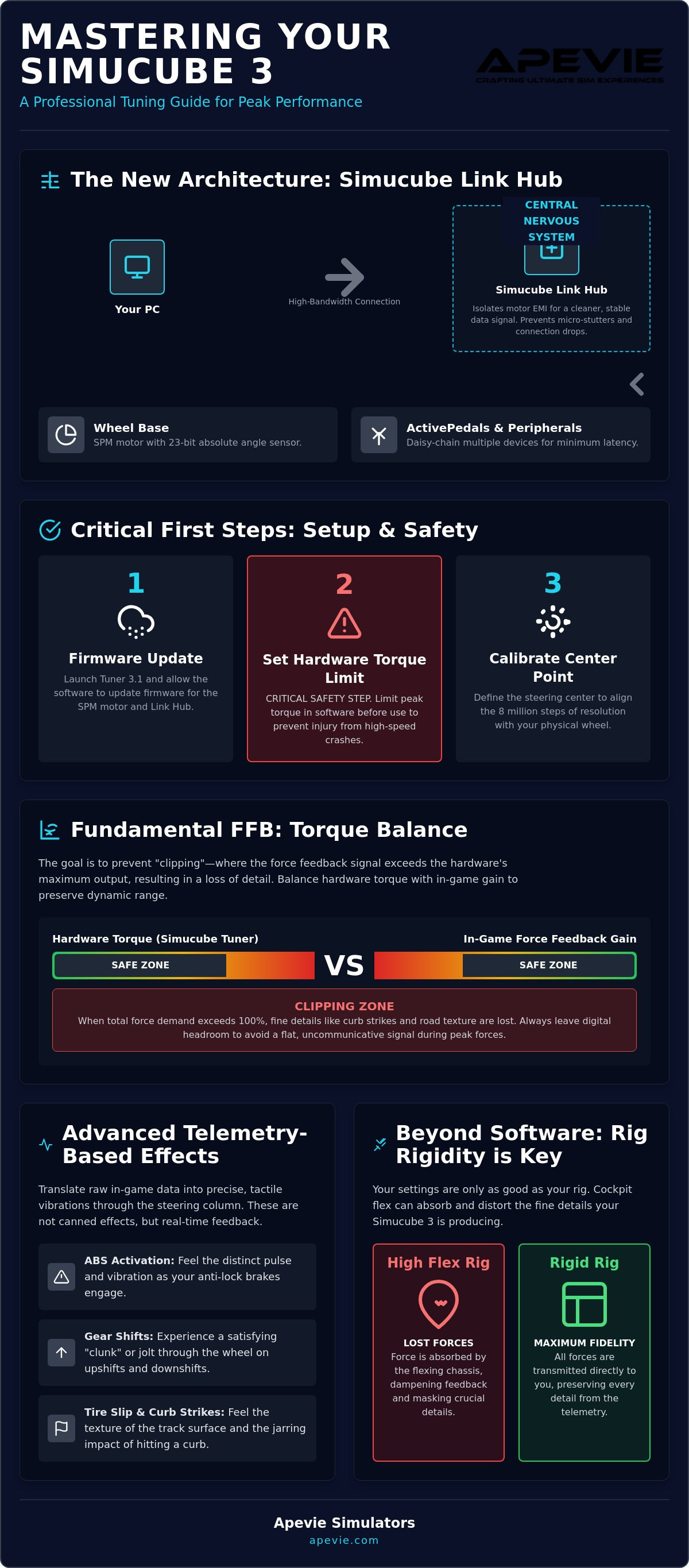
The Simucube 3 ecosystem represents a fundamental shift in how high-performance hardware communicates with your PC. Unlike previous generations that relied on a direct USB connection, the Simucube 3 utilizes the Link Hub as its central nervous system. This architecture isn't just a cabling convenience; it's a sophisticated solution to the electromagnetic interference (EMI) that has long plagued high-torque direct-drive wheel technology. By isolating the motor's power draw from the data signal, the Link Hub ensures that your Simucube 3 wheel base settings remain stable and free from the micro-stutters or connection drops often seen in lesser setups.
The Role of the Simucube Link Hub
The Link Hub is mandatory for the Sport, Pro, and Ultimate models. It acts as the bridge for all Simucube peripherals, allowing you to daisy-chain ActivePedals and your steering wheel through a single, high-bandwidth port. This streamlined approach reduces the cable clutter behind your rig and minimizes latency across the entire signal chain. If you experience connection drops during your first boot, it's usually a result of the Hub's power-cycling sequence. Ensure the Hub is powered on before launching Simucube Tuner 3.1 to allow the software to handshake with the 23-bit absolute angle sensor. When sourcing high-end peripherals like those found at Apex Sim Racing, the Link Hub becomes even more vital for maintaining signal integrity across multiple devices.
Software Initialization and Safety Limits
Setting up your Simucube 3 wheel base settings begins with safety. Before you even think about hitting the track, you must set a hardware torque limit within the Simucube Tuner 3.1 software. A 25Nm or 35Nm peak torque motor can cause genuine injury if a high-speed crash occurs while your hands are out of position. Once the safety limits are active, the firmware update process for the SPM motors begins. The SPM motor is an industrial-grade servo optimized for silent, high-fidelity operation. These motors require a specific handshake protocol that was introduced in the June 2026 software update to ensure the internal permanent magnets are perfectly synced with the encoder.
Calibration is the final step of the architecture setup. You'll need to define the steering center point, especially when using precision rims like the Gomez Sim Industries (GSI) Formula Pro Elite or the Cube Controls F-Core. This process ensures the 8 million steps of resolution provided by the sensor are perfectly aligned with your physical steering rack. Professional installers at Apevie Simulators often recommend a "hard stop" calibration. This ensures the software knows exactly where the motor's physical limits reside, preventing unnecessary strain on the internal components during high-force maneuvers.
Fundamental Force Feedback Settings for Peak Performance
Finding the sweet spot for your Simucube 3 wheel base settings requires moving away from the heavy filtering used in older direct-drive systems. The new spoke-type IPM motor architecture in the Simucube 3 provides such low internal friction that the wheel feels naturally light and transparent. Instead of using software to "fix" mechanical resistance, you are now free to use filters to enhance the car's digital rack. The goal is to preserve the dynamic range, ensuring that small road imperfections aren't swallowed by the massive torque peaks the motor is capable of producing.
Finding the Ideal Torque Balance
The 25Nm output on a Simucube 3 Pro delivers a much higher slew rate than previous generations, making the feedback feel more immediate. To avoid clipping, you must balance the hardware torque with your in-game gain settings. Always leave enough digital headroom so that a sudden curb strike doesn't flatten the signal. If you're using a lightweight rim from Apex Sim Racing, you'll likely need lower inertia settings to prevent the wheel from feeling artificially heavy. Monitoring the clipping indicator in Simucube Tuner 3.1 is essential for ensuring your torque delivery remains linear throughout a long stint.
Refining the Natural Feel Filters
The "Holy Trinity" of steering feel—Damping, Friction, and Inertia—must be tuned to match the car class you're driving. Research into sim racing haptic feedback shows that specific frequencies are vital for identifying tire slip. For GT3 cars, a damping setting of 10% to 15% usually provides enough stability to prevent oscillations without masking the road surface. Formula cars generally require even less damping to maintain the characteristic "snappy" response of a high-downforce rack. Friction settings should be used sparingly, just enough to mimic the mechanical weight of a real steering column at low speeds.
For racers who want to skip the trial-and-error phase, the experts at Apevie Simulators can pre-configure these filters as part of a turnkey racing simulator package. This professional calibration ensures that your hardware is perfectly matched to your driving style and cockpit rigidity from the very first lap.
Advanced Telemetry-Based Effects and Signal Processing
The introduction of Telemetry-Based Effects (TBE) marks the most significant evolution in the Simucube Tuner 3.1 ecosystem. While traditional force feedback relies on the simulated physics of the steering rack, TBE pulls raw data directly from the simulation engine to generate specific tactile sensations. This means your Simucube 3 wheel base settings are no longer limited by what the game's physics thread can calculate in real-time. Instead, the hardware uses dedicated signal processing to recreate ABS pulses, engine harmonics, and road surface textures that were previously lost in a muddy FFB signal. This separation of "feeling" from "force" allows for a level of transparency that professional drivers use to find the absolute limit of adhesion, a concept of high-fidelity communication also championed by mindrove.com in the development of neural interfaces.
Tuning the ABS and Traction Control Feedback
The Simucube 3 extracts brake lock-up data with surgical precision, allowing you to feel the ABS vibration directly through the steering column. This is a critical cue for muscle memory. In a GT3 car, for instance, you can set the ABS frequency to 15Hz to 20Hz, providing a distinct "shudder" when the tires begin to slip. The key is to keep the intensity high enough to be informative but low enough that it doesn't mask the weight of the steering. By fine-tuning these Simucube 3 wheel base settings, you create a tactile feedback loop that tells you exactly when to back off the brake pressure before the car becomes unsettled. It transforms a digital "on-off" sensation into a nuanced communication channel.
RPM and Engine Vibration Settings
Engine harmonics provide a secondary layer of information that helps you identify the power band without glancing at shift lights. You can customize the RPM vibration curve to match different engine configurations, such as the high-frequency buzz of an inline-four or the deeper thrum of a V8. Integrating these effects with Heusinkveld Sim Pedals Ultimate+ creates a full-body haptic experience that rivals professional motion platforms. When your hands feel the engine reach its redline and your feet feel the hydraulic resistance of the brakes, the simulator stops being a game and starts being a tool for high-performance training.
The "Road Texture" slider is another powerful tool in the Simucube 3 arsenal. Unlike generic "vibration" settings in other software, this slider uses telemetry to add the grit and imperfections of the asphalt back into the steering wheel. It adds immersion by simulating the micro-bumps of the track surface without adding artificial weight or damping to the primary FFB signal. This ensures that while you feel the texture of the track, the critical information about grip and tire slip remains clear and unobstructed. Professional setups at Apevie Simulators often prioritize this clarity, ensuring that every haptic cue serves a specific performance purpose.
Title-Specific Tuning: iRacing, ACC, and Le Mans Ultimate
Physics engines interpret tire data differently, which means your Simucube 3 wheel base settings shouldn't remain static when you switch between simulations. A profile that feels communicative in iRacing might feel harsh or "chattery" in Assetto Corsa Competizione (ACC). The goal is to align the Simucube Tuner 3.1 software with the specific output frequency of each game's physics thread. By doing so, you ensure that the high-resolution SPM motor isn't just vibrating, but actually providing a transparent window into the car's mechanical state. Handling smoothing and minimum force within the Simucube software rather than the in-game menus is almost always the better choice for preserving signal purity.
iRacing: The Precision Profile
In iRacing, the most critical setting is ensuring "Linear Mode" is checked in the simulator's options. This allows the Simucube 3 to deliver a 1:1 torque ratio without the software trying to boost mid-range forces. When driving a high-downforce car like the Dallara P217, you'll want to use the "Auto" force function in the iRacing black box during a clean lap to find the ideal output. This prevents clipping while maximizing the 25Nm or 35Nm headroom of your base. For those competing at the highest level in formula cars, matching these settings with The Best F1 Steering Wheels for Professional Sim Racing in 2026 ensures that the high-frequency vibrations of the Dallara's steering rack are transmitted without distortion.
ACC: The GT3 Immersion Profile
Assetto Corsa Competizione is known for its detailed but sometimes "noisy" FFB signal, especially when hitting aggressive curbs. To tame this without losing the weight of the GT3 steering rack, you should adjust the Simucube "Slew Rate" filter. Lowering the slew rate slightly prevents harsh mechanical jolts that can cause your rig to rattle, while maintaining the "Dynamic Damping" required to feel the car's weight shift through Eau Rouge or the Karussell. This allows you to filter out the "curb kick" while keeping the tire slip information clear. Managing these nuances is a hallmark of a professional setup, and if you're looking for a perfectly balanced system, you can consult with Apevie Simulator for a custom turnkey build that comes pre-configured for every major title.
Le Mans Ultimate presents a unique challenge with its high-downforce Hypercars. These cars require a specific damping curve to prevent the wheel from feeling "floaty" at 300kph on the Mulsanne Straight. You'll find that increasing the "Natural Damping" in Simucube Tuner 3.1 while keeping in-game smoothing at zero provides the most authentic resistance. It allows the physics of the 2026-spec Hypercars to shine through, giving you the confidence to lean on the tires in high-speed corners without the fear of a sudden, uncommunicated snap of oversteer.
Beyond Software: Why Rig Rigidity Dictates Your Settings
You can spend hours refining a digital profile, but even the most precise Simucube 3 wheel base settings will fail if your physical foundation is compromised. A common issue among enthusiasts is "FFB dampening," a phenomenon where the high-frequency telemetry cues generated by the SPM motor are absorbed by a flexing chassis. If your mounting plate or steering column moves even a fraction of a millimeter under load, you're losing the vital tire-slip information that allows you to find the limit of adhesion. High-torque motors like the SC3 Pro and Ultimate don't just require a seat; they demand a rigid structural partner that can handle 25Nm to 35Nm of peak force without deflection.
Chassis Flex and Signal Loss
Identifying lost detail in your steering column is the first step toward professional-grade performance. When the motor initiates a sharp corrective force, a weak rig will act like a spring, smoothing out the intended "bite" of the feedback. This is why heavy-duty 80/20 aluminum extrusion has become the minimum standard for any Simucube 3 Pro setup. Without a rock-solid mounting solution, the nuanced vibrations we tuned in the Simucube Tuner 3.1 software simply turn into mechanical noise. For a deeper look at building a stable platform, refer to The Ultimate Sim Rig Guide, which outlines the structural requirements for professional-grade simulators.
The Apevie Advantage: Turnkey Optimization
This physical bottleneck is exactly why a Turnkey Racing Simulator Package from Apevie Simulator uses reinforced, laser-cut mounting plates specifically engineered for the Simucube 3. We ensure that every ounce of torque is transmitted directly to your hands rather than dissipating through the frame. Our engineers also account for monitor vibration. At high torque levels, standard monitor mounts often oscillate, which can blur your visual perception of the apex and ruin the sense of immersion. By isolating the display from the wheel deck, we maintain visual clarity even during the most violent curb strikes.
The Apevie "White Glove" approach goes beyond assembly; it focuses on hardware-software synchronization. We pre-configure your Simucube 3 wheel base settings for your specific car preferences and sim titles, ensuring the Link Hub ecosystem is optimized for EMI management and signal purity from day one. This professional calibration removes the frustration of "notchy" feedback or muddy signals. If you're ready to experience the full potential of your hardware without the trial and error of home setup, contact Apevie Simulator today for a professional consultation on a bespoke, high-performance racing solution.
Refining the Digital Connection for 2026 and Beyond
Mastering your Simucube 3 wheel base settings is the final bridge between high-end hardware and genuine on-track intuition. By prioritizing the clean signal of the Link Hub and embracing the nuanced data of Telemetry-Based Effects, you transform raw torque into a transparent window into the car's physics. We've explored how title-specific profiles and structural rig rigidity are non-negotiable for those seeking professional-grade consistency. This journey isn't just about software sliders; it's about creating a harmonious ecosystem where every haptic cue serves a performance purpose.
If you want to bypass the complexity of trial and error, our team of experts is ready to assist. As an authorized Simucube dealer, we provide custom high-performance rigs designed for professional drivers who demand perfection. You can Contact Apevie Simulators for a Professional Simucube 3 Turnkey Build and experience the benefits of our expert white-glove installation and hardware-software synchronization. Your simulator should be a tool for growth, not a source of technical frustration. We look forward to helping you achieve a level of realism that was once reserved for factory racing teams.
Frequently Asked Questions
Do I need the Simucube Link Hub for the Simucube 3 wheel base?
Yes, the Simucube Link Hub is a mandatory component for all Simucube 3 models, including the Sport, Pro, and Ultimate. It serves as the central communication bridge between your PC and the wheelbase, replacing the traditional direct USB connection to significantly reduce electromagnetic interference. Without the Hub, the Simucube Tuner 3.1 software cannot handshake with the motor's encoder.
How much torque should I set for iRacing on a Simucube 3 Pro?
Most professional drivers find the best Simucube 3 wheel base settings in iRacing by using the "Auto" force function to leave roughly 5 to 10Nm of headroom. For the 25Nm Pro model, setting your in-game Max Force to approximately 65Nm ensures that you capture the full dynamic range of a GT3 or Formula car without hitting the hardware's physical ceiling during high-speed cornering or curb strikes.
What is the difference between Simucube 3 Sport, Pro, and Ultimate settings?
The primary difference lies in how you manage torque headroom and the slew rate filter. The Ultimate's 35Nm motor allows you to run lower overall gain while maintaining high fidelity, which results in a cleaner signal. On the 15Nm Sport model, you may need to use more aggressive "Slew Rate" filtering to prevent the motor from feeling overwhelmed by high-frequency telemetry spikes compared to the Pro or Ultimate versions.
Can I use my Simucube 2 wireless wheels with the Simucube 3?
Yes, your existing Simucube 2 wireless steering wheels are fully compatible with the new ecosystem. The Simucube Link Hub handles the wireless connection protocol, ensuring that your current collection of wheels works seamlessly with the Simucube 3 hardware. This backward compatibility allows racers to upgrade their base without needing to replace their entire steering wheel inventory.
How do I fix force feedback clipping in Assetto Corsa Competizione?
You can fix clipping by monitoring the FFB occupancy bar in ACC and lowering the in-game "Gain" until the bar no longer turns red during heavy loading. Within the Simucube 3 wheel base settings, you should also adjust the "Slew Rate" filter to smooth out the harsh mechanical jolts that often trigger artificial clipping in the game's physics engine, preserving the clarity of the underlying signal.
What are the best telemetry-based effects to enable on the SC3?
The most effective telemetry-based effects for performance are ABS vibration and Road Texture. Setting the ABS frequency between 15Hz and 20Hz provides a distinct tactile cue when your tires begin to lock, which is essential for consistent braking. The Road Texture slider adds a layer of surface grit that enhances immersion without adding the artificial weight or damping found in traditional force feedback signals.
Is 25Nm of torque dangerous for home sim racing setups?
High torque levels can be hazardous if you don't respect the hardware's power and configure safety limits correctly. You should always set a hardware torque limit in the Simucube Tuner 3.1 software and ensure your emergency stop button is within easy reach. While 25Nm is safe for experienced users, it requires a rigid aluminum extrusion rig to prevent the base from causing structural damage or unpredictable movement during a crash.
Does the Simucube 3 require active cooling or a specific power supply?
The Simucube 3 utilizes a highly efficient SPM motor design that relies on passive cooling, meaning there are no internal fans to create noise or fail over time. Each unit comes with a dedicated external power supply specifically rated for the peak draw of that model. The industrial-grade construction ensures that even during long endurance stints, the wheelbase maintains consistent performance without thermal throttling or the need for additional cooling solutions.