Simucube Accessories: A Buyer’s Guide to Compatibility and Setup
A premium wheelbase doesn’t guarantee a clean, compatible setup. The wrong quick release or adapter can leave your wheel disconnected or add hardware you don’t need. Choosing Simucube accessories starts with one practical question: what interface does your existing rig require?
It’s easy to assume that accessories carrying the Simucube name work across every generation, but Simucube 2 and Simucube 3 use different quick-release options. The SC Link Quick Release for Simucube 3 mounts existing wheels with a 70 mm hole pattern, while the Simucube Quick Release Wheel Side Kit is described for connecting a steering wheel to a Simucube 2 base. Those distinctions matter before you buy.
This guide will help you match accessories to your wheelbase, steering wheel, pedals, and cockpit. You’ll compare relevant quick-release options, see where the ActivePedal connector and torque-off control fit, and identify what to consider for mounting. Whether you’re refining an established rig or planning your first premium build, the goal is a setup that works together cleanly, with every component serving a clear purpose.
Key Takeaways
- Identify whether you need a connection, mounting, pedal integration, or control component before choosing an accessory.
- Compare quick-release options by wheelbase generation and the wheel’s mounting pattern, not by product name alone.
- Trace compatibility from wheelbase to wheel, pedals, and cockpit hardware before buying.
- Choose Simucube accessories that address a specific gap in your rig, avoiding duplicate parts and unnecessary adapters.
- Build around your actual requirement, whether that’s connecting a wheel, integrating compatible Heusinkveld pedals with ActivePedal, or adding a torque-off control.
Which Simucube accessory problem are you trying to solve?
You can own a premium direct-drive wheelbase, a capable steering wheel, and pedals built for precise input, yet still have a rig that feels unfinished because one connection, mounting part, or control is missing. Start by identifying what the setup needs to do, rather than browsing by appearance. In sim racing, specialized hardware is part of the driving experience, so each interface needs to suit the components it connects.
Think of Simucube accessories as purpose-built parts that connect, mount, control, or refine compatible simulator hardware. Their practical jobs fall into four groups:
- Wheel connection: Attach a steering wheel to the wheelbase using the appropriate quick-release interface or adapter.
- Base mounting: Secure the wheelbase to the cockpit. This is a rig-to-base requirement, separate from attaching a wheel to the base.
- Pedal integration: Connect compatible pedal hardware to Simucube ActivePedal. The Simucube ActivePedal Connector for Heusinkveld Sim Pedals serves this connection purpose.
- System control: Add an operating control such as the Simucube Premium Torque Off Button, which provides emergency-stop and power on/off functionality.
Pedal integration and pedal-face changes are different jobs. If you want compatible Heusinkveld pedals connected to Simucube ActivePedal, the connector addresses that link. If your aim is to change a pedal face, treat that as a separate requirement and choose a component whose stated purpose matches it. Don’t assume a connection part performs both functions.
Start with the component that is missing from your rig
Trace the physical gap before selecting a part: wheel to wheelbase, wheelbase to cockpit, pedals to ActivePedal, or driver to system controls. This prevents confusing a quick release with mounting hardware, or a pedal connector with a pedal-face component. Each solves a distinct integration need.
Why Simucube 2 versus Simucube 3 matters
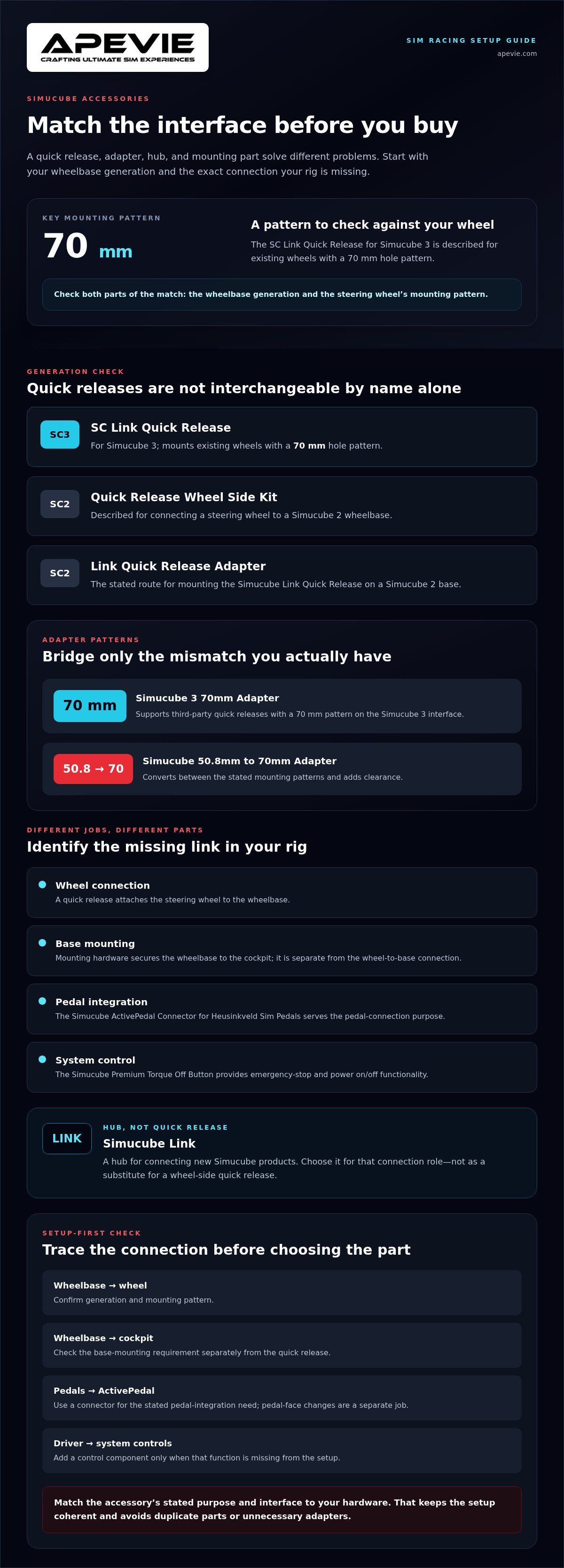
Product descriptions identify the wheelbase generation for which compatibility is stated. The SC Link Quick Release for Simucube 3 mounts existing wheels with a 70 mm hole pattern. The Simucube Quick Release Wheel Side Kit is described for connecting a steering wheel to a Simucube 2 wheelbase. The generation in the name is a compatibility cue, not a cosmetic distinction.
Match the accessory interface to the exact wheelbase generation. Start with the model you own, then compare the accessory’s stated purpose and interface with your wheel, pedals, and cockpit. This setup-first check is more reliable than choosing by similar product names or appearance.
How Simucube quick releases, adapters, and Link components differ
A quick release is the interface that lets you attach and remove a steering wheel from a wheelbase. An adapter has a different job: it bridges a specified interface or mounting-pattern mismatch. A hub connects compatible system components. These parts can look similar in a product category, but they solve different integration problems. Identify the connection you need before choosing among Simucube accessories.
SC Link Quick Release for Simucube 3
Stated compatibility: Simucube 3, with existing wheels that have a 70 mm hole pattern.
Task: Connect a wheel with that mounting pattern to the quick-release system.
Simucube Quick Release Wheel Side Kit
Stated compatibility: Described for connecting a steering wheel to a Simucube 2 wheelbase.
Task: Provide the wheel-side connection option for a Simucube 2 setup.
Simucube 2 Link Quick Release Adapter
Stated compatibility: Simucube 2.
Task: Provide the stated route for mounting the Simucube Link Quick Release.
Simucube 3 70mm Adapter
Stated compatibility: Third-party quick releases with a 70 mm pattern.
Task: Support the connection between the named pattern and the Simucube 3 interface.
Simucube 50.8mm to 70mm Adapter
Stated compatibility: Converts a 50.8 mm mounting pattern to 70 mm and adds clearance.
Task: Address that pattern mismatch while providing additional space.
Simucube Link
Stated purpose: Hub for connecting new Simucube products.
Task: Provide a central connection point for those products.
Choosing a Simucube quick release for your wheelbase
Start by matching the named wheelbase generation, then check the wheel’s mounting pattern. The SC Link Quick Release for Simucube 3 is described for existing 70 mm-pattern wheels, while the Simucube Quick Release Wheel Side Kit is described for Simucube 2. The Simucube 2 Link Quick Release Adapter is a separate route for mounting the Link Quick Release on a Simucube 2 base. For more ecosystem context, see this in-depth Simucube 3 review.
When an adapter or Simucube Link belongs in the setup
Choose an adapter only when its stated interfaces match the mismatch in your rig. The Simucube 3 70mm Adapter supports third-party quick releases with a 70 mm pattern, while the 50.8 mm to 70 mm Adapter converts between those patterns and adds clearance. Simucube Link is not a quick release; it’s a hub for connecting new Simucube products. Compare each product’s description with your hardware, then browse Simucube accessories for the component that addresses your connection need.
Compare standout Simucube accessories by setup requirement
The right part depends on which connection or mounting task your rig is missing. A quick release connects the steering wheel to the wheelbase; an adapter bridges a stated interface or hole-pattern mismatch. Mounting hardware and pedal components solve separate problems. Use this comparison to narrow down Simucube accessories by their stated purpose, not by name alone.
| Product | Stated purpose | Named compatibility | Buyer use case |
|---|---|---|---|
| SC Link Quick Release for Simucube 3 | Mounts existing wheels with a 70 mm hole pattern | Simucube 3; wheels with a 70 mm hole pattern | You need the stated Link quick-release connection for a compatible wheel |
| Simucube Quick Release Wheel Side Kit | Connects a steering wheel to a wheelbase | Simucube 2 wheelbase | You need the wheel-side quick-release component for a Simucube 2 setup |
| Simucube 3 70mm Adapter | Supports third-party quick releases with a 70 mm pattern | Simucube 3; third-party 70 mm quick releases | Your wheel connection uses a compatible third-party quick release |
| Simucube Wheel Base Mount Dims | Wheelbase mounting hardware | Simucube 2 | You’re mounting a Simucube 2 and need to compare the mount’s listed dimensions with your rig |
| Simucube ActivePedal Connector for Heusinkveld Sim Pedals | Connects compatible Heusinkveld pedals to Simucube ActivePedal | Compatible Heusinkveld pedals and Simucube ActivePedal | You need pedal integration, not a change to the pedal face |
| Sprint Baseplate Mount and ActivePedal Connector pack | Addresses the named baseplate mounting and ActivePedal connection tasks | Heusinkveld Sprint and ActivePedal connection, as stated in the product name | You need the relevant mounting and connection components together |
Wheelbase mounting and steering-wheel connection options
The Simucube Wheel Base Mount Dims is a mounting component for Simucube 2. Use its listed dimensions to check physical fit against your cockpit. Don’t treat mounting hardware as a wheel quick release. The Simucube 3 70mm Adapter supports a third-party quick release with that pattern, while the SC Link Quick Release is the wheel connection itself for existing wheels with a 70 mm pattern. For wheel selection context, see The Best F1 Steering Wheels for Professional Sim Racing in 2026.
ActivePedal and Heusinkveld integration components
The Simucube ActivePedal Connector for Heusinkveld Sim Pedals addresses the connection between compatible Heusinkveld pedals and Simucube ActivePedal. A Sprint Baseplate Mount and ActivePedal Connector pack addresses mounting and connection, while a pedal-face plate serves a different purpose: changing the pedal’s contact surface. Keep those requirements separate. For a broader look at pedal choice, read The Ultimate Guide to Sim Racing Pedals: Engineering Consistency and Precision.
Avoid compatibility mistakes with a setup-first buying checklist
A second adapter can’t fix a connection chain you haven’t mapped. Before selecting simucube accessories, write down what you own and what the new component needs to connect, mount, or control. Compare each product description with your existing mounting pattern and connection hardware instead of relying on a similar-looking part or familiar product name.
- 1. Record the wheelbase model. Note the exact generation, such as Simucube 2 or Simucube 3. Use that model to narrow down quick releases and adapters whose stated compatibility names the same base.
- 2. Identify the wheel interface. Check the wheel’s stated hole pattern and the connection hardware already attached to it. Compare those details with the accessory description. For example, the SC Link Quick Release for Simucube 3 is described for existing wheels with a 70 mm hole pattern.
- 3. Map every part in the connection chain. Trace the route from wheel to wheelbase, including any quick release or adapter already installed. Before buying another one, determine which two interfaces it must join and whether a component in that chain already does the job.
- 4. Check the pedal requirement. Decide whether you need to connect compatible Heusinkveld pedals to Simucube ActivePedal or address a separate mounting or pedal-face requirement. An ActivePedal connector and a baseplate mount aren’t interchangeable with pedal-face plates or dampers.
- 5. Check cockpit mounting and system control. Compare wheelbase mounting hardware with the cockpit’s existing mounting points and the product’s stated dimensions or compatibility. If you need emergency-stop and power on/off functionality, the Simucube Premium Torque Off Button is described for that control task.
Check the wheelbase, wheel pattern, and connection chain
Mounting is a separate interface from the wheel quick release. Before adding wheelbase hardware, note how the base attaches to your cockpit and compare that arrangement with the mount’s product description. For more on the structural side of a rig, see The Ultimate Sim Rig Guide: Building a Professional Foundation in 2026. Use it for cockpit context, then compare your hardware with the accessory’s stated details.
Confirm pedal and control requirements before checkout
Write down the function you need before choosing a pedal component: ActivePedal connection, baseplate mounting, pedal-face change, or damping. Keep them as separate requirements, and don’t assume one part covers another. Apply the same discipline to controls: choose the Premium Torque Off Button for its stated emergency-stop and power-control function, not as a substitute for an unrelated connection component.
Confirm the wheelbase, interface, and intended function before adding an accessory. Once your checklist matches a specific requirement, browse Apevie Simulators’ Simucube accessories and compare the product descriptions with your rig.
Build a coherent Simucube setup with the right accessory combination
A clean rig doesn’t need every accessory in the catalogue. It needs the parts that complete your specific connection or integration path. Before combining components, name the wheelbase, identify the hardware it must connect to, and define the job you want the accessory to do. That approach keeps your setup focused and helps prevent duplicate quick releases, adapters, or mounting parts.
Choose only the components that complete your setup
- For a Simucube 3 wheel connection: If your existing wheel has a 70 mm hole pattern, the SC Link Quick Release for Simucube 3 is described as the relevant connection option. If you’re working with a third-party quick release instead, the Simucube 3 70mm Adapter has a different stated role: supporting third-party quick releases with a 70 mm pattern. Compare the descriptions with the hardware you already have before choosing.
- For a Simucube 2 wheel connection: The Simucube Quick Release Wheel Side Kit is described for connecting a steering wheel to a Simucube 2 wheelbase. If your requirement is to mount the Simucube Link Quick Release on Simucube 2, the Simucube 2 Link Quick Release Adapter is the stated route. These parts address different interfaces, so don’t assume one replaces the other.
- For ActivePedal integration: Separate the connection, mounting, and contact-surface requirements. The Simucube ActivePedal Connector for Heusinkveld Sim Pedals connects compatible Heusinkveld pedals to Simucube ActivePedal. A baseplate mount addresses mounting, while a pedal-face plate concerns the pedal’s contact surface. Choose according to the actual task.
- For system control: If you need emergency-stop and power on/off functionality, the Simucube Premium Torque Off Button is described for those functions. It solves a control requirement rather than a wheel, cockpit, or pedal connection.
Explore the Simucube accessories collection
Apevie Simulators specializes in custom high-performance racing simulators and professional PC-based hardware. Its Simucube accessories fit into a complete setup alongside components such as Simucube wheelbases, Heusinkveld pedals, and premium steering wheels. Use the collection once you’ve identified your interface or integration need, and compare each product’s stated purpose and compatibility with the equipment on your rig. The right combination completes the setup you have without adding parts for a job already covered.
Choose the right parts for a cleaner, more coherent rig
A well-integrated setup starts with a clear job for every component. Before choosing Simucube accessories, identify your wheelbase generation, the interface your wheel or pedals use, and the function you need the part to perform. Product descriptions distinguish selected Simucube 2 and Simucube 3 accessories, so match those details to your hardware rather than assuming similar names mean interchangeable connections.
The collection covers distinct needs, including quick-release and mounting hardware, Simucube Link, torque-off controls, and ActivePedal components. The SC Link Quick Release for Simucube 3 is described for existing wheels with a 70 mm hole pattern, while the Simucube Quick Release Wheel Side Kit is described for connecting a steering wheel to a Simucube 2 wheelbase. For pedals, distinguish an ActivePedal connector from mounting hardware or a pedal-face component before adding anything to your rig.
With your setup requirement in mind, browse Simucube accessories and compare each product’s stated interface and purpose with your existing hardware. A considered choice helps keep your cockpit functional without adding parts that duplicate another component’s role. For a complete PC-based rig, explore Apevie Simulators’ custom simulator builds and white-glove installation service.
Frequently Asked Questions
Does every Simucube accessory work with both Simucube 2 and Simucube 3?
No, compatibility depends on the individual accessory. Product descriptions identify specific generations for several items, including Simucube 2 wheel connection hardware and Simucube 3 quick-release options. Start with your exact wheelbase model, then compare its interface with the accessory’s stated compatibility. Don’t assume similarly named components are interchangeable across generations. This simple check helps narrow down the right part before you buy.
Can I use a third-party steering wheel with a Simucube 3?
Yes, if the wheel’s mounting pattern and connection path match the accessory’s stated compatibility. The SC Link Quick Release for Simucube 3 is described for mounting existing wheels with a 70 mm hole pattern. The Simucube 3 70mm Adapter is described for third-party quick releases using that pattern. Check your wheel’s hole pattern and existing connection hardware before selecting either option.
What is the difference between a quick release and a wheel-side kit?
A quick release is the interface that lets you attach a steering wheel to the wheelbase and remove it. The Simucube Quick Release Wheel Side Kit is specifically described as connecting a steering wheel to a Simucube 2 wheelbase. Other quick-release products may serve different interfaces or wheelbase generations. Compare each product’s stated role and compatibility rather than choosing by a similar name or appearance.
Do I need Simucube Link for my rig?
Simucube Link is described as a hub for connecting new Simucube products. Whether it belongs in your setup depends on the products you intend to connect and how your system is arranged. Its stated hub role is the starting point. It doesn’t replace a wheel-side quick release, a wheelbase mounting component, or an adapter, since each addresses a different part of the rig.
Can I connect Heusinkveld pedals to Simucube ActivePedal?
The Simucube ActivePedal Connector for Heusinkveld Sim Pedals is described as a connector cable with a PCBA that enables a direct connection to Simucube ActivePedal. A separate Sprint accessory pack is described as combining a baseplate mount and connector for Heusinkveld Sprint. Match the product description to your pedal model and task, and distinguish connecting pedals from mounting them or changing the pedal face.
What does a Simucube torque-off button do?
The Simucube Premium Torque Off Button is described as an emergency-stop solution with power on/off functionality. It’s an operating control, not a wheel connection or mounting component, so consider it separately from quick releases and adapters. Compare its product description with your wheelbase configuration and the control function you need. For Simucube accessories or a complete custom PC-based racing simulator, explore Apevie Simulators’ collection.