The Smart Entry-Level Racing & Flight Simulator Setup
Build It Once. Race for Years.
Getting into sim racing is exciting. It is also one of the easiest ways to waste money if you start in the wrong place.
Between budget wheel stands, desk clamps, mixed-brand gear, and endless opinions online, many new sim racers end up stuck in a frustrating cycle of small upgrades that never quite fix the real problem. The result is a setup that feels unstable, inconsistent, and eventually gets replaced piece by piece.
This guide takes a different approach.
Instead of starting cheap and upgrading endlessly, we will walk through how to build an entry-level sim racing setup the right way from the start. The goal is simple: a solid foundation that feels good on day one and still makes sense when you take sim racing seriously months or years later.
Step One: The Foundation That Matters Most
Your Cockpit
If there is one place not to cut corners, it is the cockpit.
A flimsy stand or desk-mounted wheel introduces flex, movement, and vibration that completely undermines even high-quality hardware. Force feedback detail gets lost, braking becomes inconsistent, and the entire experience feels less connected.
The smart starting point is an aluminum profile cockpit.
This is the same modular, rigid construction used in professional and high-end sim racing setups. There is no flex under load, which means everything your wheel and pedals output is transmitted directly to you, not absorbed by a shaking frame.
An aluminum profile cockpit is also future-proof. You can add stronger wheels, stiffer pedals, accessories, or even motion later without replacing the chassis.
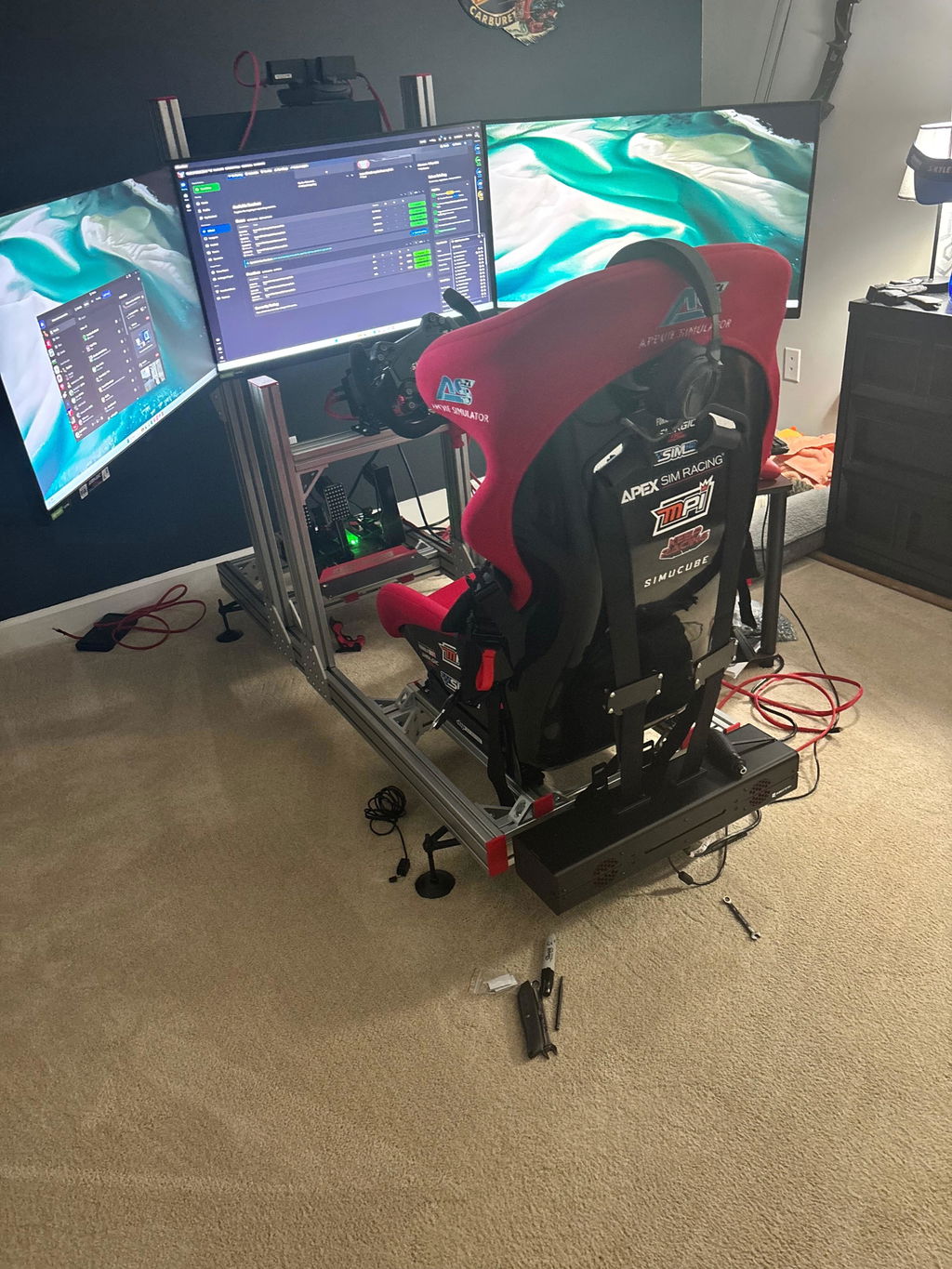
Our baseline recommendation is the Apevie RTR Aluminum Cockpit. It is built to handle direct drive wheels properly and is designed to be a one-time purchase that will not limit your progression.
The same aluminum profile approach also benefits flight simulation. If you later decide to add a yoke, joystick, throttle quadrant, or rudder pedals, a rigid cockpit allows proper mounting without redesigning your setup. This makes it a versatile foundation for sim racers who may want to explore flight simulation alongside racing.
Step Two: Comfort and Consistency
Choosing the Right Seat
Once your cockpit is solid, the next priority is how you sit in it.
Consistency in sim racing comes from being planted and comfortable. A seat that moves, flexes, or lacks support makes it harder to brake consistently and maintain control during long sessions.
There are two smart paths here.
A dedicated sim racing bucket seat, such as the Apevie M3, is designed specifically for this environment. The ergonomics and lateral support keep you locked in place, especially under hard braking and cornering.
For those looking to maximize value, a real car seat sourced from a junkyard or marketplace can be an excellent alternative. Many modern sports or premium car seats offer outstanding comfort and support at a fraction of the cost. The key is ensuring it mounts securely to your cockpit.
Step Three: Your Control Ecosystem
Keep It Simple, Keep It Compatible
One of the most common mistakes beginners make is mixing wheel bases, wheels, pedals, and software from different brands without understanding how they work together.
The golden rule for starting out is simple: choose one ecosystem for your wheel base and steering wheel.
When your core controls come from the same brand, everything works through a single software platform. Setup is faster, compatibility is guaranteed, and troubleshooting is minimal.
Brands like Moza and Fanatec dominate the entry and mid-level space for a reason. Their direct drive systems offer excellent performance, strong software support, and upgrade paths that make sense. A bundle such as a Moza R5 or similar provides more than enough fidelity and torque for serious learning and competitive racing.
Pedals are often the first component people upgrade later, especially to load cell brakes. That is not a problem. A properly built cockpit like the Apevie RTR can handle extremely stiff brake pedals without any flex, so your upgrade path stays wide open.
This ecosystem-based approach also translates well to flight simulation, where keeping controls and software within compatible systems reduces setup time and configuration complexity.
Step Four: Making the Setup Fit Your Space
A solid rig does not have to take over your home.
One option is a built-in monitor mount attached directly to the cockpit, creating a compact, all-in-one racing station that is always ready to drive. Another option is a standalone monitor stand, which offers more flexibility for shared spaces or dual-use setups with an existing desk.
This flexibility is also ideal for drivers who switch between sim racing and flight simulation, allowing one cockpit to support both with minimal adjustment.
Why a Smart Start Beats a Basic Start
Starting basic or cheap often feels safer, but it usually leads to more spending in the long run.
A desk clamp or wheel stand limits force feedback and consistency, which pushes drivers to upgrade sooner than planned. Mixed-brand setups introduce software friction and compatibility issues that sap enjoyment. Dead-end gear choices leave no room to grow without replacing everything.
Starting with a solid aluminum cockpit, a clean ecosystem, and quality components changes that equation entirely.
You get a stable platform that lasts. You get controls that feel predictable and trustworthy. And when you want to improve, you add to your setup instead of rebuilding it.
The result is a rig that lets you focus on learning racecraft, improving lap times, and enjoying the process rather than fighting your equipment.
This Is Exactly How We Think at Apevie
A smart start should never be a dead end.
That philosophy is what led to the Apevie SP Turn-Key Entry-Level System and AS8 RTR Turn-Key Racing Simulator. They both take everything outlined above and deliver it as a complete, ready-to-race package built around a no-flex cockpit, quality Moza hardware, and proper setup from day one.
The same modular design philosophy also allows Apevie systems to adapt to flight simulation as a secondary use case or future expansion.
It is designed for drivers who want to get it right the first time.