Best VR Headset for Sim Racing: How to Choose in 2026
The highest-resolution headset in the showroom may be the wrong one for your cockpit. The best vr headset for sim racing is the one your fit, PC, and driving habits can sustain. Sharp track markers matter less if heat, pressure, or unstable frame rates pull your attention away from the race.
It’s reasonable to focus on display specs first. Headsets such as the Meta Quest 3 and Pimax Crystal Light offer different routes into PC VR, but headline resolution alone won’t tell you how clearly you’ll see through the lenses, how comfortable a long stint will feel, or what your graphics card can reliably drive.
This guide compares the factors that shape cockpit performance: lens clarity, fit, comfort, refresh rate, setup demands, and the PC hardware behind the image. You’ll learn how to weigh immersion against ease of use and choose a headset that suits your rig, whether you’re planning a first premium build or refining an established simulator. We’ll also look at how VR fits into a complete setup, including Apevie Simulators’ VR headset and turnkey racing simulator options.
Key Takeaways
- Judge a headset by what you can see from the seated cockpit position, including track markers and instrument details, not resolution alone.
- Compare VR with triple monitors based on your priorities for immersion, peripheral awareness, comfort, and available space.
- Use a practical buyer framework to check your PC’s capability, prioritize fit, and plan headset connections before choosing the best vr headset for sim racing.
- Match the headset to your wheel base, pedals, cockpit, and intended use so the complete simulator works as a coherent system.
- See how a custom build and white-glove installation can help bring a PC-based VR simulator together.
What Makes a VR Headset Work Well for Sim Racing?
A convincing cockpit view is a major part of VR’s appeal: the dashboard appears around you, the track stretches ahead, and looking toward a corner feels different from watching a fixed screen. But immersion is only one measure of a good sim racing setup. The best vr headset for sim racing must also suit your comfort, driving habits, and PC. A headset is one component of the rig, not a shortcut to faster lap times.
Virtual reality creates a simulated environment by presenting a separate view to each eye and updating that view as you move your head. For a concise overview of the underlying technology, see What is Virtual Reality? In the cockpit, your view can respond when you turn your head instead of remaining fixed in front of you. The effect can feel more natural, but how useful and comfortable it is depends on the driver and the rest of the setup.
How VR changes the view from the cockpit
With a headset on, your eyes receive slightly different images that combine to create a sense of depth. Head tracking adjusts the view as you look around, so you can glance toward an apex or check a corner exit by turning your head. On a fixed monitor, you can still see the corner, but the displayed viewpoint doesn’t follow your movement in the same way.
That change in perspective can make the cockpit feel more present. It doesn’t guarantee better spatial awareness, consistency, or pace. Those depend on factors such as your visual comfort, game performance, and how well the headset fits and stays aligned during a session.
Who is most likely to enjoy sim racing in VR?
VR may suit drivers who value an enveloping cockpit view and are comfortable wearing a headset while driving. It can be compelling for a short practice session when visual immersion is the main attraction. The trade-off is practical: a headset covers your face, can feel warm or restrictive, and adds setup steps compared with sitting down in front of a monitor.
Longer league races, endurance stints, and training sessions make those considerations more noticeable. If comfort or awareness of your physical controls matters more than a fully enclosed view, monitors may be a better fit. Preferences vary, and neither option is universally superior. Choose VR for its perspective if you can sustain it comfortably, then judge the experience as part of your full cockpit and PC setup.
Which VR Headset Features Matter Most in a Sim Racing Rig?
In the cockpit, clarity means more than a large resolution number. You need to pick out mirrors, dashboard information, braking markers, and the shape of a corner without fighting blur or moving your head into a tiny clear patch. The best vr headset for sim racing balances those visual demands with fit, connection, tracking, and the graphics performance your PC can sustain.
VR presents a separate image to each eye and adjusts the view as you move. Virtual Reality Technology Explained offers a useful overview. For headset shopping, the practical question is how the display and optics render the view from your seated driving position.
Display, optics, and cockpit visibility
Panel resolution describes how many pixels the displays contain, but it doesn’t tell you by itself how sharp the image will look. Lens design, the area that stays clear when your eyes move, and usable field of view all affect whether mirrors, instruments, and distant reference points remain easy to read. A wide view can feel more encompassing, while a narrow sweet spot may require careful headset positioning.
Use the specifications below as a starting point, not a final verdict. Confirm current specifications and compatibility in each manufacturer’s documentation before buying.
| Headset | Published display details | Trade-off and likely fit |
|---|---|---|
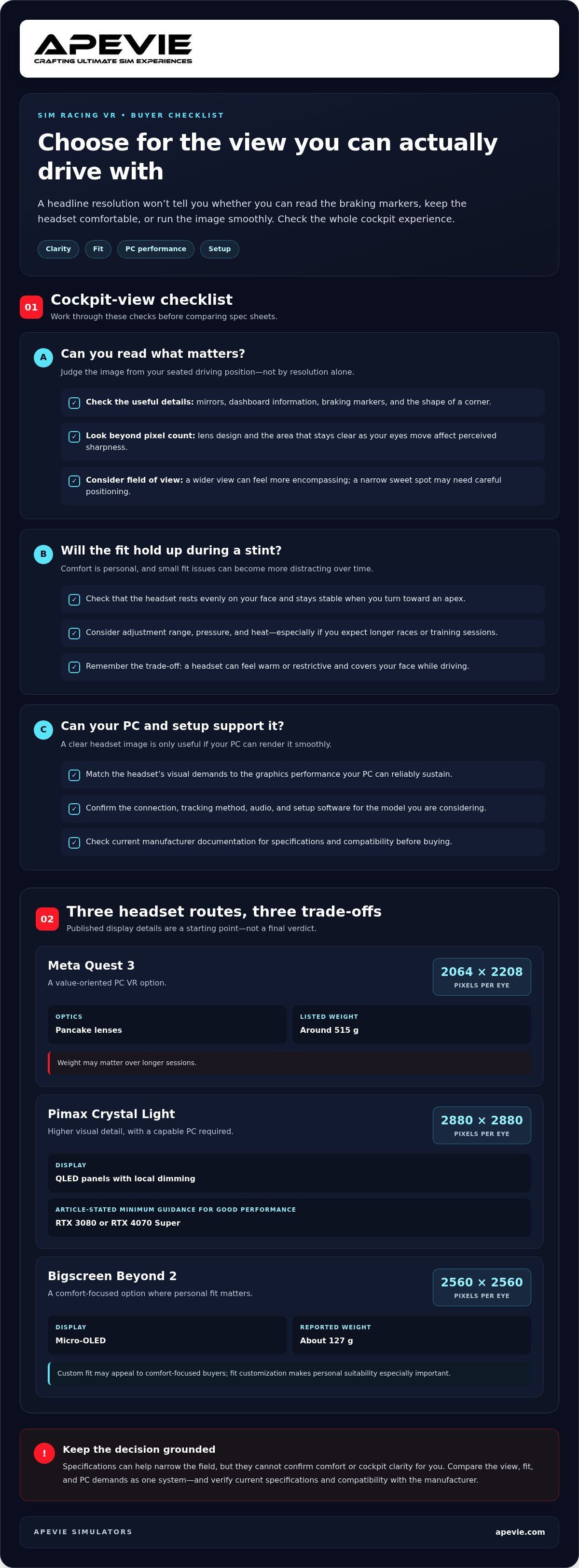
| Meta Quest 3 | 2064 × 2208 pixels per eye; pancake lenses | A value-oriented PC VR option; its listed weight is around 515 g, which may matter over longer sessions. |
| Pimax Crystal Light | 2880 × 2880 pixels per eye; QLED panels with local dimming | Higher visual detail calls for a capable PC; the stated guidance cites an RTX 3080 or RTX 4070 Super as a minimum for good performance. |
| Bigscreen Beyond 2 | 2560 × 2560 pixels per eye; Micro-OLED | Custom fit and a reported weight of about 127 g may appeal to comfort-focused buyers; fit customization makes personal suitability especially important. |
Fit, tracking, and PC compatibility
Fit is something you feel, not just a line on a spec sheet. Check whether the headset rests evenly on your face, stays stable as you turn toward an apex, and has an adjustment range that suits your head and eye position. Pressure and heat can become more distracting as a session gets longer.
Tracking method, cable or wireless connection, audio, and setup software also shape daily use. Don’t assume that every model uses the same connection or tracking setup. Check the manufacturer’s current instructions, then confirm your PC can render the target image smoothly. For a broader look at how components come together, explore this professional sim rig guide.
VR Headset vs. Triple Monitors: Which Sim Racing Setup Fits You?
VR isn’t automatically the right choice for every racer. It gives you a head-tracked cockpit view, while triple monitors keep the image on fixed displays and leave your face and physical controls unobstructed. The better fit depends on what you value, how long you race, and how much space and setup effort your rig can accommodate. Neither option replaces practice, skill, or a well-configured simulator.
Separate the technical difference from personal preference: VR changes viewpoint as you move your head; monitors present a stable image across one or more screens. Comfort, awareness, and which view feels more natural vary from driver to driver. If you race in a specific title, review its current hardware and VR guidance too. The iRacing and Virtual Reality starting point is the official platform site, where you can explore the title and its current information.
When VR may suit your driving better
Choose VR if an enveloping first-person cockpit is central to what you enjoy and you’re comfortable wearing a headset for the length of your sessions. Looking toward a corner can feel more direct, but the headset also limits your view of the physical room. Consider fit, heat, and how easily you can reach controls or respond to someone nearby. Those trade-offs may matter more during long league races than during short practice runs.
When monitors may be the more practical choice
A triple-monitor setup may suit drivers who want a broad display area without wearing a headset, need quick access to their surroundings, or spend extended periods at the rig. A single screen offers a simpler, more compact arrangement, though it gives you less display area than three screens. Monitors also provide a consistent physical reference point, while VR’s view depends on the headset and software setup. For additional tactile feedback without relying on a headset, explore Apevie’s professional haptic systems guide.
| Setup | Potential strengths | Consider if |
|---|---|---|
| VR headset | Head-tracked, immersive cockpit perspective | You’re comfortable wearing a headset and can manage its fit, setup, and limited view of the room. |
| Triple monitors | Wide, stable display with an unobstructed view of your space | You have room for multiple screens and prioritize long-session convenience and easy access to controls. |
| Single screen | Simpler, compact display arrangement | You prefer a fixed view or have limited space, and accept a narrower display area. |
To choose the best vr headset for sim racing, compare your full routine, not just the view: session length, room layout, physical access, and tolerance for wearing a headset. If you’re planning a complete simulator, Apevie’s professional sim rig guide can help you consider how display choice fits into the wider setup.
How to Choose a Sim Racing VR Headset: A Practical Buyer Framework
A headset can look ideal on a spec sheet and still be a poor match for your racing routine. Use this framework to narrow your options around your games, PC, comfort, and cockpit, rather than treating the headset as an isolated purchase.
- Define how you’ll use it. List the racing titles you play, the visual experience you want, and whether your typical sessions are short practice runs or longer races. This helps you decide how much to prioritize immersion, ease of setup, and sustained comfort.
- Check PC readiness. Compare your computer’s components with the current system requirements for each headset and the games you intend to run. Don’t rely on a generic GPU rule: performance depends on the complete PC, software settings, and the visual demands you choose.
- Prioritize fit. Consider facial pressure, adjustability, heat, and stability while turning your head. A headset that feels acceptable for a quick test may feel different over your usual session length.
- Compare the view in driving terms. Look beyond resolution. Consider lens clarity, the usable sweet spot, field of view, and whether mirrors, instruments, and track references are legible from your seated position.
- Plan how it fits the rig. Check the headset’s current manufacturer documentation for PC requirements, supported connections, tracking setup, and software. Then account for seating position, wheel clearance, cable routing, and how the headset works alongside your cockpit and controls.
Verify model-specific requirements before buying, since connection options and PC compatibility vary. Think through the whole simulator too: wheel base, pedals, display, and any motion or haptic equipment can affect how the setup is arranged and used. A coordinated build helps prevent a visually capable headset from becoming awkward to wear or difficult to integrate.
Practical trade-offs: VR’s strengths are an immersive, head-tracked view and a cockpit perspective that changes as you look around. Compromises can include headset pressure, heat, cable or software setup, and less access to your physical surroundings. Whether immersion outweighs those trade-offs is personal. The best vr headset for sim racing is the one whose visuals, fit, and setup your PC and routine can sustain.
For help matching VR to a complete PC-based rig, explore Apevie Simulators’ turnkey racing simulator options.
Build a Complete VR Sim Racing Setup with Apevie
A VR headset doesn’t operate in isolation. Its visual demands affect the PC, while its fit and cable routing need to work with your seating position, wheel, and cockpit. A clear view matters, but so does being able to turn your head freely, reach the controls, and settle into the driving position you’ll actually use. Choosing the headset alongside the rest of the simulator helps make those decisions fit together.
Coordinate VR with the rest of the simulator
Apevie Simulators builds custom, high-performance PC-based racing simulators, with VR as part of a complete system matched to the driver and intended use. That means considering the headset alongside the PC, cockpit, wheel base, and pedals, rather than treating it as a standalone upgrade.
For example, a Simucube wheel base, Heusinkveld pedals, or Sigma Integrale motion system each plays a different role in the rig. The cockpit and seating position influence where the headset sits relative to your eyes and wheel, while the PC must support the chosen VR experience. The right combination depends on your priorities and the wider build, not a preset specification applied to every driver.
Choose a build path that matches your goals
If you’re assembling a simulator from the ground up, a Turnkey Racing Simulator Package brings the major decisions into one coordinated project. If you already have a rig, selecting individual components lets you focus on the part you want to add or refine. Either route benefits from looking at the system as a whole, especially when VR needs to work alongside existing controls, cockpit hardware, and PC components.
Apevie’s white-glove installation service brings the simulator into your space as a complete setup. The goal is a considered, professional-grade build tailored to the project, not a collection of impressive parts that may not work well together.
If you’re deciding whether to add a headset or planning a new rig, Apevie can help you put those choices in context. The best vr headset for sim racing is only one element of a system that should suit your PC, cockpit, and driving habits. Explore Apevie turnkey racing simulators and professional-grade components, including VR headsets, or discuss the simulator parts you need for your build.
Choose a VR Setup That Fits Your Driving
The best vr headset for sim racing isn’t simply the model with the biggest resolution number. It’s the headset whose visual clarity, fit, and connection work for your PC and the sessions you actually drive. Check manufacturer requirements, consider comfort over a full stint, and weigh VR’s immersive perspective against the stable, unobstructed view of monitors.
Most importantly, treat the headset as one part of the simulator. Your PC, cockpit, wheel base, pedals, and display choices all shape how well the complete rig works together. Apevie Simulators builds custom, high-performance PC-based racing simulators. Its white-glove installation service brings the finished setup into your space.
Whether you’re planning a complete build or refining an existing rig, start with the driving experience you want and build around it. Explore Apevie turnkey racing simulators and professional-grade components, and take the next step toward a setup that fits your cockpit and your racing.
Frequently Asked Questions
Is VR better than triple monitors for sim racing?
VR suits drivers who want an immersive, head-tracked cockpit view, while triple monitors provide a broad, fixed display and leave your face uncovered. Neither is best for every racer. Consider session length, comfort wearing a headset, available space, and whether you prefer quick access to your surroundings. Your driving habits and personal preference matter more than choosing the setup with the most dramatic presentation.
What should I look for in a VR headset for sim racing?
For the best vr headset for sim racing, weigh cockpit visibility alongside fit and PC demands. Check lens clarity and the usable sweet spot, which affect how easily you can read mirrors, instruments, and track markers. Consider field of view, comfort, weight distribution, adjustability, and connection requirements too. Resolution is useful for comparison, but it can’t tell you by itself how clear the image will look from your seated driving position.
Can I use any VR headset for sim racing?
No. A headset needs to work with your PC, the racing titles you play, and the connection and tracking setup those products support. Requirements vary by model, so check the headset manufacturer’s current documentation and the game’s compatibility information before buying. Also consider setup software and whether your computer can run the headset and simulation together. A headset designed for general VR use isn’t automatically the right match for PC racing.
Does VR make you faster in sim racing?
No headset can guarantee faster lap times. VR changes your viewpoint and can make the cockpit feel more immersive, but pace still depends on your driving, practice, vehicle setup, and the performance of your complete system. Some drivers prefer the depth and head-tracked view; others feel more comfortable with monitors. Choose VR for the experience and workflow that suit you, not as a substitute for developing your technique.
What PC do I need for a sim racing VR headset?
The PC you need depends on the specific headset, racing simulation, and visual settings you plan to use. Your graphics card is especially important, but overall performance depends on the rest of the system too. Compare your PC with the manufacturer’s current minimum and recommended requirements, and check the game’s requirements as well. For demanding headsets or higher visual settings, plan around sustained performance rather than one component’s headline specification.
Can VR be uncomfortable during long sim racing sessions?
Yes. Facial pressure, heat, weight distribution, and a headset that shifts when you turn your head can become distracting during a long race. Fit also varies between drivers, so a comfortable short test doesn’t always predict how the headset will feel over your usual session. Check the adjustment range and how securely it sits, then assess comfort during practice before committing to lengthy league or endurance stints.
Is a VR headset enough to build a complete sim racing setup?
No. A VR headset provides the visual experience, but a PC-based simulator also needs a compatible computer and racing software, plus a cockpit, wheel base, and pedals suited to your goals. The components should work together, including the headset connection and the PC’s ability to run the simulation. Apevie Simulators builds custom high-performance racing rigs and provides white-glove installation. Explore turnkey builds, simulator parts, and professional-grade components.