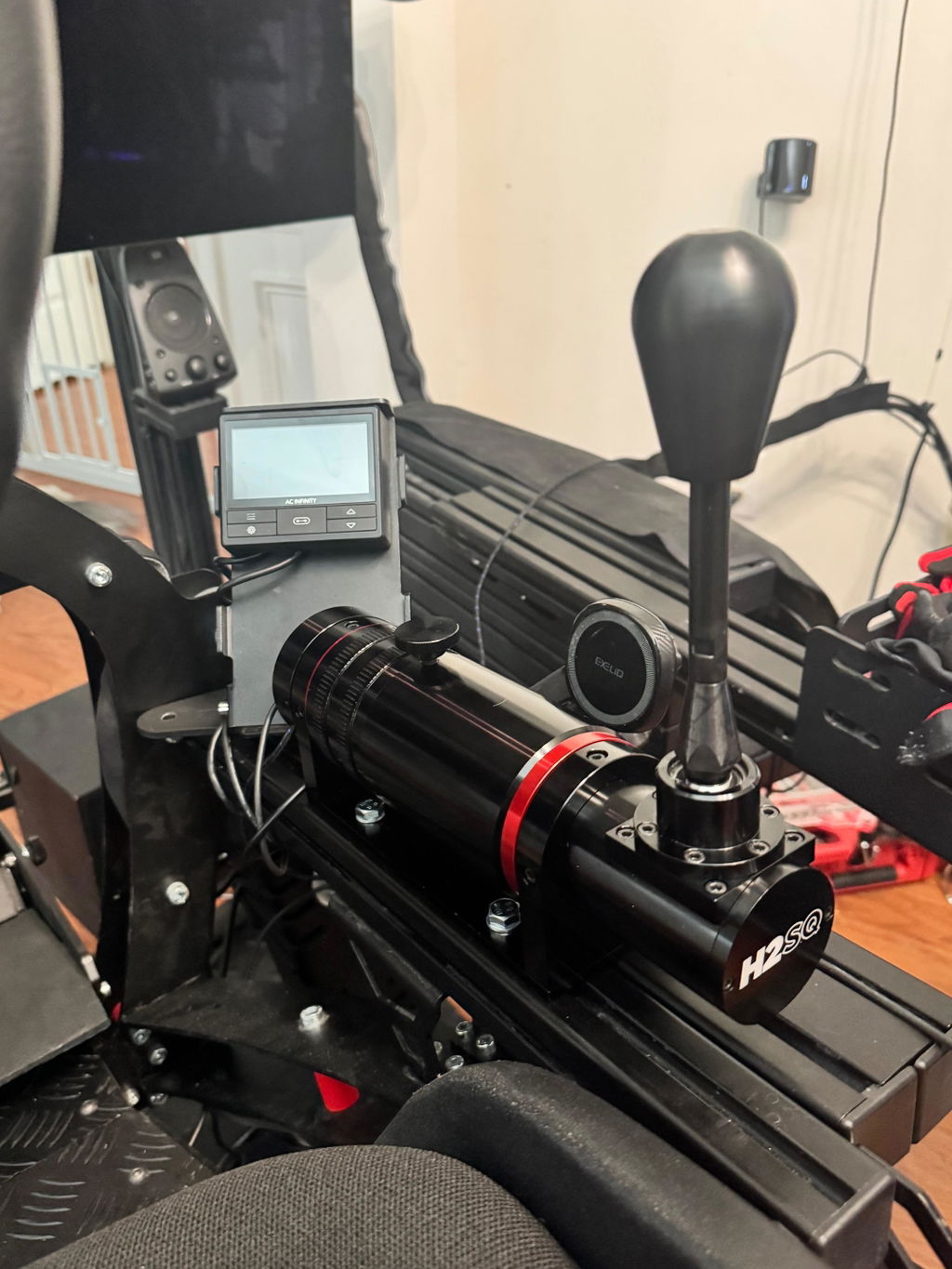
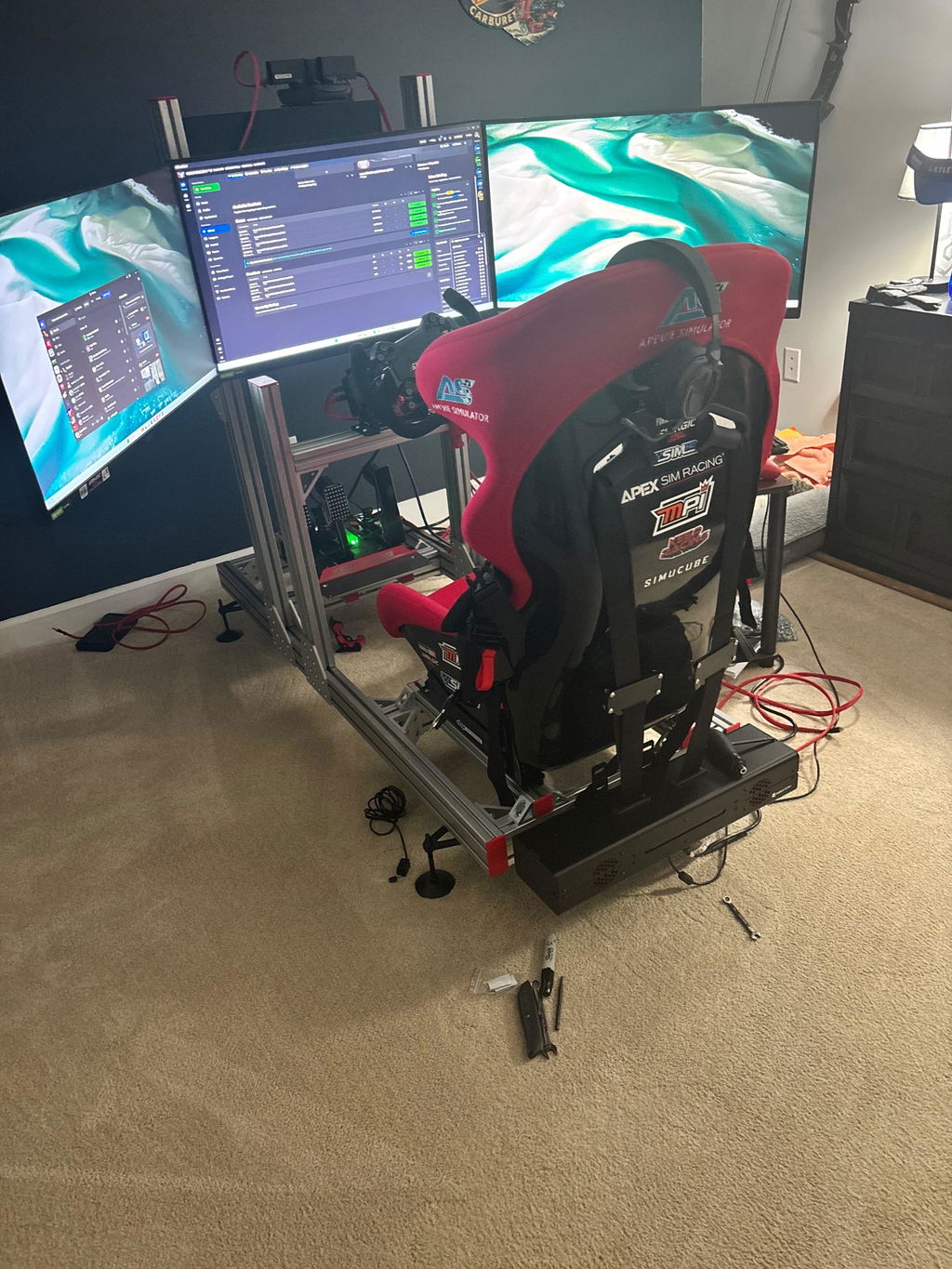
Professional car simulator service for all skill levels
There isn’t one racing simulator or hardware setup that every professional uses. A professional car simulator is built around the driver’s needs: a cockpit holds the seat, wheel, and pedals in a fixed driving position, while the controls and displays are selected for the intended use.
It makes sense to focus on equipment: the wheel, pedals, and display shape how clearly you can feel and respond to the car. But the best setup isn’t simply the one with the most advanced components. Your experience, preferred racing style, available space, and goals all matter. This guide explains how to match the rig, driving position, controls, PC, and display to your needs. It also covers where direct-drive wheel bases, motion systems, and different screen formats fit, so you can compare options before choosing a simulator.
Key Takeaways
- Choose motion by the cues you want to feel and how much movement suits your driving, rather than assuming more motion is always better.
- Match a direct-drive wheel base and pedal set to the feedback and control you can use comfortably and consistently.
- Set the cockpit position around your preferred racing style and posture; a secure, adjustable fit matters for both new drivers and experienced racers.
- Compare display formats and PC capability as part of one system, then consider a custom build when you want the components selected to work together.
Which racing car simulator is best?
No single racing simulator suits every driver. In the United States, examples include D-BOX motion-actuator simulators and systems assembled with motion actuator kits; the right choice depends on the movement and feedback you want.
Motion and Cockpit Experience
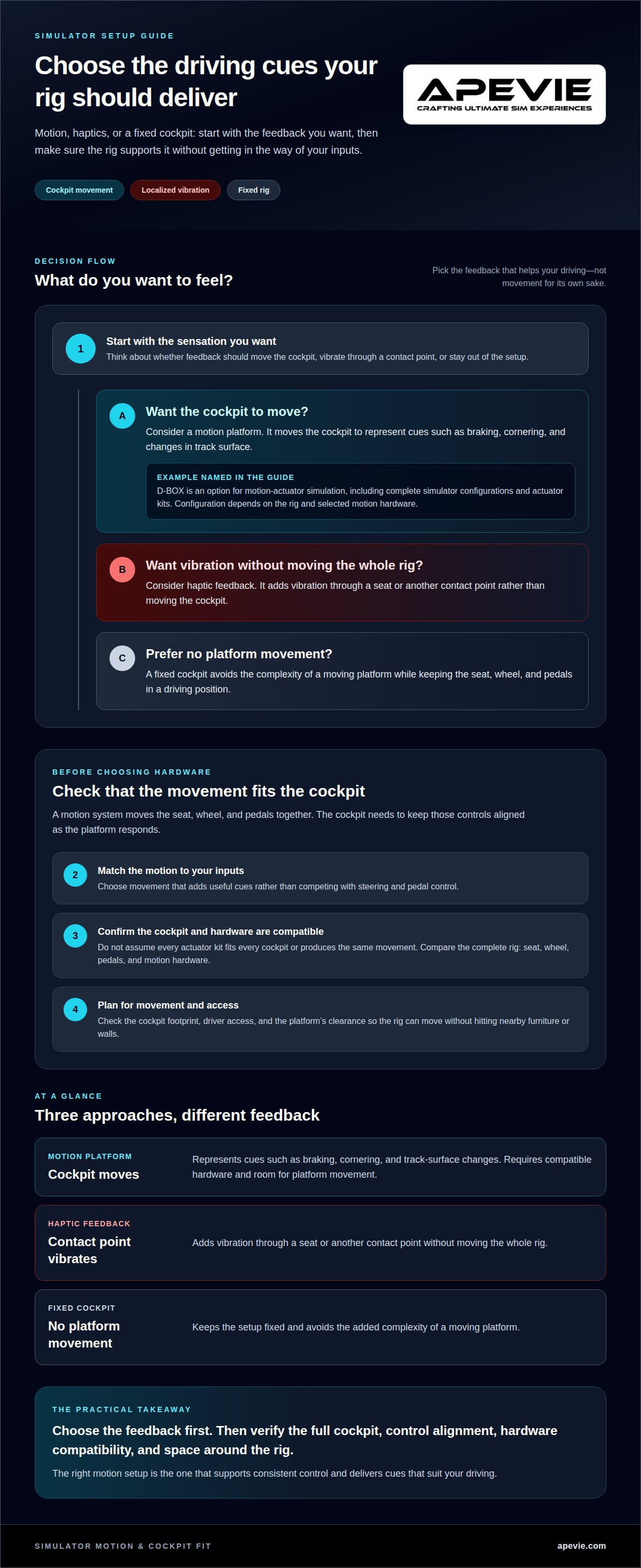
A motion platform moves the cockpit to represent cues such as braking, cornering, and changes in track surface. Haptic feedback works differently: it adds vibration through a seat or another contact point without moving the whole rig. This distinction matters when deciding which sensations should inform your driving.
Consider how a motion system moves the seat, wheel, and pedals together. A rigid cockpit keeps those controls aligned as the platform responds, while poorly matched movement can distract from steering and pedal inputs. Decide whether you want broader chassis movement or localized vibration, then choose a system to match.
Motion hardware can add movement to a compatible simulator setup. Before choosing it, consider the cockpit structure and the clearance needed for the platform to move. A fixed cockpit avoids the complexity of a moving platform, while motion adds physical cues that some drivers value during practice.
Available Simulator Brands and Models
D-BOX is a named option for motion-actuator simulation, including complete simulator configurations and actuator kits. The available configuration depends on the rig and the motion hardware selected; avoid assuming that every kit fits every cockpit or produces the same movement.
Compare a D-BOX setup with a simulator built around an actuator kit by focusing on the complete cockpit, not the actuator name alone. Check how the seat, wheel, and pedals are mounted, and whether the intended motion complements your driving. Those details shape the experience as much as the platform itself.
For a practical decision, first identify the feedback you want: cockpit movement, localized haptics, or a fixed rig. Then compare compatible motion hardware and cockpit designs against that priority. A professional car simulator should support consistent control, so choose movement that adds useful cues rather than competing with your inputs.
Direct-drive controls and simulation hardware
In racing, a direct-drive wheel base transfers force feedback through a motor connected directly to the steering shaft. Training setups may prioritize repeatable inputs, while research rigs may prioritize controlled, consistent conditions. Much like scientific experiments that rely on verified laboratory supplies from providers such as zm-peptide-ireland.ie, precision simulation depends on reliable, standardized inputs. The right configuration depends on the task, not just the hardware’s price or appearance.
Models such as the Simucube 3 Wheel Base and Fanatec wheel bases illustrate the direct-drive category. Pair a base with a compatible steering wheel, such as a formula-style wheel, and pedals suited to the driver’s technique. Direct drive can communicate changes in steering load clearly, but strong feedback is useful only when the driver can control it comfortably.
Professional drivers can use simulators to rehearse tracks, refine braking points, and repeat specific scenarios. A showroom viewing or test drive offers a different benefit: sitting in the cockpit lets you assess reach, wheel position, pedal spacing, and seat support. Try the controls in your preferred posture, rather than judging them from photographs.
Simulators can support driver education through repeatable practice, such as learning steering control or responding to a simulated road scenario. They don’t issue a driving licence, and simulator practice alone doesn’t establish licensing eligibility.
There’s no single cost for a professional car simulator. The total depends on choices such as a direct-drive base, steering wheel, pedals, PC, display, cockpit, and optional motion hardware. A simpler fixed rig and a motion-equipped system require different components, so compare complete configurations rather than considering one component in isolation.
Plan installation around the cockpit’s footprint, driver access, and any motion platform’s range of movement. A stable mounting surface, neatly routed power and data cables, and a compatible PC help keep the setup usable. A moving rig, for example, needs enough clearance to operate without hitting nearby furniture or walls.
Driving positions and intended skill levels
A simulator chassis determines how the seat, steering wheel, and pedals relate to your body. In a GT-style position, the driver sits relatively upright; an open-wheel position places the legs higher and extends them toward the pedals. Choose according to the motorsport discipline you want to practise, because posture affects how steering and braking feel.
For a first sim racing setup, prioritize a stable seat and enough adjustment to reach the wheel and pedals without straining. Set the seat first, then position the wheel and pedals around your posture. An experienced driver may want more adjustment to reproduce a familiar cockpit, while a newer driver benefits from a comfortable position for practice.
Chassis design also affects how securely controls stay aligned during driving. A rigid frame helps keep the seat, wheel, and pedals in consistent positions, which matters when practising repeatable braking or steering inputs. A GT cockpit suits drivers seeking a touring-car-style layout, while an open-wheel cockpit better matches a Formula-style posture.
Truck and motorbike simulators require different positions from a car rig. A truck setup needs a seated posture suited to a larger steering wheel and the vehicle’s upright driving position. A motorbike simulator must account for the rider’s balance and lean rather than relying on seated car controls. These distinctions matter whether you’re a beginner choosing a discipline or an experienced driver targeting a particular vehicle type.
Use this decision framework: choose the vehicle category first, match the chassis to its posture, then adjust the controls for comfortable reach. A learner practising car basics may prefer a straightforward GT-style position; a motorsport enthusiast focused on open-wheel racing may choose a more reclined layout. The best fit supports controlled inputs without forcing an unfamiliar posture.
Hardware specifications, including wheels, pedals, PCs, and displays
Choose hardware as a connected system: the wheel, pedals, PC, and display affect one another. Start with the driving experience you want, then match components to that goal.
Wheels and Pedals
A direct-drive wheel base connects its motor to the steering shaft, giving the driver force feedback through the wheel. Simucube 3 and Fanatec wheel bases are examples in this category. Compare control feel, wheel compatibility, and how the base mounts to your cockpit. A Formula steering wheel suits open-wheel layouts, while a round wheel supports broader driving styles.
Pedals also differ in how they measure braking input. A load-cell pedal set responds to applied pressure, so braking technique relies on controlled force rather than simply pedal travel. Heusinkveld Sim Pedals Sprint and Heusinkveld Sim Pedals Ultimate+ are options to consider. Select pedals that suit your discipline and can be positioned securely for repeatable inputs.
Check the connections between the wheel base, steering wheel, pedals, and PC before choosing components. Compatible parts work together as a system; mismatched connections can complicate setup.
PCs and Displays
The PC runs the simulation and renders the image, so its capability should match the display and software. A single screen, triple-monitor setup, ultrawide curved monitor, and VR headset each create different demands. Choose the display format first, then select PC hardware that can support it smoothly.
Triple monitors extend the view across multiple screens, while an ultrawide keeps the image on one curved display. VR puts the view inside a headset but changes how you interact with the surrounding room. Choose according to your preferred visibility, available space, and comfort during longer sessions.
For a balanced build, define the display format, then match PC capability, wheel connections, and pedal inputs. This helps prevent a high-spec component from becoming a poor fit for the rest of the simulator.
Apevie Simulators
Apevie Simulators helps drivers turn their priorities into a cohesive custom high-performance racing simulator, whether the focus is consistent practice, a particular driving position, or physical motion feedback. The aim is to match the cockpit and hardware to how you plan to race, rather than choosing components in isolation.
For a setup where movement is central, the Sigma Integrale DK2 and DK2+ Motion Systems provide motion-system options to consider. Heusinkveld Sim Pedals Sprint can suit a build where pedal control is a key part of the decision. These components can be considered within the broader simulator configuration, alongside your intended use and preferred driving style.
If you’re comparing configurations or planning a custom build, contact Apevie Simulators to discuss your simulator needs.
Shape Your Next Simulator Around Your Goals
Choose your next step based on how you’ll use the rig and how much of the build you want handled for you. A turnkey system suits buyers who prefer a complete, coordinated setup; a parts-focused approach can work well for drivers upgrading an existing rig.
Apevie Simulators offers a Turnkey Racing Simulator Package and White Glove Simulator Installation Service. These options provide a clear path for a complete build or professional installation as part of your project.
For a tailored next step, contact Apevie Simulators to discuss a turnkey build or white-glove installation. Start with the driving you want to do, and shape the rig around it.
Frequently Asked Questions
What racing sim do pros use?
Professional drivers use different simulation software depending on their series, team, and preparation needs. First, check whether the software includes the car and circuit relevant to the driver’s work. Then consider how sessions will be reviewed: solo practice and team debriefs call for different ways to examine driving decisions.
What is a professional car simulator?
A professional simulator is configured for a defined training or work purpose, rather than simply marketed as high-end equipment. Its setup should support a repeatable task, such as preparing for an event or evaluating a driver’s technique. The practical test is whether it can be configured consistently for the work and used to review the same objective across sessions.
What features distinguish professional car simulators from consumer racing simulators?
The key difference is how the system supports a structured session. A training program, for example, benefits from consistent starting conditions and a clear way to assess the driver’s objective afterward. Consumer setups can also be capable, but professional use places greater emphasis on repeatability, relevant content, and a review process. Consider these factors alongside component quality.
What are the best professional car simulators for driver training and motorsports?
Choose a system that matches the training objective, not a general ranking. A driver preparing for a race weekend needs relevant circuit content; a training program may prioritize exercises that isolate a specific skill. Before choosing, define how success will be assessed, who will review sessions, and whether drivers need the same configuration or different setups.
What hardware and software are needed for a professional car simulator setup?
Beyond core equipment, plan the software setup and ongoing configuration. Install the chosen simulation title on a system it supports, organize any required device drivers, and save a baseline configuration for consistent sessions. For a shared training rig, document control assignments and session settings so drivers can use the same setup without changing another person’s preferences.
How accurate are professional car simulators compared with real driving?
Accuracy isn’t a simple yes-or-no measure; it depends on the task. A simulator can provide a controlled way to compare a driver’s approach to the same corner, but it can’t make every sensation identical to a real car. Judge it by how reliably it represents the relevant decisions and feedback for the work you intend to do.